 SliTaz Forum archive
You are not logged in.
@az_ua
http://cook.slitaz.org/cooker.cgi?pkg=tazlito -> Removing old: tazlito-5.2.7.tazpkg Done
But I find tazlito-527 and tazlito-528 @ http://cook.slitaz.org/packages/
I manually deleted tazlito-527
I'm rebuilding pkgdbase, flavors,sync mirror,rebuild rolling isos,pushing them to mirror.
Offline
Hi,
[*]
Something is wrong with the notification for new/ugradable packages:
After boot no notification (the icon disappear after a few seconds)
- TazPanel > Packages > Recharge list > no diff on mirror
- [Check upgrades] => 3 packages (syslinux & syslinux-extra = new build, tazlito = new version)
- [Toggle all] and [Install]
At next boot/reboot > notification There are 3 upgreadable packages ...
The notification won't disappear until you'll have not checking for upgrades a new time.
[*]
Another point, but I don't know if it's a bug or a problem in one of my installations:
I use 2 full installations (rolling), one on sda3 and the other one on sda7. I installed xombrero on sda3 and used [c]tazpkg link xombrero /mnt [/c]to install it on sda7.
This has worked perfectly a few days, and today xombrero doesn't appear anymore neither in the Application launch bar nor in the Internet category of the Applications menu (on sda7). And yet:
- fslink is present in /var/lib/tazpkg (and sda3 is mounted in /mnt)
- and I can see the shortcut to xombrero and to libbsd in /var/lib/tazpkg/installed on sda7.
If I try to re-install xombrero:[c]
root@slitaz:/home/sda7/# tazpkg link xombrero /mnt
Package "xombrero" is already installed.
root@slitaz:/home/sda7/#[/c]
No [c]--forced [/c]option exists with [c]tazpkg link[/c]?
What will a [c]tazpkg -r xombrero [/c]remove? xombrero shortcut on sda7 or xombrero package on sda3?
How to remove a linked package? Do I have just to remove its shortcut in /var/lib/tazpkg/installed?
I know where to remove the link in TazPanel; is it possible to do it with tazpkg?
Offline
Hi all,
Execuse my, I've had a really few time to development these days.
What's new in the TazPanel and its parts?
[*]Fixed "January" in the Date settings.
[*]"tazpkg list cat" leaved infixed for English yet (for other languages there is translated categories in the second column).
[*]Problem with TazPkg lists and upgrades is not touched yet, so I have one question to Pascal. A bit later.
[*]Enhanced "user" mode for TazPanel (Pascal, thank you), also now you can see small indicator to know current user/root mode of TazPanel. Hover indicator for more info. Click indicator for log out / log in as root or other user. And later second question to Pascal.
___
Pascal, here are my questions.
[*]Is Cookutils on the cook.slitaz.org Rolling wok — the same as on the Hg repo? Does it not contain your supplements that are not yet reflected in the Hg? Can I learn Cookutils sources in the Hg to search answer to the TazPkg's lists doubling bug?
[*]As TazPanel is now works well for plain user, and he can log in to TazPanel as root / other user in case of need, at any time — can we find a way to run TazPanel without authentication by default, with login and permissions of current user?
___
Richard, really strange why old packages not removed, any ideas?
___
Ceel, linking is easy.
[c]tazpkg -lf leafpad
Installed files by "leafpad"
================================================
/usr/bin/leafpad
/usr/share/applications/leafpad.desktop
/usr/share/icons/hicolor/48x48/apps/leafpad.png
================================================
3 files[/c]
Now make three symlinks (corresponding to the number of files) — and package in linked:
[c]ln -s /var/lib/tazpkg/fslink/usr/bin/leafpad /usr/bin/leafpad
ln -s /var/lib/tazpkg/fslink/usr/share/applications/leafpad.desktop /usr/share/applications/leafpad.desktop
ln -s /var/lib/tazpkg/fslink/usr/share/icons/hicolor/48x48/apps/leafpad.png /usr/share/icons/hicolor/48x48/apps/leafpad.png[/c]
Also, folder [c]/var/lib/tazpkg/installed/leafpad[/c] is linked in above manner. And, optionally, unresolved dependencies are symlinked too.
And you ask, what will [c]tazpkg -r[/c] do? It will remove symlinks. Try to make sure.
Note one side effect. Will there be an linked package listed in the [c]/var/lib/tazpkg/installed.{info|md5}[/c]?
So, is linked package considered as installed? And can you remove uninstalled package? There a wide field to enhance conception and realization…
Offline
Hi Aleksej:
Before anything thank you for your work to improve Slitaz. I am proving Tazpkg and Tazpanel, in their respective versions 769 and 439.
Tazpanel only show me the listing of my installed packages (in green color) and also those blocked (in red color); but it doesn't show the rest of packages; although I chooses: "all packages" and the category "all".
The behavior is only correct when I choose:
"all packages" and the category "extras", where it shows me in green a couple of packages that I have installed (opera and flashplugin) and the rest of available packages of this category to install in blue color...
Offline
Hi Aleksej,
Sorry, I've been too busy this week to report, and yesterday after installing tazpanel-450, it seemed to me that the bugs of the intermediate releases were solved... till this afternoon.
Some points below concern TazPanel-450 but it could be the same with 454; I cannot check till there is no new version of tazpanel:
[*]
TazPanel does not update packages that follow tazpanel in the list to update. In the example tazpanel-450_1.png, I only selected TazPanel and TazPkg. First nothing at display (TazPanel doesn't display anything from it started to update tazpanel, packages before would have) and second (tazpanel-450_2.png), tazpkg hasn't been updated.
[*]
Then Packages > Check updates > tazpanel-450_3.png; this already exists on previous releases.
Click on [OK] -> displays the list of packages to update
[*]
I closed TazPanel and opened it again to be sure to operate with TazPanel-454 (I hope: after updating 445 to 450 it remained some bugs of 445; I had to install SliTaz with ISO 20150409 to have a correct working; may it's better to reboot after an update of TazPanel?); TazPanel always opens as root, and this even if you close the X session. Reboot -> works correctly.
[*]
When installing, in [c]Select destination[/c], [c]Home partition[/c] and [c]Formatting option[/c], the list of options does not remain displayed after clicking, we must maintain the left button of the mouse.
Thank you for your explanations on install/remove packages with the link option, that's clear (and how simple! I should have think a little more...). I'm going to test it more and will have probably new questions.
[attachment=37582,1900] [attachment=37582,1901] [attachment=37582,1902]
Offline
Hi there,
Sorry, I not answered too long. So, all in order. And sorry again.
Hi Ceel. You wrote:
Something is wrong with the notification for new/ugradable packages:
After boot no notification (the icon disappear after a few seconds)
- TazPanel > Packages > Recharge list > no diff on mirror
- [Check upgrades] => 3 packages (syslinux & syslinux-extra = new build, tazlito = new version)
- [Toggle all] and [Install]
At next boot/reboot > notification There are 3 upgreadable packages ...
The notification won't disappear until you'll have not checking for upgrades a new time.
It is by design. Really, notification not checks updates (do you remember how CPU and time this checking needs?). Notification just uses already prepared list of packages that you can update. So, in the beginning you have not this list, and notification is silent. Then you checked for updates — list prepared, and you can see notification with updates (if you reboot your system. And maybe if you log off / log in, not sure.)
But if you updated your packages as you wrote — at this point you're absolutely right — TazPkg should exclude already updated packages from this list (you can update one, or two, or … all packages). Bug.
Hi Robertux. I reply now, after four days. You wrote:
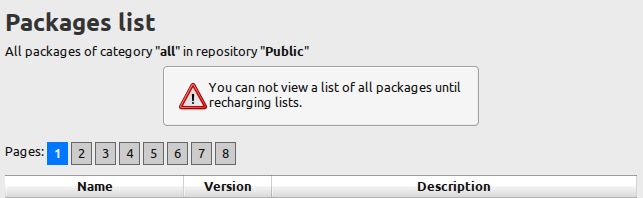
Tazpanel only show me the listing of my installed packages (in green color) and also those blocked (in red color); but it doesn't show the rest of packages; although I chooses: "all packages" and the category "all".
Oh, I think you just never updated TazPkg lists. I added small warning to avoid confusion in such cases:
And Ceel again.
1. Seems we can't update TazPanel using TazPanel itself, and we need to do some workaround to solve this problem.
4. Can't answer, I'm just terribly afraid of installers 
As for the last picture — I keep forgetting to fix this small bug.
I will be free April 15 and 16 and I plan a good work with TazPanel and TazPkg.
See you
Offline
Hi Aleksej,
Rather to write a long post I'm going to report problems I meat with TazPanel 461 in several posts.
Manage users
New users created with TazPanel are blocked (appear in red in the list); but may be you did it voluntarily. This is not really a problem when you know it ;-)
But...
I cannot open a session with these users -> [c]Failed to execute login command[/c] (and yet I can open TazPanel with the new users login/password ???)
Not sure it is due to TazPanel because I cannot open a session with users created with [c]adduser[/c] in the command line too.
Note the difference (tazpanel461_1.png) in the User ID between a user
- "nokia" created with TazPanel
- and "acer" created with the line command
I don't know if it is important or not.
Is it normal that the user login field becomes red when entering numbers in it?
[attachment=37735,1903]
Offline
Manage daemons
I use zram to have a swap in RAM; I modified [c]LOAD_MODULES[/c] and [c]RUN_DAEMONS[/c] in my rcS.conf like this:[c]
LOAD_MODULES="zram"
RUN_DAEMONS="firewall httpd compcache"[/c]
to launch it automatically at boot; works fine but in TazPanel > Boot > Manage daemons, the status for compcahe is "Stopped" (but I know it is running). If I click on the start button it remains "Stopped" and in Panel activity I can read [c]compcache already running[/c].
Probably here are the limits of my knowledge because I can start/stop other deamons. Do I run compcache correctly?
Offline
Link to another SliTaz installation
SliTaz is installed on /dev/sda3 (main installation, biggest partition) and on /dev/sda7 (small partition).
I installed xombrero on sda7 with tazpkg: [c]tazpkg link xombrero /media/sda3[/c]
When I run SliTaz from sda7, if sda3 is not mounted in /media/sda3 I cannot launch xombrero; normal.
If I set link [c]/media/sda3[/c] in TazPanel, it doesn't change anything; sda3 must be mounted.
When I install a new package with tazpanel, this is done from the mirror and not from sda3 even if this package exists on sda3. That's good for me like this, I prefer to decide by myself from where a package must be installed but I don't understand what the utility to set a link in TazPanel.
Offline
While I'm here, which of the slitaz-* tools must I add. The fact that they use makefiles makes it easier to add to buildroot.
Offline
Hi Trixar,
I can't understand your question (?)
TazPanel uses Hg repo http://hg.slitaz.org/tazpanel and you'll get the “base” TazPanel.
TazPkg uses Hg repo http://hg.slitaz.org/tazpkg and you'll get both console tool tazpkg as well as TazPanel “add-on” for TazPkg.
Offline
Various
Texts in Boot logs and System logs overflow the window; same in Create Report (tazpanel461_2.png).
Where is stored the report? How to go back to TazPanel without... closing TazPanel?
When recharging the packages list or updating packages, TazPanel doesn't use all the available space for messages (tazpanel461_3.png).
What should I see in the
- Current users sessions
- and Last users sessions
sections (tazpanel461_4.png).
Who is USER shutdown?
and LOGIN ?
[attachment=37740,1904] [attachment=37740,1905] [attachment=37740,1906]
Offline
Hi Ceel,
I see wrong Group IDs for your new created users. It should be 100 (group "users"), but not 1000 or 1001.
Now I tried to add new user in the TazPanel. It got group ID 100. Strange. Tomorrow I'll try to do so using latest Rolling with latest TazPanel.
I can only confirm — yes, new users are blocked (“red”) for unknown reason.
About daemons and links — sorry, tomorrow or day after tomorrow. Until that I can mainly to write simple posts using Android.
Offline
and the last
tazpkg 785
You wrote in your last post
But if you updated your packages as you wrote - at this point you're absolutely right - TazPkg should exclude already updated packages from this list (you can update one, or two, or ... all packages). Bug.
I tried to understand how the notification works; it seems that at boot if /var/lib/tazpkg/packages.up is not an empty file, tazpkg displays the notification.
packages.up is created when checking for updates in TazPanel (or [c]tazpkg up[/c]); but TazPanel does not modify packages.up after a partial/full update. So, at next boot tazpkg will tell [c]There are ## upgradeable packages[/c] even if the system is updated. May be TazPanel should check for update again after it has installed packages. But you are the developer :-)
I didn't check if [c]tazpkg up[/c] then Y to update, works correctly; no more package to update...
I wanted to see if the problem with [c]tazpkg list cat[/c] was the same in the french language and I forgot to come back in English. I saw a bad message (tazpanel461_5.png) when installing packages:
[c]<package> n'est pas installé[/c] (is not installed) should be [c]<package> est installé[/c]
[attachment=37742,1907]
Offline
Various.
I think the better place for System Report is on the user's Desktop, isn't it? You can easily find it. But it is one “but” here. Only root user has access to all tools and utilities that generated Report. So, only root user can create Report. And I think it is no good to put Report to the root's desktop while I run system as user tux.
I'll try one trick. Seems command "who" executed in the tazpanel can tell us actual user name who ran the TazPanel. Then I can save Report on the user's desktop (while TazPanel running whith root) and change the Report's ownersheep and permissions.
Viewing of the Report should fix, it's not a problem.
---
About scrollable content and free screen's space. I don't know how to do it in the HTML and CSS  I mean, that will be better if scrollable block have ability to grow up to fill free space. Now scrollable block height is fixed — about 12 lines of text.
User sessions — something strange. I'll check it later.
Offline
Notification.
Yes, seems you understand the things quite right.
I think we strongly need another, more quick mechanism to check available updates...
And at the end I want again to say you: Thank you for your testing work and reports! I really like this form of feedback 
Offline
I grabbed a lot of the files found at http://download.tuxfamily.org/slitaz/sources/ and they're all archives that have a makefile that installs the scripts (and config files) to the right places.
I want to automate the 'compile' step by writing custom package compile instruction for buildroot - so I can use buildroot to generate slitaz images auto-magically. I note the ones on the repository is more up to date, so I'm wondering which are essential to add.
Offline
OK, found the report; it is in /var/cache/slitaz/sys-report.html...
[attachment=37746,1908]
EDIT : and modify /usr/share/applications/tazpanel.desktop, changing
[c]
Exec=tazpanel[/c]
to[c]
Exec=browser http://tazpanel:82[/c] to add tool/address bar so I can go back to previous page
Offline
2Trixar_za
Sorry, really I don't know what Buildroot is, and how it differs from Cookutils we using to make packages.
I think you can read current "receipts" to see compilation instructions.
2Ceel
We can insert one html page (Report) into other html page (TazPanel interface) using "iframe". But we should define the size of this " iframe". Seems, some scripting required again... I'll search something relative on the Stackoverflow...
PS. Changing tazpanel into plain TazWeb — no no no, it is not bug, it is feature!
While development I pefere plain TazWeb with its address bar and buttons.
But it waste free space on my small 1024x600 px screen.
We can add [«Back] buttons to the relative places on the TazPanel interface.
Really, it is not so simple question. Sometimes pressing Back button in the TazWeb toolbar is evil — it can repeat some operation again, and sometimes it is unwanted behavior.
I want to provide something like “modal dialogs”: for example: you are in the package info page. Then you press “Block package”. Next you should get nice small window with text “Package *** blocked” above current page (with package info), and you can close this small info staying on this info page...
Offline
http://buildroot.uclibc.org/ - it's an embedded distro builder using makefiles like Linux and Busybox does.
Offline
2Trixar_za
Thank you for the link.
Reading simple “About” and later deep in the documentation, I can't understand why you choose this tool, Buildroot, to make Slitaz. Seems I read too quick and not found how to add your own programs to Buildroot.
What related the SliTaz Makefiles — seems you can use them in the most cases without deeping into them. At least, when I develop TazPanel and TazPkg, I using common sequense:
[c]make; make install; make clean[/c]
to apply changes from my text editor to the current system.
Offline
Chapter 17 in the manual.
Why did I choose it? Because it's constantly being developed and it's packages is (mostly) up to date, gets auto-stripped, optimized for size, built against eglibc or uclibc and works. All I need to do is create a script that changes buildroot packages files into SliTaz build receipts and half our packages updating work will be done. Maybe a process that does the opposite would also work since Buildroot does not compile desktop environments or specialized packages since they're considered 'bloat' by the devs.
Offline
Interesting thing and nice large documentation with examples. I have not enough free time, so I've read it quickly again. Two thoughts.
One. Seems you can build something relative to the “gtkonly” SliTaz flavor without much of effort. And you should extend it using your “recipes”. Yes, you can use SliTaz receipts to integrate packages into Buildroot, however it is not simple. Other thing — SliTaz packages database is huge. You need to prioritize one subset of packages over the rest. I think LFS (Linux from Scratch) and BLFS (Beyond Linux from Scratch) projects will help you to make your choise in the sequence of adding the packages.
Two. Seems, Buildroot is intended to make rootfs only, where “all in one” preinstalled? Does it can to build “optional” packages that you will have to install and remove?
Offline
All it's packages are optional at the configuration stage (using menuconfig like kernel compiling). Newly added package build instructions will appear in the packages menu. Maybe we can make them packages that tazpkg can understand and remove - I know another developer has done something like that before with his own custom package manager.
You're right about it generating the equivalent of SliTaz gtkonly - only not as complete. This is where SliTaz's scripts and configuration files are nice since they can be used (with minor tweaking) to complete buildroot generated distros.
A year ago when I initially tried it, it was a little beyond me, but recent experimentation with making my own distros has given me enough experience to actually use Buildroot effectively.
Sorry about hijacking your thread though 
Offline
[ Generated in 0.018 seconds, 7 queries executed - Memory usage: 1.62 MiB (Peak: 1.77 MiB) ]