 SliTaz Forum archive
You are not logged in.
I don't know how Loram converter works, so can't answer nothing.
_____
Next. What about /var/lib/tazpkg/packages.*.bak files?
They have no sense at all. They contained just old information, and I have no guess how you can use them.
So, I decided to have only one, actual version of package database files. Files are baked up before update. Then "bundle" archive extracted with new package database files. And then all old *.baks are removed. If update/recharge error is occured then we rename all *.baks back in order to work with your current package database.
_____
I've read your files about sda6 and sda7. I can say only one little word: WTF?! Sorry.
Seems your two SliTaz installations are different. And seems we still have huge problem with mirrors freshness  (( Problem is: using default repository mirror (http://mirror.slitaz.org/) or many of the other mirrors you get the files WITH RANDOM FRESHNESS. And EVERY TIME. Default mirror (http://mirror.slitaz.org/) can point (redirect you) to the other different mirrors. And many mirrors constructed from many servers with the different IP. Mirroring of files is not a simple job, it needs some time. So, some servers already synchronized with the main mirror, while other servers still have some old files:
[c]wget -q -O - http://mirror.slitaz.org/packages/cooking/IDs
f2141ea5f7d8ac9ce64b5177819122e4 1435017688
wget -q -O - http://mirror.switch.ch/ftp/mirror/slitaz/packages/cooking/IDs
a6001cbcb1c273491fda3de87172859d 1434931289[/c]
You get only one, or two, or three files when recharging (IDs, bundle.tar.lzma, and files-list.lzma). But every of these three files can be actual or outdated. Imagine, IDs is actual, bundle is outdated, files-list is actual. OMG.
Seems it need some extra checks while recharging.
_____
In order to compare: is your two installations are the same, or are different, you can use some sort of the next command:
[c]diff -r /var/lib/tazpkg /mnt/sda6/var/lib/tazpkg > diff.diff[/c]
where "/var/lib/tazpkg" is path to the first package database; "/mnt/sda6/var/lib/tazpkg" is path to the mounted second installation's package database; "diff.diff" is resulting file. This file can be large, and you can show it me using http://paste.slitaz.org service. Change paths to your actual paths.
Offline
And few words about current development.
I'm a prisoner of the TazPkg :-))
About a week ago I found that TazPkg incorrect use "--root=" option. This option point you to the different SliTaz installation, like "--root=/mnt/sda6". When you execute command "tazpkg -gi leafpad" then you'll install Leafpad to your current SliTaz. When you execute command "tazpkg -gi leafpad --root=/mnt/sda6" then you'll install Leafpad to other SliTaz installation located in the /mnt/sda6.
Story continues. We have configuration file /etc/slitaz/slitaz.conf (and /mnt/sda6/etc/slitaz/slitaz.conf). Configuration file is designed to make changes in the configuration. These files have next line by default:
[c]PKGS_DB="/var/lib/tazpkg"[/c]
But you free to change it as you want:
[c]PKGS_DB="/home/slitaz/tazpkg"[/c]
(note, that it is not a "from scratch"-installation then you'll need to move all the files manually from old to the new place).
What's wrong?
Let variable $ROOT=/mnt/sda6
First step: we read configuration file /etc/slitaz/slitaz.conf and get all the configuration variables (i.e. PKGS_DB=/var/lib/tazpkg).
Second step: to determine PKGS_DB from other installation it just prepended by the $ROOT variable: $ROOT$PKGS_DB (and it equals what? right: /mnt/sda6/var/lib/tazpkg while it should equal /mnt/sda6/home/slitaz/tazpkg in our example).
I make many changes to the TazPkg since then.
Now "--root=" works for ALL TazPkg commands, literally. You can install, remove packages, recharge, show activity, search files, etc. in the remote SliTaz installation.
Also, now I can INSTALL SLITAZ to the random folder using TazPkg instead of INSTALLER. Execute next command:
[c]tazpkg install-flavor base --root=/tmp/base[/c]
and after minute you'll get the full SliTaz filesystem tree in the /tmp/base.
Also, finaly I update TazPkg documentation (only English and Russian docs). I described all the commands with all the options. And you can read this help on the terminal too: to get complete help about "up" command:
[c]tazpkg -h up[/c]
Help system is intellectual in the some sort, and you can execute command:
[c]tazpkg -h mi[/c]
and get the answer:
[c]2 help topics available:
* list-mirror, lm
* setup-mirror, sm[/c]
And also I tried to solve the oldest problem. Imagine you installed package X.
It depends on the packages Y and Z. And it installs packages Y and Z.
If you don't need package X anymore, then you'll remove X. But Y and Z are still here.
The way is still long, and I started it with "reason". In few words: reason of the package installation. It answer question: why this package installed?
X: reason=user wish
Y: reason=depend of X
Z: reason=depend of X
Later I'm going to make logic how to work with that "reasons". TazPkg can check and (ask to) remove these "orphaned" packages after X removing.
Today I finished "tazpkg up" script. Now it works very quickly: about 1-2 seconds on my machine. But it works not very well with our Undigest repository:
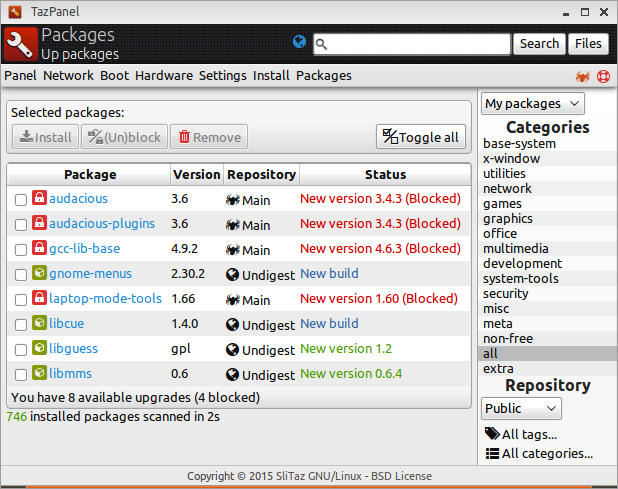
But you know: so many changes means so many bugs. This evening I lost all the "receipt" files in my /var/lib/tazpkg/installed. And I don't know why So I forced to update each and every package in my SliTaz installation. "Receipts" are now in place, but I need to test TazPkg huge times and very precise before show it to SliTaz users.
Offline
Hi Aleksej,
Thanks for all these precisions.
link to diff.diff: http://paste.slitaz.org/?ba8a95099011faa2#nkguPairYyOk1lntZEVF4lD7ai1BuxEuRJKo6qUieHA=
/var/lib/tazpkg/ = sda7 (rolling ISO 2015-04-09, last update= 2015-06-23 12:19:00)
/mnt/var/lib/tazpkg/ = RC3 (last update= 2015-06-23 12:25:09)
Differences between the 2 installations are
- web browser: midori on sda7 / xombrero and iron-linux on sda6 (/mnt)
- bluefish installed on sda7 only
I think that's all.
From today all the 3 installations have now the same mirror: http://mirror1.slitaz.org/packages/cooking/
Next updates in a few minutes ;-)
Offline
Hello,
No difference when updating since I use mirror http://mirror1.slitaz.org/ instead of http://mirror.slitaz.org/ on all my installations.
Just something strange: http://mirror1.slitaz.org/packages/cooking/ disappeared of /var/lib/tazpkg/mirrors files on the 3 installations; I suppose it happened after an update but I don't know when and which package (tazpkg?).
Offline
Hi Ceel,
It is expected behavior. "mirrors" is not user-driven configuration file. It is actual list of the current SliTaz mirrors, and it refreshes from server on every "tazpkg recharge". In opposition, "mirror" file contains one user-defined current mirror. If absent, it re-created with the default value, and then only user change it's content.
Offline
Hi Aleksej,
I can't install with TazPanel from my LiveUSB
I use the micro SD card of my phone as USB storage.
I've partitioned it as follow:
- sdb1 for the phone
- sdb2 for LiveUSB
- sdb3 for a full install
- sdb4 for /home
I've created the LiveUSB on sdb2 (latest rolling ISO, 20150719) and it works well.
I now try to do a full install on sdb3 from this Live but when I select LiveUSB in Select source media, the installer propose to me to choose between /dev/sdb or /dev/sdb or /dev/sdb or... /dev/sdb :-(
The number of the partition never appears and what ever I choose, the installer returns [c]Error: Partition not found[/c]. It seems it expects a device and not a partition.
I replaced [c]SOURCE="/dev/sdb"[/c] by [c]SOURCE="/dev/sdb2"[/c] in /root/tazinst.conf but the installer modifies the file as soon as I click on [>Proceed to SliTaz installation]
I edited the file again and run [c]tazinst execute tazinst.conf[/c] -> OK
No problem for Select partition or home partition
Offline
Hi Aleksej,
[c]root@rolling:/home/sda5# tazpkg desc tazdrop
Package "tazdrop" is not installed.[/c]
Is it normal? I thought it was possible to display the short description of all packages even if they weren't installed; it exists in the packages.desc file.
[c]tazdrop | 946 | SliTaz desktop Drag N' Drop tool | office | http://www.slitaz.org/[/c]
Offline
Hi Ceel,
TazInst bug "/dev/sdb or /dev/sdb or ... /dev/sdb" fixed.
You can download fixed tazinst version 63 right now from this page of the Cooker web site, or
Wait tomorrow until fixed package will pushed to SliTaz mirror and mirror you use will syncing.
________
TazPkg function "desc" was re-written. New package tazpkg version 819 was cooked.
Few tests for "tazpkg desc" (sorry for Russian):
[*]Package installed and has only short description:
[c]$ LC_ALL=C tazpkg desc gtk+
Description of package "gtk+"
================================================================================
The GIMP Toolkit.
================================================================================[/c]
[*]Package not installed and has "long" description:
[c]$ LC_ALL=C tazpkg desc bison
Description of package "bison"
================================================================================
Bison is a general-purpose parser generator that converts an annotated context-
free grammar into a deterministic LR or generalized LR (GLR) parser employing
LALR(1) parser tables.
================================================================================[/c]
[*]Installed package with "long" description:
[c]$ LANG=C LC_ALL=C tazpkg desc nano
Description of package "nano"
================================================================================
The Nano package contains a small, simple text editor which aims to replace
Pico, the default editor in the Pine package.
================================================================================[/c]
[*]And we have this "long" description translated to Russian (file /var/lib/tazpkg/descriptions.ru.txt belongs to package tazpkg-desc-ru):
[c]$ tazpkg desc nano
Описание пакета «nano»
================================================================================
GNU nano — простой в использовании текстовый редактор, созданный как замена для
Pico, псевдографического редактора из пакета несвободной почтовой программы Pine
(теперь доступного как Alpine под лицензией Apache).
В nano добавлено множество функций, которых не было в pico, включая:
* включение и выключение функциональных возможностей;
* интерактивный поиск и замена с поддержкой регулярных выражений;
* команда перехода к строке и столбцу;
* автоматические отступы и подсветка синтаксиса;
* автодополнение названий файлов и поддержка нескольких буферов;
* интернационализация.
================================================================================[/c]
Offline
Hi Aleksej,
I tried the [c]--root=[/c] option in tazpkg
root@slitaz:/home/ceel# mount /dev/sda5 /mnt
root@slitaz:/home/ceel# tazpkg recharge --root=/mnt
Recharging repository "Main"
================================================================================
Database timestamp: 07/29/15 21:02
Creating backup of the last packages list... [ Done ]
Getting "bundle.tar.lzma"... [ Done ]
Getting "files-list.lzma"... [ Done ]
================================================================================
Last database is ready to use.
Mirrored packages diff
================================================================================
tazpanel-513
tazusb-179
================================================================================
2 new packages on the mirror.
:-) cool !
root@slitaz:/home/ceel# tazpkg up --root=/mnt
Package Version Status
================================================================================
System is up-to-date...
================================================================================
278 installed packages scanned in 7s
:-( not cool...
278 installed packages -> this is the current installation, not the one on sda5
root@slitaz:/home/ceel# tazpkg up
Package Version Status
================================================================================
System is up-to-date...
================================================================================
278 installed packages scanned in 6s
Seems that [c]--root=[/c] option doesn't work with [c]tazpkg up[/c] (TazPkg 819)
Offline
Hi Ceel,
I already have changeset to the tazpkg to process [c]--root[/c] option for every tazpkg command.
But I not released that changes because they have not been tested well, and possible strange bugs and side-effects exists.
So, I started over again from scratch. Someday [c]--root[/c] will work for all tazpkg commands, it's not simple work.
Offline
Hi Aleksej,
Didn't open the good topic... :-/
TazPkg 824 buged; after update, unable to install packages:
root@slitaz:/home/tux# tazpkg -gi tazpkg -gi abiword
/usr/bin/tazpkg: .: line 26: can't open '/usr/lib/tazpkg/tazpkg-find-depends'
root@slitaz:/home/tux#
Offline
Hi Aleksej,
I wonder, whether You know, that installing from PCman File Manager of an already downloaded package fails, when You are logged in as user root. TazPkg does not show any information about the package and isn't able to install the package. This worked with version 806 for root, and still doesn't work with version 819 and 824 for root. Please look at the picture trying to install gdmap-0.8.1.tazpkg. For the user tux it works well as usually with all versions.
Please apologize my comments, if You already know it. TazPkg is very long, You are working quite a while on it, I don't understand half of Your problems, but I wish You to solve them.
[attachment=38857,1985]
Offline
Hi Ceel,
Oh, I'm so sorry
Everyone who installed tazpkg-824 need to fix it manually.
Package tazpkg-825 fixed, but you can't install it yet.
Steps to fix tazpkg:
[*]Open terminal.
[*]Become super user using command "su" and root's password (type "s", then "u", then "Enter", then blindly type super user password (it is root by default), then press "Enter")
[*]Open tazpkg script in the nano text editor:
[c]nano -w /usr/bin/tazpkg[/c]
[*]Scroll down to the line 26 and change it's content:
[c]. /usr/lib/tazpkg/tazpkg-find-depends[/c]
into
[c]. /usr/libexec/tazpkg/find-depends[/c]
[*]To save changes press two keys in the same time: Ctrl and letter O, then press Enter
[*]To exit press two keys in the same time: Ctrl and X
[*]Close terminal
Offline
Hi kubepc,
That bug fixed in the tazpkg-825 » Changeset » TazPkg cooker
Offline
Hi Aleksej,
thanks, I have testet version 826 and now it is alright with installing by clicking on any package. I have hoped, that this solves another bug, but this bug still exists.
The dialog from the menu Manage locale packages produces an empty box even after recharging. The last good one, that worked, is Slitaz rolling 2015-05-31. Look at the picture with the empty box not containing any locale packages. it is like this since 2015-06-08.
[attachment=38865,1986]
Offline
Hi Ceel,
Two weeks ago you tried the command
[c]tazpkg up --root=/mnt[/c]
Please try again with tazpkg-836, it should work now.
http://cook.slitaz.org/cooker.cgi?pkg=tazpkg
Also, you can try
[c]# tazpkg recharge --root=/tmp/not/exists
# tazpkg up --root=/tmp/another/folder[/c]
to update package DB from scratch (make new TazPkg working environment).
Offline
Hi Aleksej,
I updated my SliTaz rolling installations this evening (didn't do it for 11 days): 19 packages to update -> [Toggle all] and [Install]
When I ran [c]tazpkg up[/c] in a terminal a few minutes later:
[c]
root@slitaz:/home/ceel# tazpkg up
Recharging repository "Main"
================================================================================
Checking... [ Done ]
Database timestamp: 08/21/15 02:01
================================================================================
Repository "Main" is up to date.
cat: can't open '/var/lib/tazpkg/blocked-packages.list': No such file or directory
Package Repository Version Status
================================================================================
curl Main 7.40.0 New build
sqlite Main 3.8.11.1 New build
================================================================================
You have 2 available upgrades (0 blocked)
282 installed packages scanned in 1s
Do you wish to install them now? (y/N)
[/c]
I don't understand why these 2 packages haven't been updated previously.
Then I tested [c]tazpkg up --root=/run/media/ceel/rolling/[/c]
It's ok excepted that /run/media/ceel/rolling/var/log/slitaz/tazpkg.log hasn't been updated.
Offline
Hi Aleksej!
I tested rolling version of this week and I noticed that there's no download progress bar been shown when we install a large package, like Firefox or some Office Suite. During the download process, there's only a black space that remains a long time at the terminal before some message be shown.
It would be interesting to have a progress bar, so the user can state how is the download going. Something like this:
firefox-official.tazpkg: 53% of 41MB downloaded
Is it possible to include this functionality to TazPkg?
Thanks in advance. Sorry for my poor Engligh.
Offline
@ Aleksej,
Problem with option --root=
Main install running (rolling 20150712); last update= 2015/08/25:
[c]2015-08-25 21:06:38 - Installed - busybox (1.23.2) - 1840156c7bd3004c24f3a9d3033bdefd
2015-08-25 21:06:41 - Installed - cookutils (750) - ce7e0baba33b78c7eabc0f350727f42f
2015-08-25 21:06:46 - Installed - slitaz-base-files (284) - ad389c88c4c8b71090ca4c91a266cde0
2015-08-25 21:06:50 - Installed - tazpanel (526) - 8116c3207bbc87a0d44e1cd08220840d
2015-08-25 21:06:53 - Installed - tazpkg (839) - c12a47cf11ceeebcefa12eb68ea1aff3[/c]
root@slitaz:/home/ceel# tazpkg up --root=/mnt
Recharging repository "Main"
================================================================================
Checking... [ Done ]
Database timestamp: 08/26/15 14:51
Creating backup of the last packages list... [ Done ]
Getting "bundle.tar.lzma"... [ Done ]
Getting "files-list.lzma"... [ Done ]
================================================================================
Last database is ready to use.
Mirrored packages diff
================================================================================
ponyprog-2.08c
tazpanel-529
================================================================================
2 new packages on the mirror.
cat: can't open '/var/lib/tazpkg/blocked-packages.list': No such file or directory
Package Repository Version Status
================================================================================
tazpanel Main 526 ��� 529
================================================================================
You have 1 available upgrade (0 blocked)
282 installed packages scanned in 6s
Do you wish to install them now? (y/N) y
Package "tazpanel-526" already in the cache
Installation of package "tazpanel"
================================================================================
SliTaz administration and configuration panel.
--------------------------------------------------------------------------------
Copying package... [ Done ]
Extracting package... [ Done ]
Saving configuration files... [ Done ]
Installing package... [ Done ]
Removing all tmp files... [ Done ]
Execute post-install commands... [ Done ]
================================================================================
Package "tazpanel" (526) is installed.
Offline
tazpkg info <package> --root=/<path> does'nt indicate that a package is installed:
root@slitaz:/home/ceel# tazpkg info samba --root=/mnt
TazPkg information
================================================================================
Package : samba
State : mirrored package
Version : 3.6.7
Category : system-tools
Short desc : File and print services with SMB/CIFS.
Depends : libldap samba-common glibc-extra-samba ncursesw popt zlib
cifs-utils acl krb5 cups
Web site : http://samba.org/
Size : 6.8M/46M
================================================================================
root@slitaz:/home/ceel# tazpkg -gi samba --root=/mnt
"samba-3.6.7" package is already installed.
You can use the --forced option to force installation.
Offline
EDIT at my post http://forum.slitaz.org/topic/new-version-of-packages-manager-tazpkg-testing-needed/page/8#post-39011
If I update first the main install when I run [c]tazpkg up --root=/mnt[/c] then tazpkg finds tazpanel-529 in the cache and installs it.
When using --root option, tazpkg searchs in the cache of the current install and not in the one on /mnt
Offline
Is this normal (TazPkg 839)?
[c]
# tazpkg -cc
find: unrecognized: busybox-1.23.2.tazpkg
Command line: find /var/cache/tazpkg -name atk-2.15.4.tazpkg busybox-1.23.2.tazpkg bzlib-1.0.6.tazpkg cairo-1.14.2.tazpkg cifs-utils-6.1.tazpkg[/c] ... a lot of packages ... [c]xorg-libXt-1.1.4.tazpkg xorg-libXxf86vm-1.1.3.tazpkg xorg-libpciaccess-0.13.1.tazpkg
BusyBox v1.23.2 (2015-08-25 12:03:55 CEST) multi-call binary.
Usage: find [-HL] [PATH]... [OPTIONS] [ACTIONS]
Search for files and perform actions on them.
First failed action stops processing of current file.
Defaults: PATH is current directory, action is '-print'
-L,-follow Follow symlinks
-H ...on command line only
-xdev Don't descend directories on other filesystems[/c]
...the help of busybox...
[c] -exec CMD ARG ; Run CMD with all instances of {} replaced by
file name. Fails if CMD exits with nonzero
-delete Delete current file/directory. Turns on -depth option
Cleaning cache directory...
================================================================================
Path: /var/cache/tazpkg [ Done ]
================================================================================
0 files removed from cache (0K).
sh: getcwd: No such file or directory
# [/c]
0 files removed from cache but all packages have been removed.
Offline
Hi Ceel,
Thank you for all your reports!
Yes, I know I fix bugs very slow. Actually, I rewrite and adopt parts of TazPkg. So, real debugging is soon. I think, I'll show beta version of the new TazPkg on the next week.
Why I started to rewrite the code? Because it very large and hard to understand — as well as to implementing new features and debug. So, I broke single tazpkg script into number of independent modules — it is often one module per tazpkg command. So, if command that shows package info (for example) not works — then we should find bugs only in the module 'info'. Next, if I want to make new feature for working with cache — not only to remove all packages but, say, remove only installed and leave not-installed — then I'll touch only 'cache' module and will not to add new bugs to other modules and commands.
Now I working with the heart of TazPkg  It is module 'get-install' to get and/or install packages. This module is significantly bigger than others — about thousand lines of code (both with depending functions). Work in progress, and I planning to finish this part on the next week.
I can't push current code into SliTaz Hg because currently this code broken and it will not work.
It is question still stay opened — what about other SliTaz tools/services? Can 'root' support, for example, to break SliTaz service that make weekly ISOs?
I know, changes are huge. But, frankly, TazPkg was very hard to maintaining. And here no way back, only forth!
And finally, touching your last question. No, it is not normal. Please, see tazpkg script — here for reference
http://hg.slitaz.org/tazpkg/file/a02e36d44d06/tazpkg#l1459
In the line 1459 please quote with single quotes part of the line:
[c]'*.tazpkg'[/c]
This should help.
And now I have this code in the 'cache' module, and this code is slightly different.
That's all for the moment
Have a good day!
Offline
Hi Aleksej,
Well, as you are working on the get-install module, I noticed the 'get' option dowloads packages in 2 directories; the current one and /var/cache/tazpkg/5.0/packages. Not really a problem but is there a reason?
A personal request: would it be possible to have an option in tazpkg to install a package without its dependences? Something like [c]tazpkg -gi[/c] <package> [c]--nodep[/c].
Thank you for your great work with tazpkg (and other packages)! Eager to test this new version of tazpkg.
Offline
[ Generated in 0.017 seconds, 7 queries executed - Memory usage: 1.63 MiB (Peak: 1.77 MiB) ]