 SliTaz Forum
You are not logged in.
Aleksej,
sorry, but it is stupid to stay on 3.2 for "SliTAz Next" - you can support the same hardware - we support now with 5.0 - also with kernel 4.1
here an example - like my old Fujitsu futro with AMD Geode CPU is still supported in Kernel 4.1
https://s3.amazonaws.com/archive.travis-ci.org/jobs/13273642/log.txt - search for snd_cs5535audio
only very old hardware, we do not support also in 5.0 was removed from 4.x kernel.
my suggestion:
kernel 4.1 ...... glibc 2.21 ......... gcc 4.9
kernel 4.4 ...... glibc 2.22 ......... gcc 5.3
Offline
>kernel 4.4 ...... glibc 2.22 ......... gcc 5.3
UPVOTE!
Offline
SliTaz 5.0-RC4?
1. bzImage File not found
Loading /boot/bzImage… failed: File not found
c32box.c32: Boot aborted!
boot:
[attachment=41381,2219]
2. fontcolor in lxpanel taskbar
[attachment=41381,2220]
Offline
You running a the 64 bits flavor on a 32 bits machine.
Retry with qemu-x86_64.
Offline
enable-kvm
slitaz-5.0-RC4.jpg
tux@slitaz:~$ grep RC4 /media/cdrom/boot/isolinux/isolinux.cfg
MENU TITLE SliTaz GNU/Linux - 5.0-RC4 20160117
tux@slitaz:~$ grep -B4 bzImage /media/cdrom/boot/isolinux/isolinux.cfg
# Labels
LABEL slitaz
MENU LABEL SliTaz Live
COM32 c32box.c32
APPEND linux /boot/bzImage initrd=/boot/rootfs.gz rw root=/dev/null autologin
tux@slitaz:~$ ls -l /media/cdrom/boot
total 58549
-rw-r--r-- 2 root root 3140304 Dec 23 14:13 bzImage64
-rw-r--r-- 1 root root 364242 Sep 17 05:35 ipxe
drwxr-xr-x 2 root root 2048 Jan 17 00:04 isolinux
-rw-r--r-- 1 root root 45100 Sep 16 19:32 memtest
-rw-r--r-- 1 root root 53259940 Jan 17 00:12 rootfs.gz
-rw-r--r-- 2 root root 3140304 Dec 23 14:13 vmlinuz-3.2.71-slitaz64
tux@slitaz:~$
1. bzImage File not found
Loading /boot/bzImage… failed: File not found
c32box.c32: Boot aborted!
HOST: i686
1. enable-kvm and slitaz-rolling-core64.iso
# qemu-x86_64 -m 1024 -enable-kvm -cdrom slitaz-rolling-core64.iso &
Loading /boot/bzImage… failed: File not found
c32box.c32: Boot aborted!
2. enable-kvm and modify command line
.com32 c32box.c32 linux /boot/bzImage64 initrd=/boot/rootfs.gz rw root=/dev/null autologin
from /boot/bzImage change to /boot/bzImage64
# qemu-x86_64 -m 1024 -enable-kvm -cdrom slitaz-rolling-core64.iso &
Loading /boot/bzImage64… ok
Loading /boot/rootfs.gz… ok
This kernel requires an x86-64 CPU, but only detectes an i686 CPU.
Unable to boot - please use a kernel appropriate for your CPU.
3. unable-kvm and slitaz-rolling-core64.iso
# qemu-x86_64 -m 1024 -cdrom slitaz-rolling-core64.iso
Boot x86_64 OK.
syslinux/c32box: x86_64 auto select
http://hg.slitaz.org/wok/rev/5e47b1bdb6f4
4. enable-kvm and slitaz-rolling-core.iso
# qemu-x86_64 -m 1024 -enable-kvm -cdrom slitaz-rolling-core.iso &
Boot i686 OK.
5. enable-kvm and slitaz-rolling-10in1.iso
# qemu-x86_64 -m 1024 -enable-kvm -cdrom slitaz-rolling-10in1.iso &
Boot i686 OK.
IMHO:
HOST i686 and qemu-x86_64 with enable-kvm : detectes an i686 CPU.
should be use i686 kernel ( bzImage ),
but the slitaz-rolling-core64.iso only has bzImage64, no bzImage.
“Loading /boot/bzImage… failed: File not found”
Offline
HOST i686 and qemu-x86_64 with enable-kvm : detectes an i686 CPU.
Can KVM run a 32-bit guest on a 64-bit host? What about PAE?
http://www.linux-kvm.org/page/FAQ#Can_KVM_run_a_32-bit_guest_on_a_64-bit_host.3F_What_about_PAE.3F
KVM supports 32-bit guests on 64-bit hosts,
and any combination of PAE and non-PAE guests and hosts.
The only unsupported combination is a 64-bit guest on a 32-bit host.
Offline
backgroundfile panel-bg-dark.png : File no found
MENU TITLE SliTaz GNU/Linux - 5.0-RC4 20160117
-rw-r--r-- 2 root root 3140304 Dec 23 14:13 bzImage64
slitaz-rolling-core64.iso 2016-Jan-17
2. fontcolor in lxpanel taskbar
Let’s take a look at the slitaz-5.0-RC4.jpg
http://forum.slitaz.org/topic/slitaz-next/page/2?bb_attachments=41381&bbat=2220
Almost not see clearly in the top left corner ‘Applications’ and the top right corner ‘clock & tux’.
1.
tux@slitaz:~$ egrep 'fontcolor|back' .config/lxpanel/slitaz/panels/panel
usefontcolor=1
fontcolor=#cfcfcf
background=1
backgroundfile=/usr/share/themes/Clearlooks Human Dark/gtk-2.0/Panels/panel-bg-dark.png
2.
tux@slitaz:~$ ls -l /usr/share/themes/Clearlooks\ Human\ Dark
ls: /usr/share/themes/Clearlooks Human Dark: No such file or directory
3.
tux@slitaz:~$ tazpkg -sp panel-bg-dark.png
Search result for package "panel-bg-dark.png"
================================================
clearlooks-colors
murrine-svn-themes
================================================
2 packages
4.
tux@slitaz:~$ tazpkg info clearlooks-colors
Unable to find the receipt: /var/lib/tazpkg/installed/clearlooks-colors/receipt
5.
LXPanel look: background ….
http://hg.slitaz.org/slitaz-configs/rev/d0f40dd58170
--- a/rootfs/etc/lxpanel/slitaz/panels/panel Sun Nov 08 12:24:47 2015 +0100
+++ b/rootfs/etc/lxpanel/slitaz/panels/panel Mon Nov 09 01:01:34 2015 +0200
@@ -19,15 +19,18 @@
fontsize=10
fontcolor=#cfcfcf
usefontsize=0
- background=0
+ background=1
+ backgroundfile=/usr/share/themes/Clearlooks Human Dark/gtk-2.0/Panels/panel-bg-dark.png
iconsize=22
+ loglevel=2
}
6.
lxpanel, slitaz-configs: copy LXPanel profile to /etc/skel (again)
http://hg.slitaz.org/wok/rev/c761ba5755e1
--- a/slitaz-configs/receipt Tue Nov 17 16:13:43 2015 +0200
+++ b/slitaz-configs/receipt Tue Nov 17 16:50:26 2015 +0200
@@ -61,6 +61,11 @@
cp -a $src/rootfs/usr/share/applications $fs/usr/share
cp -a $src/rootfs/usr/share/slitaz $fs/usr/share ;;
esac
+
+ # Put LXPanel profile to /etc/skel for new users
+ mkdir -p $fs/etc/skel/.config/lxpanel
+ cp -a $fs/etc/lxpanel/slitaz $fs/etc/skel/.config/lxpanel
+
chown -R root.root $fs
}
Offline
Hi alanyih,
2. fontcolor in lxpanel taskbar
backgroundfile panel-bg-dark.png : File no found
ls: /usr/share/themes/Clearlooks Human Dark: No such file or directory
Solution: install "clearlooks-colors" package: http://hg.slitaz.org/flavors/file/59cec645a2c8/core/packages.list#l80
--------
Next, using current SliTaz Rolling (2016-01-24).
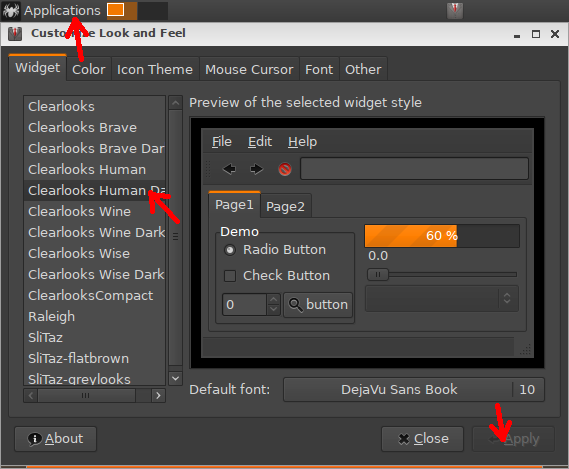
Two solutions for panel:
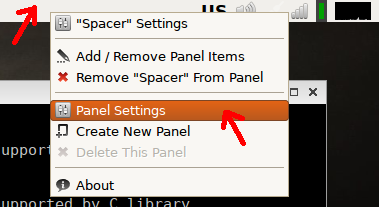
1. Use background AND font color:

Now panel colors are NOT changed if you change the theme:
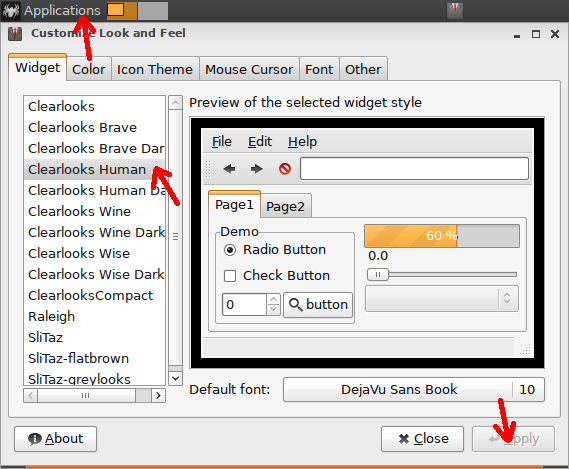
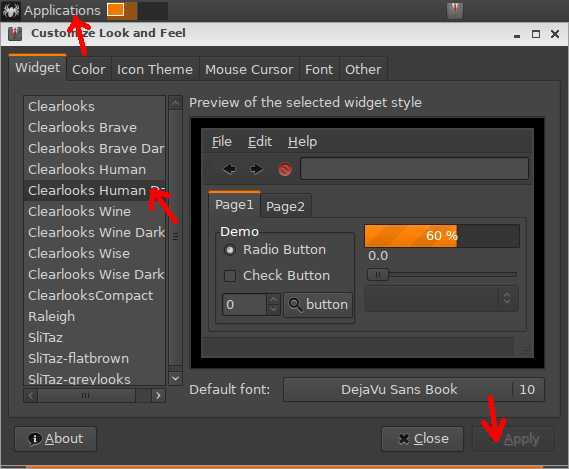
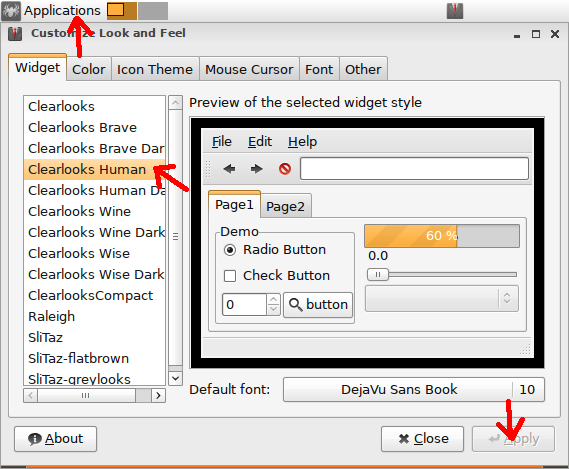
2. Don't use background AND don't use font color:

Log out and log in (or reload LXPanel if you know how to do it).
Now panel colors are CHANGED according to the theme you choose:
Offline
Solid color (with opacity)
Solution: install "clearlooks-colors" package:
1. Use background AND font color:
2. Don't use background AND don't use font color:
Try:
1. Download and boot slitaz-rolling-core64-20160124.iso 2016-Jan-24
https://goo.gl/jyJHOX
2. CLICk ‘Solid color (with opacity)’
[attachment=41528,2227]
----
Distro: rolling-core64
http://cook.slitaz.org/cookiso.cgi?distro=rolling-core64
Description: 64 bits kernel with a fully featured 32 bits desktop.
Summary
Build time : 738s ~ 12m
Build date : 20160131
Packages : 291
Rootfs size : 188.4M
ISO image size : 52.0M
Cookiso log
Cookiso started: 2016-01-30 23:57
Creating flavor core64.. Done ]
[..]
Installing package: gtk+-2.24.24.tazpk Done ]
Installing package: gtk-clearlooks-2.20.2.tazpkgsed: /home/slitaz/distro/rootfs/usr/share/themes/SliTaz*/gtk-2.0/gtkrc: No such file or directory
sed: /home/slitaz/distro/rootfs/usr/share/themes/SliTaz*/gtk-2.0/gtkrc: No such file or directory
sed: /home/slitaz/distro/rootfs/usr/share/themes/SliTaz*/gtk-2.0/gtkrc: No such file or directory
sed: /home/slitaz/distro/rootfs/usr/share/themes/SliTaz*/gtk-2.0/gtkrc: No such file or directory
[ Done ]
Installing package: clearlooks-colors-2.22.tazpk Done ]
Installing package: clearlooks-compact-1.5.tazpk Done ]
Installing package: gtkdialog-0.8.2.tazpk Done ]
Installing package: gtkmm-2.24.4.tazpk Done ]
Offline
ifconfig: SIOCGIFFLAGS: No such device
slitaz-rolling-core64.iso 2016-Feb-14
[attachment=41810,2244]
1.
Loading network settings from /etc/network.conf
[0;33mSetting hostname to: slitaz [0m[ Done
[0;33mConfiguring loopback... [0m[ Done
ifconfig: SIOCGIFFLAGS: No such device
Starting udhcpc client on: eth0...
udhcpc: SIOCGIFINDEX: No such device
Processing: /etc/init.d/local.sh
Starting X environment...
Starting message bus daemon: DBUS... [ Done
Starting all daemons...
Setting up kernel security rules... [ Done
WARNING: IPtables rules are disabled
Starting inetd deamon: inetd... [ Done
Starting ntpd deamon: ntpd... ntpd: bad address 'pool.ntp.org'
[ Done
Welcome to your box
2.
tux@slitaz:~$ grep RC4 /media/cdrom/boot/isolinux/isolinux.cfg
MENU TITLE SliTaz GNU/Linux - 5.0-RC4 20160214
3.
tux@slitaz:~$ ifconfig eth0
ifconfig: eth0: error fetching interface information: Device not found
tux@slitaz:~$ lspci -v | grep -A7 Ethernet
00:03.0 Ethernet controller: Intel Corporation 82540EM Gigabit Ethernet Controller (rev 03)
Subsystem: Red Hat, Inc QEMU Virtual Machine
Flags: fast devsel, IRQ 11
Memory at febc0000 (32-bit, non-prefetchable) [size=128K]
I/O ports at c000 [size=64]
Expansion ROM at feb80000 [disabled] [size=256K]
4.
tux@slitaz:~$ lsmod
Module Size Used by Not tainted
tux@slitaz:~$ ls -l /lib/modules/3.2.71-slitaz64/modules.dep
-rw-r--r-- 1 root root 0 Feb 14 01:59 /lib/modules/3.2.71-slitaz64/modules.dep
tux@slitaz:~$
Offline
slitaz-rolling-core64.iso 2016-Feb-14 20:42:57
1.
Activity
http://cook.slitaz.org/cookiso.cgi
2016-02-14 19:30 : Building rolling core64
2016-02-14 19:20 : Building rolling core
2016-02-14 19:04 : Building rolling core-4in1
2016-02-14 19:02 : Building rolling preinit
2016-02-14 19:02 : Rolling tracking for changes
2016-02-14 01:59 : Building rolling core64
2016-02-14 01:48 : Building rolling core
2016-02-14 00:57 : Building rolling core-4in1
2016-02-14 00:51 : Building rolling preinit
2016-02-14 00:51 : Rolling tracking for changes
2.
tux@slitaz:~$ uname -a
Linux slitaz 3.2.71-slitaz64 #2 SMP Sat Feb 13 22:41:08 Europe 2016 x86_64 GNU/Linux
3.
tux@slitaz:~$ lsmod
Module Size Used by Not tainted
ipv6 226481 13
ppdev 4870 0
floppy 49327 0
parport_pc 17570 0
parport 26967 2 ppdev,parport_pc
e1000 86267 0
button 4167 0
tux@slitaz:~$ ls -l /lib/modules/3.2.71-slitaz64/modules.dep
-rw-r--r-- 1 root root 75825 Feb 14 19:35 /lib/modules/3.2.71-slitaz64/modules.dep
4.
tux@slitaz:~$ lspci -v | tail -9
00:03.0 Ethernet controller: Intel Corporation 82540EM Gigabit Ethernet Controller (rev 03)
Subsystem: Red Hat, Inc QEMU Virtual Machine
Flags: bus master, fast devsel, latency 0, IRQ 11
Memory at febc0000 (32-bit, non-prefetchable) [size=128K]
I/O ports at c000 [size=64]
Expansion ROM at feb80000 [disabled] [size=256K]
Kernel driver in use: e1000
tux@slitaz:~$
[attachment=41825,2245]
Offline
Failed to execute login command
login: can't change directory to '/home/tux/'
ls: /home/tux: No such file or directory
1. boot from slitaz-rolling-core64.iso (2016-Feb-14 20:42:57)
2. rootfs.gz: # tazusb writefs lzma
bzImage64: extract from slitaz-rolling-core64.iso
3. autologin gui mode
Failed to execute login command
[attachment=41885,2249]
4. login text mode
login: can't change directory to '/home/tux/'
tux@slitaz $ ls -l /home/tux
ls: /home/tux: No such file or directory
[attachment=41885,2250]
Offline
@alanyih
Works as expected, # tazusb writefs was never made to save /home in rootfs.gz, but for using with manually specified "home=/dev/sd??" kernel option
See also [c]# tazusb usage[/c] - some gen-* options can modify bootloader and put "home=" option automatically.
It's possible to add "/home" here: http://hg.slitaz.org/tazusb/file/186/tazusb#l486 or use # tazlito writeiso.
==================================================================================================
I got an idea about unified "lib" for common tazusb/tazlito code with first answer about /home, but in which repo?
Offline
Hi, Alexander!
I'm about to finish rewriting some parts of the Tazlito. I'm afraid it will be unavailable to merge my current big changes with yours. Main stopper for me, why I already not pushed code into Hg, — because I not tested multi-rootfs creation. This part may not work properly. I can push the code today later, and the second pair of eyes will be very appreciated.
Touching Tazlito, as for me it's a tool to make official SliTaz images (using flavor files) to share. I doubt we need /home on a Live CD. I may be wrong because I still not get why Tazlito needs so many weird commands 
Touching TazUsb, I think it's precise the tool to save current snapshots of the working system. Possibly with the /home.
Returning to Alanyih problem. SliTaz Live CD rootfs.gz also haven't /home/tux inside it. But it have /init script working that recreated /home/tux at a boot time using content of the /etc/skel. Question why it not working in the similar way with the rootfs.gz produced by TazUsb?..
Offline
> not tested multi-rootfs creation. This part may not work properly.
Wait, but this works now on tank with cookiso. Only local iso creating is broken.
> Question why it not working in the similar way with the rootfs.gz produced by TazUsb?
I made search for text "tux" in all files in /etc
mc used, digits are line numbers:
My currently running frugal system, user tux used:
/etc
6:group
7:group
12:group
13:group
14:group
17:group
20:group
6:group-
7:group-
12:group-
13:group-
14:group-
17:group-
20:group-
5:passwd
5:passwd-
74:slim.conf
76:slim.conf
14:mtab
15:mtab
17:mtab
18:mtab
/etc/init.d
31:bootopts.sh
34:bootopts.sh
/etc/slitaz
24:tazinst.conf
27:tazinst.conf
We need to clean some of this files, I guess.
Unpacked default rootfs.gz with empty /home:
/tmp/rootfs.cpio/ucpio://etc
74:slim.conf
/tmp/rootfs.cpio/ucpio://etc/init.d
31:bootopts.sh
34:bootopts.sh
/tmp/rootfs.cpio/ucpio://etc/slitaz
24:tazinst.conf
27:tazinst.conf
Offline
Checked now: repacking tazusb writefs's rootfs.gz
with default /etc/group /etc/passwd
and removed /etc/group- /etc/passwd-
boot with autologin, tux now creating during boot process.
Offline
Wait, but this works now on tank with cookiso. Only local iso creating is broken.
We need universal tool working on any SliTaz, as well on Tank or local host.
Tazlito has several issues you may not see at the first look:
“upgrade-flavor” and “pack-flavor” updated the (estimated) sizes in the flavor description file in the wrong way: it calculated only the “unpacked” sizes of only packages being in the list (without their dependencies) and multiplied this size to ⅔ to guess “packed” size.
“base” flavor packages list contains 29 packages, but Tazlito will install 52 packages (listed packages + their dependencies). Estimated sizes should be close to real sizes you can see after ISO is produced.
Mirrors are ignored in these calculations. Imagine, you created your own flavor with your own packages in your own mirror (like me).
Using mirrors was a broken topic in the Tazlito. Now it set up to use several mirrors with few conditions and priorities:
[*]/home/slitaz/packages of the Host machine (if it exists). Here we can find all the fresh packages (on Tank) or user created packages (on local host). The highest priority.
[*]Repo defined in the variable PACKAGES_REPOSITORY in the tazlito.conf. It may or may not equal the previous repo (on the Tank the both are equal /home/slitaz/packages, on my host PACKAGES_REPOSITORY=/home/slitaz/cooking/packages). The high priority.
[*]All the repositories listed in the “mirrors” in the flavor. Normal priority.
[*]Regular “main mirror”. The low priority.
Tazlito was collected packages in the PACKAGES_REPOSITORY. Only packages listed in the packages.list (remember 29 packages of 52 for “base”). It may be taken from the TazPkg cache (why?) or repacked from the current system, or downloaded from the “main” mirror. In the case of Tank: the only “listed packages” was taken from Tank fresh packages repo, all other dependencies was not controlled by Tazlito and we have several “hacks” to force TazPkg to not download them from a “regular mirror”.
Now packages not preloaded, they all directly installed using TazPkg with root= and properly settings inside the chroot: Tazpkg knows better how to operate it's cache and how to search package in the multiple repositories.
Next, “packed flavors” use the packages lists including packages names with the versions. You know, versions are useless (as yesterday I added package to the TazPanel dependencies and version not changed because sources not changed). Now Tazlito strips (and not used) versions in the lists.
Tazlito has unclear (maybe only for me) documentation. I can't remember (shame on me) all it's commands and why we need them. I started to write man pages based on the existing documentation: tazlito(1), tazlito.conf(5) and flavor(5).
Tazlito now is big script: 80 KB of code, more than 2,900 lines, more than 50 functions(). I consider to break it on easy-to-understand small independent modules, like TazPkg. Like Linux-way: make the only one job, but make it perfect.
Offline
Checked now: repacking tazusb writefs's rootfs.gz
with default /etc/group /etc/passwd
and removed /etc/group- /etc/passwd-
boot with autologin, tux now creating during boot process.
Seems it needs to be patched to use other logic:
1. Get the user name into USER variable from /proc/cmdline.
2. Check user existence in the /etc/passwd /etc/shadow /etc/group… and execute “adduser” if needed.
3. Check /home/$USER existence. Recreate it using /etc/skel if it missing.
Now it stops on the (2) and not executes (3). It thinks, if we already have user in the /etc files, then we already have /home for him.
If /home is completely empty we unconditionally need to make /home/tux and add tux user.
Offline
bootopts.sh
http://hg.slitaz.org/slitaz-boot-scripts/file/09aba02ed71a/etc/init.d/bootopts.sh#l18
18 # Parse /proc/cmdline for boot options.
19 echo 'Checking for SliTaz cmdline options...'
20
21 # Default user account without password (uid=1000). In live mode the option
22 # user=name can be used, but user must be added before home= to have home dir.
23 # This option is not handled by a loop and case like others and has no
24 # effect on an installed system.
25 if ! grep -q '100[0-9]:100' /etc/passwd; then
26
27 if fgrep -q 'user=' /proc/cmdline; then
28 USER=$(cat /proc/cmdline | sed 's/.*user=\([^ ]*\).*/\1/')
29 # Avoid usage of an existing system user or root.
30 if grep -q ^$USER /etc/passwd; then
31 USER=tux
32 fi
33 else
34 USER=tux
35 fi
36
37 # Make sure we have users applications.conf
38 if [ ! -f '/etc/skel/.config/slitaz/applications.conf' -a \
39 -f '/etc/slitaz/applications.conf' ]; then
40 mkdir -p /etc/skel/.config/slitaz
41 cp /etc/slitaz/applications.conf /etc/skel/.config/slitaz
42 fi
43
44 action 'Configuring user and group: $USER...'
45 adduser -D -s /bin/sh -g 'SliTaz User' -G users -h /home/$USER $USER
46 passwd -d $USER >/dev/null
47 for group in audio cdrom video tty plugdev disk; do
48 addgroup $USER $group
49 done
50 status
51
52 # Slim default user
53 if [ -f /etc/slim.conf ]; then
54 sed -i "s|default_user .*|default_user $USER|" /etc/slim.conf
55 fi
56 fi
Add 'Checking home directory...'
autologing gui OK.
Offline
Thank you, Alanyih!
I propose next patch:
Move lines 27-42 -> between current lines 24 and 25.
Add next code between current lines 56 and 57:
[c]if [ ! -d /home/$USER ]; then
mkdir -p /home/$USER
cp -a /etc/skel/* /home/$USER
chown -R $USER:users /home/$USER
fi[/c]
Offline
hidden file/directory
mkdir -p /home/$USER
cp -a /etc/skel/* /home/$USER
chown -R $USER:users /home/$USER
1.
root@slitaz:~ # mkdir -p /home/test
root@slitaz:~ # cp -a /etc/skel/* /home/test
root@slitaz:~ # ls -a /home/test
. Desktop Downloads Music Templates
.. Documents Images Public Videos
2.
root@slitaz:~ # ls -a /etc/skel
. Documents .isomaster Templates
.. Downloads .local Videos
.bashrc .gtk-bookmarks .mhwaveedit .Xdefaults
.cache .gtkrc-2.0 Music .xinitrc
.config .gtkrc-2.0.mine .profile .Xresources
Desktop Images Public .xsession
3.
root@slitaz:~ # cp -a /etc/skel /home/temp
root@slitaz:~ # ls -a /home/temp
. Documents .isomaster Templates
.. Downloads .local Videos
.bashrc .gtk-bookmarks .mhwaveedit .Xdefaults
.cache .gtkrc-2.0 Music .xinitrc
.config .gtkrc-2.0.mine .profile .Xresources
Desktop Images Public .xsession
root@slitaz:~ #
Offline
SliTaz Live USB - Version: 186
slitaz-rolling-core64.iso 2016-Feb-21 02:11:19
the same as before
Failed to execute login command
login: can't change directory to '/home/tux/'
ls: /home/tux: No such file or directory
tux@slitaz:/$ tazusb | head -1
SliTaz Live USB - Version: 186
[attachment=41983,2254]
Offline
Hi Alanyih,
http://hg.slitaz.org/slitaz-boot-scripts/rev/23d89ddc30ad
Offline
I had a similar problem 1 week ago. I used „cp -a /etc/skel/* /home/tuxt“ - and it did not work. Till I established in a root konsole the passwd for tux. Then it worked, I could login with „slim restart“ and came to /home/tux.
Offline
[ Generated in 0.018 seconds, 7 queries executed - Memory usage: 1.62 MiB (Peak: 1.77 MiB) ]