 SliTaz Forum
You are not logged in.
Hey!
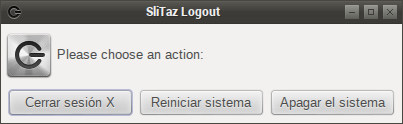
I would like to fix some missing translations in my SliTaz box (in spanish). Some of them need a quick fix in my opinion (for example, the close/reboot/halt dialog).
I have seen some threads with some user-made translations but there isn't any place with the last community made language fixes (with download links and installing instructions), or any easy way with instructions to fix/made/extend your SliTaz box translation by your own, or at least I didn't see them.
Could someone provide any help? I also would love to find the way to translate the VLC (the slitaz package installs always the English localized).
Regards!
P.D. I found myself explaining to my girlfriend that "halt" means shutdown (apagar in spanish), because she is using our Slitaz-powered mediacenter in the living room, ROFL.
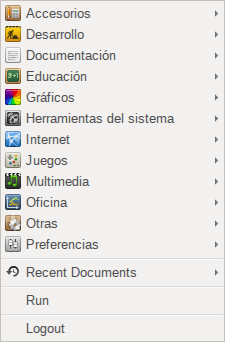
[attachment=28756,1374] [attachment=28756,1375] [attachment=28756,1376]
Offline
Extra info:
The gimp is also in English (among others). Maybe exist some way to import language translations in from .debs of something like that?
Offline
Hi
for Gimp (from Slitaz repo) install
http://mirror.slitaz.org/packages/stable/locale-es-extra-4.0.tazpkg
Offline
Info about System translation: http://www.slitaz.org/i18n.php
Slitaz logout dialog is executed by [c]tazbox logout[/c]
There is es_AR locale (Spanish Argentina) po file for tazbox which is compiled and packaged as /usr/share/locale/es_AR/LC_MESSAGES/tazbox.mo in slitaz-tools-boxes tazpkg
Project: http://hg.slitaz.org/slitaz-tools
POT file:http://hg.slitaz.org/slitaz-tools/raw-file/tip/po/tazbox/tazbox.pot
PO file: http://hg.slitaz.org/slitaz-tools/raw-file/tip/po/tazbox/es_AR.po
Test in Slitaz-4.0
Open /etc/locale.conf in text editor.
Add this:
LANG=es_AR
LC_ALL=es_AR
Save/exit
Logout/in
[c]tazbox logout[/c]
No es_AR msgstr in tazbox.
pt_BR and fr display msgstr from their tazbox.po files when tested using same method.
EDIT: Install glibc-locale and use either [c]tazlocale[/c] , [c]tazbox locale[/c] , or Applications/Preferences/System language to set es_AR
Login/out
es_AR msgstr from tazbox.po display in tazbox
Thanks Aleksej!
Install Spanish translation for vlc:
[c]tazpkg install locale-es-vlc-4.0.tazpkg[/c]
Offline
mojo, thank You!
You're right, but not quite. Switching the locale is not only modify the file /etc/locale.conf.
The most correct is to use dialogue “Preferences → System locale” and choose locale, and then logout/login.
The thing is that locales are in inactive, compressed form.
The other thing is if the user wishes to support of any locale, then installing of glibc-locale package is necessarily required.
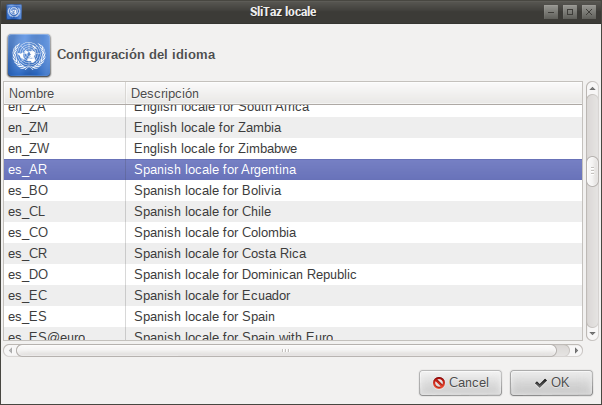
Offline
Алексей, вопрос еще есть по локали.
У меня почему-то в хроме не работает переключение языков, хотя в остальной системе всё отлично. Не сталкивался с этим?
Offline
To devl547
Александр, я не понял вопроса 
Не переключается раскладка клавиатуры?
Нет, с этим никогда не сталкивался. И тогда, когда у меня была переключалка из стандартной LXPanel, и сейчас, когда у меня стоит панель Waterline из SDE.
Переключение раскладки клавиатуры работает как положено, и для каждого окна запоминается своя раскладка, как я люблю 
Offline
>Александр, я не понял вопроса :-)
Переключение раскладки работает везде, кроме хрома.
Offline
To devl547
Как воспроизвести ситуацию?
Какой программой переключается раскладка?
Как устанавливался Хром? Через get-chrome.tazpkg или вручную (как у меня)?
Какая версия SliTaz?
Это так, навскидку вопросы...
Offline
>Как воспроизвести ситуацию?
Ставишь систему с cooking iso, ставишь русские локали, ставишь хром через get-chrome.
Раскладка везде переключается. В хроме - нет.
>Какой программой переключается раскладка?
setxkbmap и апплет lxpanel
>Как устанавливался Хром?
Через get-chrome
>Какая версия SliTaz?
cooking
Offline
Aleksej,thank you!
After I installed glibc-locale the selection es_AR was available in
[c]tazbox locale[/c] and tazlocale
Now I could use [c]tazbox locale[/c] which runs tazlocale es_AR
Log out/in
[c]tazbox logout[/c] and other tazbox dialogs display es_AR tazbox.po msgstrs
Issue with [c]tazbox tz[/c]:
The rewrite of tazbox requires zone.tab to populate list of time zones
glibc-locale must be installed to have zone.tab
glibc-locale is not included in the flavor packages.list of core,core-4in1 slitaz isos because of it's size.
[c]tazbox tz[/c] or Applications/Preferences/Time Zone list is blank on rolling core-4in1,core.
One solution I coded was to use if $ZONEINFO/zone.tab exists then use it else use previous method to populate tz list.
Offline
To devl547
У меня раскладка переключается, и я сейчас пишу из Google Chrome Unstable, который установился пакетом get-google-chrome.
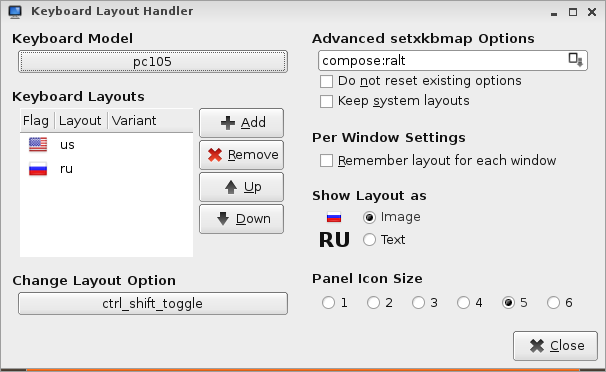
Система SliTaz Cooking 140216, установил locale-ru, добавил апплет на LXPanel, настроил апплет (может, в этом всё дело?): снял галочку «Keep system layouts», к имеющейся (единственной!) английской раскладке добавил русскую, изменил клавиши переключения раскладки на Ctrl+Shift, добавил клавишу «Compose».
Offline
To mojo
I see three solutions here.
[*]Keep dialog as-is, but remove empty list. The “Index” key allows you to select the required timezone.
[*]Old method of list population.
[*]To add zone.tab to SliTaz. Maybe, to base flavor, or something else. File isn't too big, 18 KB only.
Personally, I like the third solution.
And I want to say that really we don't need full glibc-locale package (I forgot about it). Most of its files were distributed among the packages locale-**. So we need glibc-locale only for languages that have no appropriate locale-** package. I could be wrong.
And one more little note. I don't understand, why glibc-locale is the source of Time Zone information? I always thought that tzdata provides frequently updated and the most actual information. I still remember when my country, Ukraine, was going to switch to daylight saving time, and then canceled. And so a few times. And each time, the tzdata authors released a new version of its database.
Offline
Hey, thank you everyone for your answers, time & help.
I was able to translate gimp and vlc with your advices, but I couldn't translate the login/logout box.
I have glibc-locale installed, es_ES set in Preferences->System Language and in tazlocale
Also locale.conf looks ok, I reboooted the system several times doing tests, still the same.
Any advices?
Thank you!
Offline
Hey, sh4!
I don't know is it the big difference between es_AR (Spanish for Argentina) and es_ES (Spanish for Spain).
You can use existing translation:
[c]/usr/share/locale/es_AR/LC_MESSAGES/slitaz-tools.mo[/c]
Copy it to:
[c]/usr/share/locale/es_ES/LC_MESSAGES/[/c]
Offline
Set the System Language to es_AR
There is no es_ES translation for slitaz tazbox unless you translate the tazbox.pot
Offline
Hi mojo,
I think the best solution for us is to switch to plain “es” locale for all SliTaz tools. It should work both for es_AR, es_ES, and other Spanish locales because SliTaz package “locale-es” has its translations only in the /usr/share/locale/es/ folder:
http://pkgs.slitaz.org/search.sh?filelist=locale-es&version=cooking
Offline
@ sh4
Hola amigo.. vamos en español, asi es mas rapido entre nosotros 
Para modificar el cuadro de dialogo de cierre de sesion/Apagado/Reinicio, lo que yo hice en slitaz 4 fue modificar directamente el script tazbox.
Abre una terminal y como root
# leafpad /usr/bin/tazbox
(ve a la linea 88 a 99) y modifica segun tu agrado, grabas y lo pruebas, sin reiniciar ni cerrar sesion, al grabar ya funciona . para mi lo mas importante era modificar el orden de las opciones, pues queria que la opcion de apagado estuviera primera,me quedó asi:
ATENCION: en la última opción no colocar la barra invertida al final.
88 # Logout GUI function
89 logout_main() {
90 text=$(gettext "<b>SliTaz Logout.</b> Por favor seleccione una acción:")
91 yad --entry --title="SliTaz Logout" --window-icon=$icon \
92 --width=440 --height=140 --text="$text" \
93 --image="slitaz-icon" --image-on-top \
94 --center --on-top --entry-text \
95 "[c]gettext \"Apagar sistema\"[/c] : halt" \
96 "[c]gettext \"Cerrar sesion X\"[/c] : exit" \
97 "[c]gettext \"Reiniciar sistema\"[/c] : reboot"
98
99 }
[attachment=28941,1388]
Offline
Thanks to Aleksej, rerivero, mojo and all the people who helped
If if I didn't understood bad I think there isn't such an only "es" locale but there is es_ES or es_ES@euro (wich I am using) points in the filesystem to the "es" folder, because there were some translations I installed during this time (like gimp and others).
Indeed there were missing translations in the "es" folder who were in the es_AR folder so I copied all the files in that folder to the "es" folder.
The files were:
slitaz-boxes.mo, slitaz-tools.mo, tazbox.mo and tazinst.mo
# cp /usr/share/locale/es_AR/LC_MESSAGES/* /usr/share/locale/es/LC_MESSAGES/
This fixed the system shutdown dialog among others, I think this fixes should be included in "es" folder in future releases, there isn't almost any differences between es_ES and es_AR in written form, and if they are is better to fix little differences than having a lot of things untranslated.
Cheers,
David.
Offline
To follow my crusade to a full-translated Slitaz system I have already missing translations in:
- The login box
- Some items in the menu like "Manage servers", "Mount devices", etc...
- Sakura all context menus (right click).
Cheers,
David.
P.D. Love SliTaz and its community!
Offline
Hi sh4,
David, your goal to have a full-translated SliTaz system just a great! My goal is the same but for Russian language.
If I understand correctly, you are Spanish-speaking. Can you help to other Spanish SliTaz users and add missing translations?
"Applications" menu items.
[*]Open folder [c]/usr/share/applications[/c] in your file manager (as root user - to have possibility to edit files). Here you can find all the menu items with its names on your selected language (Spanish, yes?)
[*]If some item miss Spanish translation you can easy add it. Right click icon, open in the Leafpad text editor (or any text editor you like).
[*]Example for tazweb menu item:
[c][Desktop Entry]
Type=Application
Name=TazWeb Browser
Name[pt]=Navegador TazWeb
Name[pt_BR]=Navegador TazWeb
Name[ru]=Браузер TazWeb
Comment=SliTaz simple, fast and small Web Browser
Comment[pt]=Navegador web simples e rápido do SliTaz
Comment[pt_BR]=Navegador web simples e rápido do SliTaz
Comment[ru]=Простой, быстрый и маленький браузер SliTaz
Icon=tazweb
Exec=tazweb %u
Categories=Network;WebBrowser;
MimeType=text/html;text/xml;text/plain;application/xhtml+xml;application/xml;image/svg+xml;application/x-shockwave-flash;image/jpeg;image/png;[/c]
You can translate "Name" and "Comment" to Spanish - just add a pair of lines:
[c]Name[es]=Navegador TazWeb
Comment[es]=Simple, rápido y pequeño del SliTaz explorador Web[/c]
I'm sorry for this rough translation. You can better!
[*]Save and close text editor. Return to file manager. You'll see immediately name of item changed. Wait few seconds and click "Applications" menu, now you'll find here your translated menu item! If you hover mouse pointer above menu item, you'll see your translated comment.
[*]And when done. Post here all your translated lines, or mail me (click my nick to find my e-mail). And I'll make changes to these files, and all Spanish-speaking people will see your translations in the near Rolling release (literally: next day).
Offline
I have already missing translations in:
-Sakura all context menus (right click).
There are no sakura.mo for any language in Slitaz-4.0 repo because sakura was not included in CORE_PKGS variable in slitaz-i18n/stuff/locale-pack.conf
locale-sakura-4.0.tazpkg includes sakura.mo for all languages in sakura-2.3.8
[c]/usr/share/locale/fr/LC_MESSAGES/sakura.mo
/usr/share/locale/cs/LC_MESSAGES/sakura.mo
/usr/share/locale/pt_BR/LC_MESSAGES/sakura.mo
/usr/share/locale/de/LC_MESSAGES/sakura.mo
/usr/share/locale/hr/LC_MESSAGES/sakura.mo
/usr/share/locale/it/LC_MESSAGES/sakura.mo
/usr/share/locale/ca/LC_MESSAGES/sakura.mo
/usr/share/locale/es/LC_MESSAGES/sakura.mo
/usr/share/locale/zh_CN/LC_MESSAGES/sakura.mo
/usr/share/locale/ja/LC_MESSAGES/sakura.mo
/usr/share/locale/ru/LC_MESSAGES/sakura.mo
/usr/share/locale/hu/LC_MESSAGES/sakura.mo[/c]
Offline
@Aleksej, yep my language is spanish, thank you very much for your info, tested with pair of programs and works great. I will translate 'em all and post back the files when they're ready . By the way, some of the portugese translations look like they are mistankenly translated as spanish. I'm not a portuguese expert, but I think they're wrong.
@mojo Thank you for this package works great but it has some untranslated strings. i.e. "New window", Do you have the .pos to correct them and re-compile the .mos to post them back here or for my own use?
Thank you all!
Offline
Hey David,
I forgot to ask you, what is the SliTaz version are you using?
Is it 4.0 (Stable nowadays)? If so, I've not touch it, sorry. Stable must be stable, and allowed only security updates. But you'll find your work in the current Rolling and in the upcoming 5.0.
And I think there are similar words in Spanish and Portuguese. You can use online translator to verify that.
-----
For *.po files you need to get sources. And it is something tricky if you using 4.0.
Search your package in pkgs.slitaz.org, open receipt: http://pkgs.slitaz.org/search.sh?receipt=sakura&version=s
Click to WGET_URL string to download source tarball. Use archiver to get inside. Search for *.po files.
Now it's very simple to explore Rolling packages since we have FTP access to Wok. For sakura package open following URL in your preferred FTP client (Opera web browser, Midnight Commander or similar):
ftp://cook.slitaz.org/sakura
Here you'll find the receipt and three folders:
In the [c]source[/c] you'll find sources (already unpacked/unarchived).
In the [c]install[/c] — all the compiled files.
And in the [c]taz[/c] — specified subset of the compiled files. Only these files are packaged to *.tazpkg.
PS. Oh, something wrong and currently our FTP is unavailable.
Offline
Sakura-2.4.2.tazpkg complete install including all translation files compiled for Slitaz-4.0
Spanish translation "Nueva ventana" for "New window" in context menu.
tux@slitaz:~$ tazpkg list-files sakura
Archivos instalados con: sakura
================================================================================
/usr/bin/sakura
/usr/share/applications/sakura.desktop
/usr/share/doc/sakura/INSTALL
/usr/share/locale/ca/LC_MESSAGES/sakura.mo
/usr/share/locale/cs/LC_MESSAGES/sakura.mo
/usr/share/locale/de/LC_MESSAGES/sakura.mo
/usr/share/locale/es/LC_MESSAGES/sakura.mo
/usr/share/locale/fr/LC_MESSAGES/sakura.mo
/usr/share/locale/hr/LC_MESSAGES/sakura.mo
/usr/share/locale/hu/LC_MESSAGES/sakura.mo
/usr/share/locale/it/LC_MESSAGES/sakura.mo
/usr/share/locale/ja/LC_MESSAGES/sakura.mo
/usr/share/locale/ko/LC_MESSAGES/sakura.mo
/usr/share/locale/pl/LC_MESSAGES/sakura.mo
/usr/share/locale/pt_BR/LC_MESSAGES/sakura.mo
/usr/share/locale/ru/LC_MESSAGES/sakura.mo
/usr/share/locale/zh_CN/LC_MESSAGES/sakura.mo
/usr/share/man/man1/sakura.1
/usr/share/pixmaps/terminal-tango.svg
================================================================================
Archivos 19 instalados con sakura.
Offline
[ Generated in 0.016 seconds, 7 queries executed - Memory usage: 1.6 MiB (Peak: 1.77 MiB) ]