 SliTaz Forum archive
You are not logged in.
Pages: 1
Current version of PCManFM is 1.2.0.
It have a lot of small new features I like. And I want to share them with you.
User folders
Here is XDG Standard that PCManFM follows. Put this file to ~/.config/user-dirs.dirs
[c]# $(XDG_CONFIG_HOME)/user-dirs.dirs
# Current set of directories for the user
XDG_DESKTOP_DIR="$HOME/Desktop"
XDG_DOWNLOAD_DIR="$HOME/Downloads"
XDG_TEMPLATES_DIR="$HOME/Templates"
XDG_PUBLICSHARE_DIR="$HOME/Public"
XDG_DOCUMENTS_DIR="$HOME/Documents"
XDG_MUSIC_DIR="$HOME/Music"
XDG_PICTURES_DIR="$HOME/Images"
XDG_VIDEOS_DIR="$HOME/Videos"[/c]
And you'll see nice icons in your home folder:
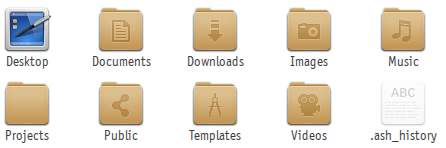
Of course, you can rename these folders if you want. And "big linuxes" have special utility (for monitoring these folders) that runs on startup. But I think SliTaz don't need this utility. SliTaz wants to be simple distro, and to follow standards.
Let's say I want to translate my ~/Downloads folder to Russian.
Open ~/.config/user-dirs.dirs in the text editor and change this line:
[c]XDG_DOWNLOAD_DIR="$HOME/Загрузки"[/c]
And rename folder "Downloads" to "Загрузки". That's all. Applications that follows this standard will use this renamed folder for downloads.
Offline
Virtual Filesystems
Now you can open remote file systems in your PCManFM. Menu "Go -> Connect to Server..."
Here you can make connection to FTP, SSH or WebDAV servers.
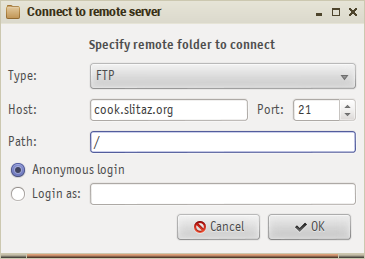
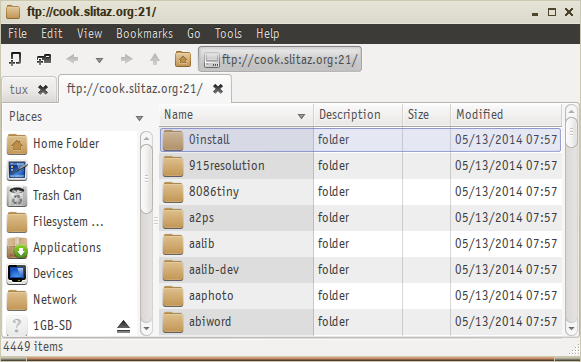
It is a bit tricky if you want to connect to SSH. All you need is to install openssl package.
Connect to WebDAV ("cloud" filesystem like Google Drive, etc.) not works for me at all. It needs some additional "dances" with gvfs and company.
Offline
Thumbnailers
In the "icon" mode you can usually view thumbnails for your jpg and png images.
But in addition, here a class of applications called thumbnailers for view thumbnails for other types of documents. And PCManFM support it.
File /usr/share/thumbnailers/pdf.thumbnailer:
[c][Thumbnailer Entry]
Exec=/usr/lib/pdf-thumbnailer %i %o %s
MimeType=image/jpeg;image/png;application/pdf;application/x-pdf;image/pdf;application/acrobat;[/c]
And you'll see PDF thumbnails:
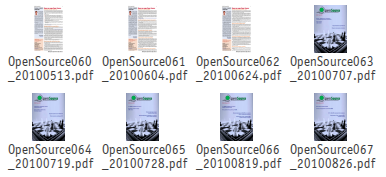
Oh, sorry, SliTaz repositories haven't any pdf-thumbnailer. Maybe I've grab it from http://pkgs.org/
Other example. File /usr/share/thumbnailers/ffmpeg.thumbnailer:
[c][Thumbnailer Entry]
TryExec=ffmpegthumbnailer
Exec=ffmpegthumbnailer -i %i -o %o -s %s -f
MimeType=video/jpeg;video/mp4;video/mpeg;video/quicktime;video/x-ms-asf;video/x-ms-wm;video/x-ms-wmv;video/x-msvideo;video/x-flv;video/x-matroska;[/c]
All right, SliTaz repos have ffmpegthumbnailer package. And you can see thumbnails for your avi, mp4, flv (and maybe other) video files. And it's so fast (in opposition with pdf thumbnails).
Offline
Templates
Ok, folder ~/Templates really for it. You can put here your customized templates for all your life situations.
And then you can right click on empty space on folder and select item in the "Create New..." submenu.
But this is not all! We can put more life in the "system default templates". Analizing PCManFM with tracer I've found that PCManFM scans all these template folders:
/usr/local/share/templates
/usr/share/templates
/home/tux/.local/share/templates
/home/tux/Templates
Ok, let's move our "system wide default templates" from /etc/skel/Templates to /usr/share/templates.
You can ask me what I meant while say "more life"? Here another standard or hidden feature, really I don't know.
So, first step. Please, rename our HTML template to "name.html". Why "name"? I think you'll understand it a bit later.
Second step. Create a file-companion /usr/share/templates/html.desktop with this content:
[c][Desktop Entry]
Type=Link
Name=HTML document
Name[ru]=документ HTML
Comment=Please enter HTML document file name:
Comment[ru]=Введите имя документа HTML:
URL=name.html[/c]
You can add translations here! And now your "Create New..." submenu not contains "html-file" anymore. It contains "HTML document" for English speakers, and "документ HTML" for Russian speakers:
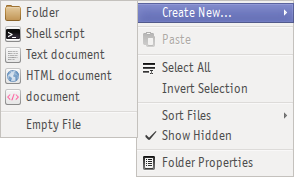
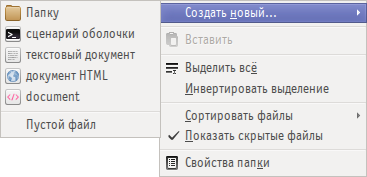
Do you see "document" here? It is "document.xml" that have no ".desktop" companion file.
And what about "Comment"? Ok, you'll see:
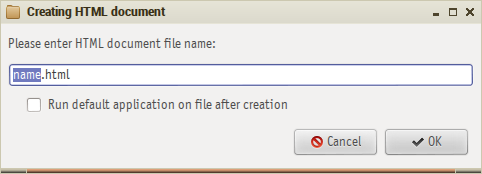
Note, here our "name" where you should type file name.
Offline
That's all for now. You can share your finds and advices here.
And me... Today evening I'll go to the sea side!  For ten days. So, see you all later (less or more later).
Happy SliTaz! ;-)
Offline
Hello
Many interesting functions I did not know (I will test the gdrive connection for sure)
Maybe you could compile this into a file in the documentation ? it would be worth it.
Offline
Hi christophe,
Your start point with Google Drive is here: https://dav-pocket.appspot.com
But nevermind, it'll not works. Need somethind like gvfs-webdav binary in the system.
Offline
Really nice tips! Thanks Aleksej!!!
@christophe
It's a very good idea to write a doc on Slitaz Wiki. Recently I create a page on Wiki about Xbinkeys; it would be cool if you create a page about these PCManFM features.
Offline
I whish it would work. I decided to use gdrive for some files I am using all the time, so as to be able to share them between my laptop and desktop... will hardly be able to switch back to slitaz if I cannot make it work 
Offline
Pages: 1
[ Generated in 0.017 seconds, 8 queries executed - Memory usage: 1.55 MiB (Peak: 1.77 MiB) ]