 SliTaz Forum archive
You are not logged in.
Pages: 1
Hi all!
Recent PCMan supports so called “Custom Actions”. In short, there are actions that you can do with selected files and folders using context (right-click) menu in the PCManFM.
As usually, PCManFM have Terminal and Archiver integration—you can open selected Terminal in the folder, and add files and folders to the archive. Nothing more.
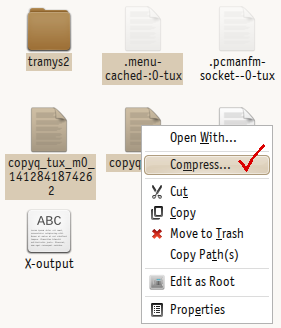
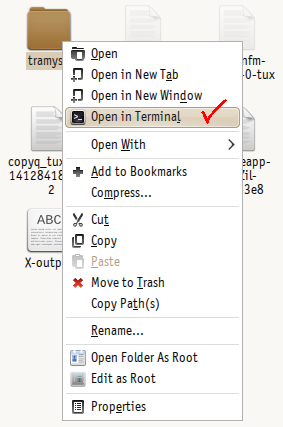
But I think you have enough fantasy to write few more actions that you need 
[*]Most wanted action—open current folder as Root.
[*]You can convert selected mp3 files to m4a.
[*]You can upload selected files to the various servers—like share pictures, or send file to your private server.
[*]For tazpkg—make package from folder, or make folder from package.
[*]Make tazpkg packages from Debian (and other) packages.
[*]Completely delete selected files and folders using shredder.
[*]Set an image as wallpaper.
[*]Send selected files as e-mail attachments.
[*]Mount an ISO image to the loop.
[*]Write an ISO image to the CD/DVD.
[*]... all you want!
Few words for those who interested.
Link to the implemented in the PCManFM specification.
How to start: Custom actions for PCManFM-Qt.
You'll find more in the net searching for PCManFM custom actions example.
____________________
PS. Next: outdated info.
And now few words to the active SliTaz developers.
Custom Actions not works in our PCManFM 
And after few days of debugging, searching and recompiling I can't force them to work. Please help!
More info.
I used binary file /usr/bin/pcmanfm from this Ubuntu package: http://pkgs.org/ubuntu-14.10/ubuntu-universe-i386/pcmanfm_1.2.2-1_i386.deb.html It works great!
Our Cook log for PCManFM package shows no errors or warnings. And we have no custom patches or something that can break custom actions.
Custom actions works both in the PCManFM-Qt and in the libfm-demo, but not working in our PCManFM.
Offline
Acknowledgements are sent to Alexander a.k.a. az_ua.
After his patches ([1], [2]) Custom Actions started working.
Fixed PCManFM you'll find here: http://cook.slitaz.org/cooker.cgi?pkg=pcmanfm
Now I want to share with you an Action — slideshow:
[c][Desktop Entry]
Type=Action
Name=Run Slideshow
Name[ru]=Запустить слайдшоу
Icon=image-x-generic
Profiles=viewnior_on_folder;viewnior_on_images;gpicview_on_folder;gpicview_on_images;
[X-Action-Profile viewnior_on_folder]
TryExec=viewnior
Exec=viewnior --fullscreen --slideshow %f
MimeTypes=inode/directory;
[X-Action-Profile viewnior_on_images]
TryExec=viewnior
Exec=viewnior --fullscreen --slideshow %F
MimeTypes=image/*;
SelectionCount=>1
[X-Action-Profile gpicview_on_folder]
TryExec=gpicview
Exec=gpicview --slideshow %f
MimeTypes=inode/directory;
[X-Action-Profile gpicview_on_images]
TryExec=gpicview
#Bug: gpicview shows other images after selected
Exec=gpicview --slideshow %F
MimeTypes=image/*;
SelectionCount=>1[/c]
Here you can see four different profiles—two of them will work if you have Viewnior installed (preferred), and two other—if you have Gpicview. Next, two profiles activates if you right-click on folder (or in current folder), and two other profiles—if you select more than one image and right-click.
You have many ways if you want to show slideshow!
You can download this Action as file here: slideshow.desktop. Save it to your ~/.local/share/file-manager/actions/ folder and restart your PCManFM.
Offline
Pages: 1
[ Generated in 0.018 seconds, 7 queries executed - Memory usage: 1.54 MiB (Peak: 1.77 MiB) ]