 SliTaz Forum
You are not logged in.
Pages: 1
all of a sudden i cant use sudo to launch any command.
tux@slitaz:~$ sudo tazpkg -v
Password:
su: incorrect password
i cant enter a password, it immediately says i entered a wrong one.
this is very strange. what can i do to fix this?
Offline
[c]Sudo[/c] command in Slitaz does not work. Use [c]su[/c].
Offline
Sudo command requires:
Installation:
[c]tazpkg -gi sudo[/c]
Configuration:
[c]sudo visudo[/c]
Read the comments in /etc/sudoers and use google to get information on sudo configuration.
Offline
Hi K3nn3th,
Hi mojo,
Really, SliTaz provides sudo utility. But it is not regular sudo. It is small fake utility. Main difference from real sudo is that SliTaz's sudo uses root password. Not yours...
It uses password you previously enter in the subox. Like this, when you run gparted from your Applications menu:
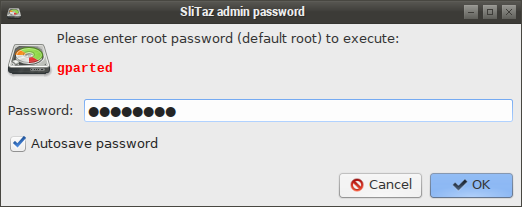
If you enter your root password, tick on checkbox, and press OK button, then your root password will write to ~/.config/slitaz/subox.conf (and gparted will run).
Next, if you'll run gparted again you'll see that password is filled, and you not need to type it again.
And if you run your command "[c]sudo tazpkg -v[/c]", you'll see that it works.
----
OK. I try.
With password saved: it works and not ask me for password.
Without password saved (I temporary renamed my ~/.config/slitaz/subox.conf): it works, it asks my root password.
If it not works for you, probably you need to
[c]# tazpkg recharge
# tazpkg -gi slitaz-base-files --forced[/c]
Offline
http://forum.slitaz.org/topic/ru-добавляем-команду-sudo#post-4011
Carefully, using the Russian language!
Offline
thanks for the advice, guys, but i already have sudo installed.
the thing is, it worked up to 2 days ago!
i updated some packages (cant recall which ones exactly), rewrote my rootfs.gz and it stopped working.
never seen/heard any of this before.
its not a problem with sakura..
Offline
okay, reinstalled sudo and set up my sudoers file to the same state as i had i all the time.
now its working again.
i dont get what caused the problem.
Offline
Pages: 1
[ Generated in 0.018 seconds, 7 queries executed - Memory usage: 1.54 MiB (Peak: 1.77 MiB) ]