 SliTaz Forum
You are not logged in.
Okay, first off, I will go on and perhaps hazardously say that such thing doesn't yet exist on Slitaz (although I have noticed that some Slitaz features are available in Romanian using the "locale" settings, which is interesting...).
Now, I may not be the best programmer on the planet (lol, of course I'm not - I quite suck at it), but I'm willing to try to create a keyboard layout by forking one of the existent ones (e.g. the Hungarian one as it's closer to the layout I need/want).
The trouble is that last time I did that was roughly 8 years ago and in the meantime I forgot... almost everything.
So what I (think I) need from you guys is to point me into the right direction to start doing it.
I love SliTaz quite a lot and if I can get Romanian layout, it would probably be amongst the last nails in the coffin of Winblows  ) - not to mention that if I manage to create such thing, I can popularize it and bring more people to use SliTaz (and it will give me the satisfaction of contributing something to the community).
I should probably also mention that I'm using the "cooking" version (the 42MB ISO) - which to me is by far the most stable version of SliTaz (RC1 - 'cause RC2 only gave me headaches).
P.S.: I'm sorry if I picked the wrong forum to post this but I really didn't know where to post it (perhaps in the "Devel" forum?)
Hi Lucian,
Please, wait me, I have no free time now.
I'll try to prepare full Romanian locale package for you this evening. And I will describe how to switch to the one of three Romanian keyboard layout. See you!
Offline
Wow, that would be fabulously fast.
No hurries. I can wait.
Although I only need the keyboard layout. I am not interested in having the interface in Romanian (in fact, I'd rather not to).
Also, just to be sure: Please use the "Romanian[Standard]" (as it's called in Windows 7). I'm mentioning this because there's also "Romanian[Legacy]" floating around not just Windows but also some Linux distros and that layout not only is qwertz but it's also quite counter-intuitive.
Cheers.
Hi Lucian,
It's me again
1. Download
Here you'll find the package: http://cook.slitaz.org/cooker.cgi?pkg=locale-ro
Click on "Download", save package.
2. Install
Open PCManFM in the folder where you downloaded package, then double-click it to install (enter root password, press "Install" button).
3. Choose Romanian locale (optional for you)
Open Sakura terminal (or Xterm), become admin (type: su command, enter root password).
Type command: tazlocale and choose "ro_RO Locale" in the dialog.
Don't close terminal.
4. Choose right Timezone
Type command: echo "Europe/Bucharest" > /etc/TZ
5. Choose romanian keyboard
Type command: tazkeymap ro
6. Restart session: Applications Menu → Logout → Close X Session
Log in again.
Possible done. Please, try and post all your errors, comments and suggestions here.
It's strange, but I see almost all our configuration tools are broken on my SliTaz installation 
_____
PS. You can try among three keyboard layouts: "ro", "ro_std" and "ro_win", for example: tazkeymap ro_std
But layouts "ro" and "ro_std" throws errors on terminal for me:
[c]Creating: /etc/X11/xorg.conf.d/40-Keyboard.conf [ Done ]
unknown keysym 'quotedblbase'
lk_add_key called with bad keycode -1[/c]
Only "ro_win" finished without errors. Maybe you luck more...
___
PPS.
Error is gone after SliTaz rebooting.
In the Linux console I can type Romanian (hmm, maybe and have "keyboard switcher" (don't know if we need it?) Alt+Shift: English layout - Romanian layout.
Right now, here in the browser I type like on usual English keyboard. And I get next symbols with pressed RightAlt:
[c]â߀rțyuîo§„”\
ãșðfghjk³;'
zx©vbnm«»/[/c]
And with RightAlt+Shift:
[c]Â RȚYUÎO |
ÃȘÐFGHJK£:"
ZX VBNM ?[/c]
___
PPPS.
Seems there is errors in the layout:
[c]RightAlt + a = ã (+ Shift = Ã) <- error?
RightAlt + q = â (+ Shift = Â) <- error?
RightAlt + i = î (+ Shift = Î) <- ok
RightAlt + s = ș (+ Shift = Ș) <- ok
RightAlt + t = ț (+ Shift = Ț) <- ok[/c]
Offline
Wow! With explanation for newbies as well. Not that I need them but redirecting other people to this thread would spare me of some explanations.
ro_std and ro_win don't seem to do anything on my end, Aleksej. No way of making "ș" or any other Romanian char appear on any editor.
However, "tazkeymap ro" did the trick in the sense described in your "PPPS".
Whilst this fix is good enough for me, it's not good enough for most people - especially when one wants to write a 3000-word text in Romanian and thus using RightAlt + t for every ț can be quite a pain in the arse
What would indeed do the trick would be the import of the Romanian [Standard] layout existent in Windows or the "Standard Romanian" in Ubuntu.
Link1: http://i.stack.imgur.com/00gXI.png
Link2: http://askubuntu.com/questions/273025/romanian-special-characters-the-default-comma-standard-version-looks-bad-in (disregard the user's complaints, just look at the pictures to see what I mean with the differences between the layouts)
The "Standard" in Ubuntu means that when I press ";" the editor will show "ș" - when I press ' the editor will show "ț" and so on with "\" for "â"; "]" for "î" and "[" for "ă". <<- this is the layout used allover academia and the press and... pretty much everywhere where writing in Romanian is needed.
Now, I'm pretty sure that "ro_win" was supposed to do that, Aleksej, but it brings error
Funny part that "tazkeymap ro" also brings an error but it works. "tazkeymap ro_std" brings no errors on my end but it also does not work. (I get the same error message as you)
I should also mention that I was only interested in "tazkeymap" and not in the whole locale since I can get the timezone by setting Finland/Greece (no need for a special one on Romania) and having the menus in Romanian is not one of my targets (although I can already think of 4-5 people who would want that).
>and have "keyboard switcher" (don't know if we need it?)
Absolutely. If we can get the "Standard" layout to work (i.e. the one that returns "ș" when ";" is pressed) - then the keyboard switcher is more than needed.
Also, props for getting the right "ș" and "ț" (with commas beneath "s" and "t") -> even Microsoft screwed things up with this by implementing sedillas instead of comma (the "ș" with sedilla exists in Turkish, but not Romanian and "ț" with sedilla exists nowhere, lol).
Hi Lucian,
Here very simple solution!
Only if you don't need Romanian in console, and if you using LXPanel. Steps are below:
[*]Right click on empty space of LXPanel, select «Add / Remove Panel Items»
[*]Click «+Add» button
[*]Select «Keyboard Layout Handler» and press «+Add» button
[*]Select «Keyboard Layout Handler» and move it using buttons «Up» and «Down»
[*](Select «Keyboard Layout Handler» and) press «Edit» button
[*]Uncheck «Keep system layouts» checkbox
[*]Click «+Add» button, scroll to the «ro Romanian» line, unfold it
[*]Select «ro(std) Romanian (standard)» and click «OK» button
[*]That's almost all. You can add more keyboard layouts, change layout switcher, activate per window settings, etc. based on your taste
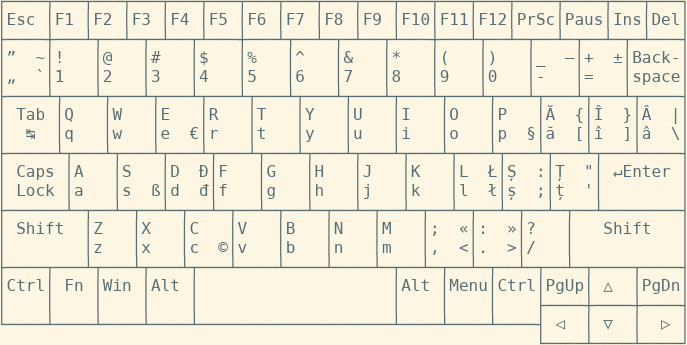
And here is keyboard of my netbook with «ro(std)» layout. Here:
[*]left bottom: just key
[*]left top: key with Shift
[*]right bottom: key with Alt
[*]right top: key with Alt and Shift
Offline
OK, after that I switched to the Linux console.
Type command tazkeymap ro_std (as root) and get next keyboard layout:
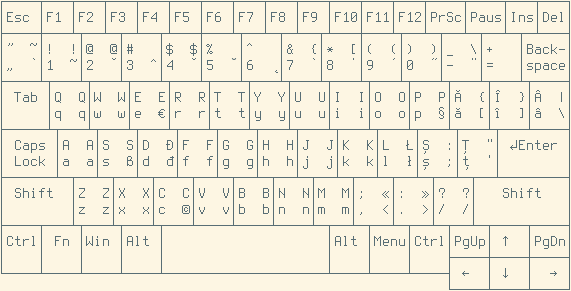
Seems that all works.
And «Alt+Shift» works not as layout switcher.
It works as «Alt Lock» (like Caps Lock, but locked not Shift but Alt).
Lucian, can you repeat this on your side?
Offline
Yep. Repeated and works like a charm. I set alt+shift as a switcher and added ro_std, us and ro -> which means I have it just like I used to have in Winblows (Ro-programmers, Ro Standard and US).
Now I'm gonna try finding an order that suits all of my needs (I also write in Swedish, Hungarian and a few other languages but that's my problem, not yours).
Thanks a lot, Aleksej.
Now I really need to find time to popularize the hell out of SliTaz to my Romanian audience struggling with old computers 
I'll mark this topic as "Solved" since it is solved, as far as I'm concerned :DTep
Thanks again. I really didn't expect to get this solved just a day after I began the thread
Oh, I remember those feelings when I've made SliTaz my main desktop system and start to use Windows less and less...
Good luck to you, Lucian!
And... ask your questions 
Offline
[ Generated in 0.017 seconds, 7 queries executed - Memory usage: 1.56 MiB (Peak: 1.77 MiB) ]