 SliTaz Forum
You are not logged in.
Pages: 1
Hallo!
Many things in the SliTaz appearance you can tweak on your own taste.
It is interesting — if it is handy for me — maybe it is handy for other SliTaz people?
______
First question — Panel layout
a) "icons only" style

b) "classic" style

I prefere old good classic style. My screen is small (1024×600), but I think that "icons only" style intended for really small screens only.
______
Second question — Default GTK Theme
Not long time ago we used old/outdated version of Clearlooks theme engine with both old/outdated Clearlooks GTK themes. Currently background and font color of the Panel are forced in the settings.
Now we use new Clearlooks engine with damn pretty themes set containing of eight themes (half of them are light and half — dark). Also, now you can change theme colors to your taste.

Now we can set in the Panel settings "Background: system theme" and get background of Panel matched your GTK theme — light Panel for light themes and dark Panel for dark themes.
I think "Clearlooks Human" theme is the best theme for SliTaz. And we can remove native SliTaz GTK themes (based on the old Clearlooks themes with changed colors): "SliTaz", "SliTaz-flatbrown", and "SliTaz-greylooks". Or we can leave them here — they takes only 28KiB.
______
Third question — "Start Here" button
I mean Applications menu, and it called as "Start Here" in the few Linux distros, and Freedesktop specification.
a) Current "icon and text" style (text takes a lot of space on the small screens):

b) "Icon only" style (something wrong — icon is too small):

c) "Icon only as button" style:

I developed this icon-button for my eye pleasure, and we can use it as default SliTaz "Start Here" button.
______
Fourth question — Terminal colors and misc.
a) "White on black" style:

b) "Colorful" style (also scrollbar):

"White-on-black" is real pain for eyes to search where are the commands and where are the outputs of that commands. Color helps to quckly find that commands when you scroll. Oh, scrolling! It is also pain to scroll long listing without scrollbar. I think — let Xterm be as-is without scrollbar, but Sakura — with it.
______
Fifth question — Applications set.
Time goes. I forget the last time I burn CD or DVD (on the Desktop machine). Also my netbook have no CD/DVD at all  I know SliTaz used in countries all over the World, and can't to know if CD/DVD is still used anywhere? Only I want to say that CD/DVD popularity is tends to be zero in my country…
It touch next applications: Accessories → Burn CD/DVD (SliTaz Tools); Multimedia → Asunder CD Ripper. I propose to remove.
Next. "Beaver Code Editor" is unmaintained. Author leaves its development in the very early stage. And after that Beaver is almost unusable. Yes it small, but it very unhandy. And its color highlighting is breaks badly on the listings I opened. I propose to remove also.
Office → SQLite SQL Engine. Oh, is it office at all? I know we need sqlite for webkit engine. But I doubt that we need this icon.
What do you think about this? Please share your opinion.
Offline
Hi Aleksej
Panel layout
"classic" style of course
GTK Theme
The orange color is somehow traditionell,I know,
but I always get a picture in my mind of old, fat men sitting in a big leather chair, smoking cigars..creepy.
How about something fresh, like a cool blue or this:
http://forum.slitaz.org/topic/slim-themes#post-26479
dark Themes are OK, but the buttons/icons should be (easily) visible.
"Start Here" button
start here -- whaaat?-- am I entering a labyrinth??..
to be honest,I opt for a and/or b
Terminal colors and misc
make it easy for the eyes..some colors,why not..but no Hannah Montana Linux.lol
Applications set
yup,I'm still burning CDs/DVDs.And a CD to mp3 (Lame) GUI-tool I'm using too.
but I would not miss "Beaver".
and please no FF or anything with "chrome" in it's name...
Offline
Panel:
icons only.
however be careful with the color theme, to make sure icon ans systray icons in particular remain visible (I always need to tune that somewhat)
Background and theme
I always switched to some blue clearlooks.
I would recommend that the light/dark choice is completed with each having hot/cold colors (eg, yellow or orange, and green or blue). I tend to prefer cold color, others will like hot ones.
Start here: I always replace that one with an old red spider-like button (i think i took that from version 2 or version 3 of slitaz). Perfect.
[attachment=37919,1914]
Sakura - Agree !
Keep CD burner ability. I seldom use mine anymore, - still... keep it !
beaver: I usually install SCiTe
Sqlite3 - love it ! but i would run it from terminal, or, better, from firefox with some extension which makes it more powerful.
For firefox/chrome, I do not agree ith sixofeight: to me firefox has become slow but is it still the most complete browser that I can use (I tend to use chrome and chromium too, but I believe they are functionnaly still inferior). Have not found any usable other one.
Offline
hi Aleksej,
my tastes are:
Panel >> "classic" style
GTK >> "Clearlooks Human" (I think is good)
"Start Here" button >> "Icon button only as"
Terminal >> "White on black" without bar displacement (assuming that the terminal is for 100% keyboard) (I do not like colors, high contrast I think is not good)
Applications set. >> Should keep CD / DVD option
"Beaver Code Editor" >> you can see alternative replacement.
SQLite >> delete icon
Offline
Hi guys,
Don't worry — I will not remove anything from SliTaz distribution if anyone needs it. Also, I will leave SliTaz appearance as-is while we have no significant preference from one theme to other.
It takes me only few minutes to tweak fresh SliTaz with my preferences.
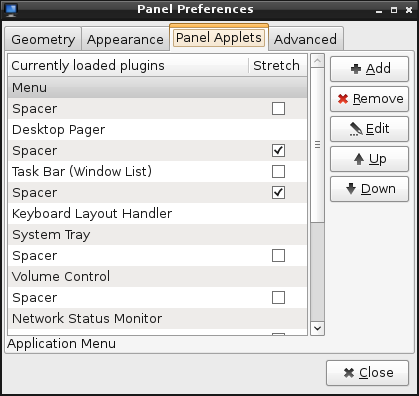
Settings for "Icons only" (note checkboxes):
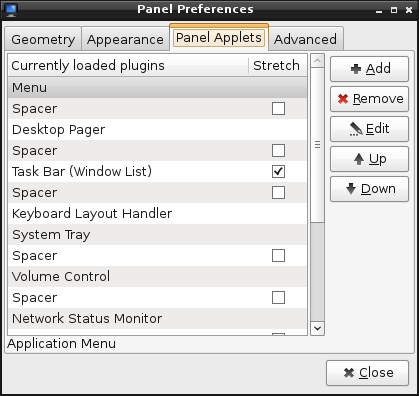
Settings for "Classic" (note checkboxes):
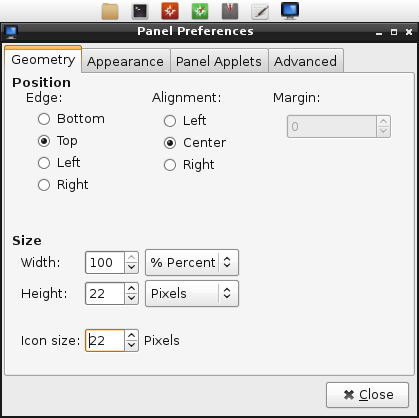
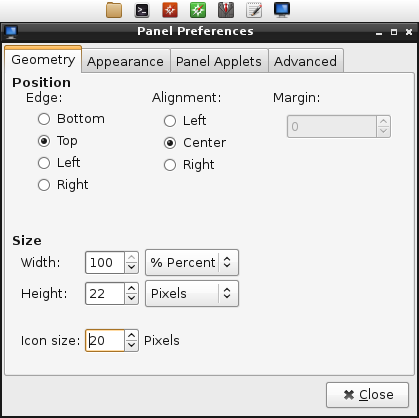
Also, I like pixel perfect look of SliTaz. I see all that pixels. Alas, SliTaz comes out-of-the-box with blurred icons. I'll fix it soon, I found a way to make small restricted icon set with both small (16px) and big (48px) icons. All icons are crisp, and this iconset is even smaller that one used now in the SliTaz (slitaz-icon package).
Two settings:
a) SliTaz Rolling as out-from-the-box: you got blurred icons:
b) Sizes tweaked a bit: crisp icons:
Summary:

TazWeb is still blurred because we have only one TazWeb icon: /usr/share/icons/hicolor/32x32/apps/tazweb.png
Guys I don't know about you but I see all that pixels.
sixofeight, you can choose between:
a) Clearlooks Brave (Icy Blue);
b) Clearlooks Human (Orange);
c) Clearlooks Wine (Wine Red);
d) Clearlooks Wise (Green).
I think it will be enough both with ability to change theme's colors on your own.
SliTaz is still orange. Pankso designed it to be orange. Also, somewhere I meet precise color specification for SliTaz orange.
Christophe, yes, circle button is looks not bad. I found bigger version (or original?) of it here: http://www.slitaz.org/en/artwork/
Rerivero, you're right. But only a half. Terminal is for keyboard only, yes. But Sakura is not terminal. It is a terminal emulator. When I cook packages on my cooking environments, I forced to scroll long-long cooking logs, and scrollbar helps me a lot. Mouse wheel scrolls to slowly and sounds loud And sorry, I don't know how to scroll terminal (or terminal emulator) window using keyboard only. Also, in the Linux terminal (not emulator) you can use "gpm" to use mouse — i.e. to click menu or buttons in the Midnight Commander
Oh, who wants Midnight Commander in the default SliTaz applications set?
And what about current SliTaz Rolling default wallpaper? It looks dark and gloomy. Orange "magic" wallpaper from SliTaz 4 is more pleasant for eyes. Any ideas?
Offline
I have bad eyesight due to work accident many years ago.
My vision was so bad I had to have cataracts removed from both eyes in 2010.
Then I had complications in one eye and a laser procedure was done that made it worse.
I require white text on black background in Sakura,the scroll bar is OK.
Please don't remove burn-box, I burn isos with it to cdrw for testing. Most computers sold in US come with dvd burners. Slitaz boots faster from live cd than live usb on old motherboards with usb 1.1 and plop loader.
I showed you my desktop in 2013.

Offline
Hi Richard,
Of course, all SliTaz defaults will be stored. Have a nice day.
PS. More, now you can use one of the dark SliTaz GTK theme to have white text on the dark background on your whole system. Even TazPanel supports this mode, try it out.
Offline
Hi Aleksej,
Users can't see the new themes until they install clearlooks-colors
[c]tazpkg -gi clearlooks-colors[/c]
Offline
Yes, you're right. And current Rolling distro contains that package.
Also, package murrine-svn-themes contains all that themes but based on the murrine GTK engine:
[c]tazpkg -gi murrine-svn-themes[/c]
[*]Murrine Brave
[*]Murrine Brave Dark
[*]Murrine Human
[*]Murrine Human Dark
[*]Murrine Wine
[*]Murrine Wine Dark
[*]Murrine Wise
[*]Murrine Wise Dark
Offline
Aleksej,
I was reviewing the Spanish translation tazpkg and there are serious problems! The review will fully and then posting. These are just some examples.
#: tazpkg:186
#, fuzzy
msgid "Rebuild a package with a better compression ratio"
msgstr "Reconstruye un paquete con un mejor radio de compresión." >>> FAIL (radio???)
#: tazpkg:199
#, fuzzy
msgid "Convert alien package to tazpkg"
msgstr ""
"Convertir paquetes deb/rpm/tgz/pet/sfs/sb/arch/ipk al de slitaz (.tazpkg)." >>>
unnecessary.
very long
#: tazpkg:819
msgid "Removing old package..."
msgstr "Removiendo viejos..." >>> INCOMPLETE
#: tazpanel/pkgs.cgi:171
msgid "Files"
msgstr "Filas" ??? >>> FAIL
#: tazpanel/pkgs.cgi:604
msgid "File"
msgstr "Fila" ??? >>> FAIL
#: tazpanel/pkgs.cgi:1245
#, fuzzy
msgid "Blocked packages list"
msgstr "Páginas bloqueadas" ??? >>> FAIL
#: tazpanel/pkgs.cgi:723
#, fuzzy
msgid "Blocking: %s"
msgstr "Descargar la imágen DVD" >>> SUPER FAIL
#: tazpanel/pkgs.cgi:724
#, fuzzy
msgid "Unblocking: %s"
msgstr "Descargar la imágen DVD" >>>SUPER FAIL
#: tazpanel/pkgs.cgi:725
#, fuzzy
msgid "(Un)blocking: %s"
msgstr "Descargar la imágen DVD" >>> SUPER FAIL
#: tazpanel/pkgs.cgi:1334
msgid "Installed files:"
msgstr "Filas instaladas:" >>> FAIL
Offline
Hi Rene,
I'm not a Spanish translator. Do you native Spanish speaker? Can you improve the translations?
I will put improved translations to the repository, with happy.
Note that translations marked "fuzzy" are automated — translation program just puts some already translated phrases here.
Offline
My native language is Spanish. When finished, the posting.
thanks
Offline
Hi all,
My preferences:
1. Panel layout = icon only style (a)
2. Default GTK Theme = I prefer warm colors so maybe Clearlooks Human but have to try
3. Start Here button = Icon only as button style (c)
4. Terminal colors and misc = Colorful style (b)
5. Applications set:
- Sorry, I only have antiques that can't boot from usb1 ports without plop manager and in this case I'm unable to use the usb keyboard at boot so unable to do a choice when the menu is displayed; I still often use cdrw for Lives. But it'll always be possible to burn a cd from an installed SliTaz or Windows.
- Beaver Code Editor is one of the packages I systematically remove (like Xterm) after I installed SliTaz.
- Midnight Commander in the default SliTaz applications set? Why not.
- And what about current SliTaz Rolling default wallpaper? I definitively adopted Mojo's wallpaper when he showed it to us, for installations that I don't use only for tests.
Offline
My two cents
I have added to blacklist sakura, geany, tazpanel, and icon square (aka faenza icon)
at least orange colors is no meat or fish, but an anyway is minor problem.
Offline
Hello, bonjour
My preferences:
1. Panel layout = icon only style (a)
2. Default GTK Theme = Clearlooks Human
3. Start Here button = "Icon only" style
4. Terminal colors and misc : "Colorful" style (also scrollbar)
5. Applications set:
- Please keep a tool to burn/erase CD/DVD
- Geany is a convenient editor, specially with LaTeX
- Nano is useful when you're in tty mode
- Pcmanfm is fast and simple
- Possibility to play DVDs out of the box or after tazpkg -gi libdvdcss2 (and libdvdread )
Have a nice day
Offline
Hi all,
I added little tweaks page to the TazPanel (Settings → Tweaks). There you can change:
[*]black-and-white or colorful style of the terminal prompt;
[*]icon and style of the LXPanel Menu button.
You need:
[*]tazpanel ≥ 474
[*]slitaz-configs-base ≥ 253
Download and install packages using "download" links on the given pages right now.
Offline
Hi all,
I have noticed a change in the menu of slitaz-rolling, which has happened in April 2015. There have been decent little arrows in the menu until slitaz-rolling 20150329. Since April until today they are replaced with big arrows. I prefer the old little arrows, the new ones are too big. Is there anybody who agrees or objects? How can I change this?
[attachment=38237,1930] [attachment=38237,1931]
Offline
Hi kubepc,
Really interesting where these arrows are from. Maybe from LXPanel or current GTK theme. I'll dig it.
Offline
Hi Aleksej,
thank You, this would be very nice.
Offline
Found something.
Exact type of the arrows is provided default unthemed GTK engine. Open LXAppearance and switch to the "Remond" or "Raleigh" GTK theme, then open Applications menu to check arrows. I found such themes a bit ugly, so back to the Clearlooks-based themes.
You can only scaled the size of arrows, I not found anything else.
Imagine you using theme called "SliTaz". Open (as root) file /usr/share/themes/SliTaz/gtk-2.0/gtkrc in the Leafpad text editor and add this line:
[c]GtkMenuItem::arrow-scaling = 0.5[/c]
somewhere after these lines
[c]style "clearlooks-default"
{[/c]
and before this line
[c]}[/c]
Something like this:
[c]style "clearlooks-default"
{
GtkButton ::default_border = { 0, 0, 0, 0 }
GtkRange ::trough_border = 0
GtkPaned ::handle_size = 6
GtkRange ::slider_width = 15
GtkRange ::stepper_size = 15
GtkScrollbar ::min_slider_length = 30
GtkCheckButton ::indicator_size = 12
GtkMenuBar ::internal-padding = 3
GtkTreeView ::expander_size = 14
GtkTreeView ::odd_row_color = "#f1f1f1"
GtkExpander ::expander_size = 16
GtkToolbar ::internal-padding = 0
GtkToolbar ::shadow_type = GTK_SHADOW_NONE
GtkMenuBar ::shadow-type = GTK_SHADOW_NONE
GtkFrame ::shadow_type = GTK_SHADOW_NONE
GtkMenuItem::arrow-scaling = 0.5
#GtkNotebook ::show-bodrer = 1
GtkScrollbar ::has_secondary_backward_stepper = 1
GtkScrollbar ::has_secondary_forward_stepper = 0
. . . . . . . . . . . .[/c]
And you'll get the same >-styled icon but a bit smaller.
Offline
Hi Aleksej. I love Slitaz. I'd like to see single mouse-click operation as a default. That's just a personal preference. I don't know if others feel the same......?
Offline
Hi Tazman,
To change single / double click type in the PCManFM file manager: open PCManFM, go to menu Edit → Preferences:
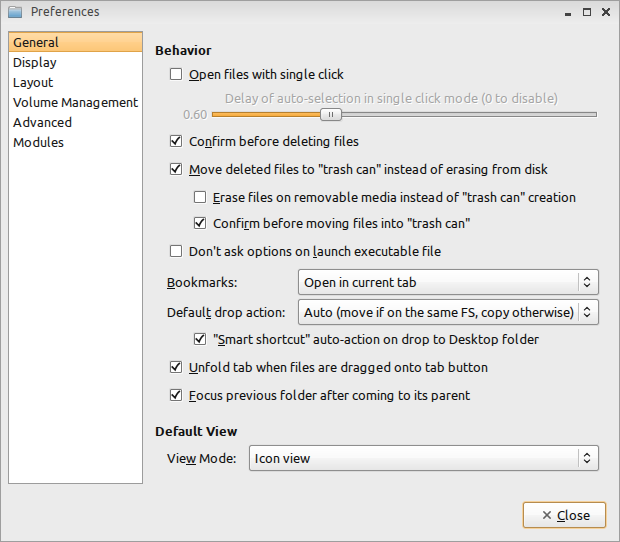
Tick "Open files with single click".
Personally I not feel the same. I bought a mouse with additional button that emulated double-click :-p
Offline
Hi Aleksej,
thank You for Your hints. They were helpfull. Somebody has replaced clearlooks-0.6.2.tazpkg with gtk-clearlooks-2.20.2.tazpkg. After installing clearlooks-0.6.2.tazpkg I got my decent little arrows back.
Offline
Pages: 1
[ Generated in 0.018 seconds, 7 queries executed - Memory usage: 1.6 MiB (Peak: 1.77 MiB) ]