 SliTaz Forum
You are not logged in.
Evening, everybody.
You can probably guess the subject matter here, before I even ask it. Yes, you guessed it.....I can't get SliTaz to boot. (Wonder why THAT is..? *a-hem*)
I've been messing around with these things ever since quitting school, in the late 70's. I've probably used just about everything going over the years; DOS, Windoze, BSD, etc...and since April last year, when XP passed its sell by date, Linux.
Started off with the 'buntus. Did a spell of distro-hopping; Fedora, Arch, Zorin (even attempted Gentoo...yuk!)...Debian, OpenSuse, PCLinux OS...you name it, I've tried it. Always kept Ubuntu on the hard drive, though. Then, in October last year, I discovered the Puppies. Whooo; what FUN!
I've probably tried over 30 of the Pups; like I said, I like 'em. Even though my old Compaq desktop is now over 10 yrs old, they FLY on it. Mind you, I have done a lot of upgrading over the years...
I've now gone 'all Puppy'. Tahrpup, Slacko 570, and ChromeBook Pup (v.2) are currently in my 'kennel'  Anyway, I've now developed an interest in the 'micro-distros'. Tried DSL; antiX: Tiny Core, and Feather, so far. I've heard a lot of mentions of SliTaz, so I thought, 'Let's give it a try...'
The Live CD works beautifully. Installation is a breeze. BUT: trying to get the damn thing to boot...it's nigh impossible. The Puppies use Grub4DOS; I've yet to find anything it can't boot. Er, should that be 'thought I'd yet to find'?
I've tried this on & off over the last few months.....but each time I've just been defeated. I confess, I've never seen a boot setup QUITE like it. Why IS that?
With barely a year under my belt, I'm not exactly 'comfy' in the terminal yet. I'm not that happy with editing GRUB, either ; mainly 'cos I still don't really understand what's going on. At the moment, I have Pups in sda's 1, 2 & 3. An extended partition, with 2 'logicals'; swap at the end, and Slitaz 4.0 in sda6. I know it's there (I can see everything in Puppy's 'Rox-Filer' (Puppy runs as root all the time.))
**SEE BELOW**
Can someone explain to an old codger what I need to add to sda1's 'menu.lst', in order to boot this little gem? Any help (any help at ALL!) would be much appreciated; especially if you can find the time to explain what's going on..!
I get the impression this is NOT the first time this has been asked... (lol)
Regards,
Mike.
[attachment=38148,1929]
Offline
Try adding the following lines to your /boot/grub/menu.lst in sda1.
title SliTaz GNU/Linux 5.0 (Kernel vmlinuz-3.2.53-slitaz)
root (hd0,5)
kernel /boot/vmlinuz-3.2.53-slitaz root=/dev/sda6 rootfstype=ext4 quiet
This should boot Slitaz. The second line tells which partition (first disk - hd0 in your case, partition 6 - 5 because it starts counting from 0). Third line tells where to locate the boot image.
Hope this helps.
Offline
I probably should mention that SliTaz isn't as forgiving as Puppy. I came from Ubuntu myself, but the difference between the two was a shock. It was like coming from Windows to Linux a second time. But if you stick it out, SliTaz will increase your Linux skills in leaps and bounds. You'll love it if you love a challenge, solving problems and crafting the system to suit your needs. You'll probably hate it if you expect it to be easy like Puppy or Ubuntu though.
Offline
Hi Mike,
As for “any help”
Here is my HDD:
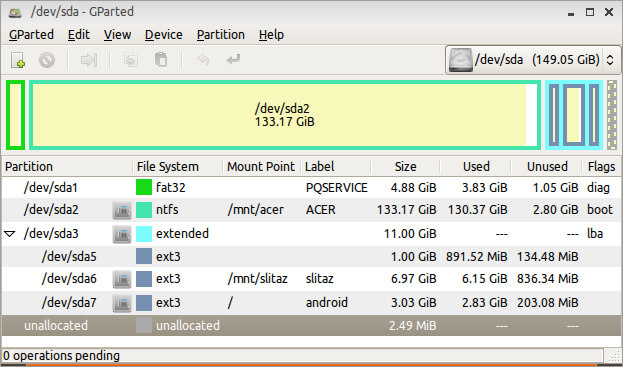
It is Acer Aspire One netbook with Windows™ XP preinstalled.
sda1 is service partition, and I not used it anytime.
sda2 is Windows disk C:
All other partitions appeared later.
I want to say, I'm terribly afraid of installers. It starts when installer of one of Russian Fedora Remix removed partition on my desktop. Yes, I restored it later, but…
Here, on netbook I partitioned my HDD with care, and decided not to overwrite Windows bootloader to not loose warrancies I've put grldr (GRUB4DOS bootloader) into Windows' disk C:, then tweak a bit C:\boot.ini:
[c][boot loader]
timeout=3
default=c:\grldr
[operating systems]
multi(0)disk(0)rdisk(0)partition(2)\WINDOWS="Microsoft Windows XP Home Edition RU"
c:\grldr="Start Linux"[/c]
Now on netbook boot started Windows' ntldr, next I can choose to start grldr or proceed to Windows (really, started it very rare).
GRUB4DOS (grldr) uses menu.lst which located on the /dev/sda2 (in other words — disk C:) Here I have many items. My regular SliTaz installation is in the /dev/sda7 now. And I started new Rollings from time to time.
How to boot SliTaz installed on the /dev/sda7
Next lines in the GRUB4DOS menu.lst:
[c]title SliTaz test-3.2.53 full install
rootnoverify (hd0,6)
kernel (hd0,6)/boot/vmlinuz-3.2.53-slitaz rw root=/dev/sda7 lang=ru_RU kmap=ru font=ter-v14n laptop i915.modeset=1 irqpoll[/c]
Here title is any custom title you want. hd0,6 is hda7 (0 is hda, 1 is hdb, 2 is hdc... and 6 is hda7 because GRUB4DOS started count from zero). Next single line started with kernel.
(hd0,6)/boot/vmlinuz-3.2.53-slitaz — my Linux kernel is sda7/boot/vmlinuz-3.2.53-slitaz file.
rw — read and write (can't recall is it needed, so maybe optional).
root=/dev/sda7 — partition where my SliTaz is.
lang=ru_RU kmap=ru — locale and keyboard layout settings (optional).
font=ter-v14n — console font Terminus (optional)
laptop (optional).
i915.modeset=1 (optional)
irqpoll (optional)
That's all.
How to boot frugal SliTaz.
When I want to test fresh SliTaz Rolling without installation (I have no CD drive on my netbook) I downloaded ISO from mirror: http://mirror1.slitaz.org/iso/rolling/
I choose "slitaz-rolling-core.iso", then I opened it in the ISO Master, and extracted two files from it: "bzImage" and "rootfs.gz" to the... "rolling" folder on the sda7 (where is SliTaz installed too).
Next lines in the menu.lst helps me to boot fresh SliTaz Rolling:
[c]title SliTaz Rolling 150426
rootnoverify (hd0,6)
kernel (hd0,6)/rolling/bzImage rw root=/dev/null lang=ru_RU kmap=ru
initrd (hd0,6)/rolling/rootfs.gz[/c]
Line started with "kernel" described path to the Linux kernel — (hd0,6)/rolling/bzImage
rw — mandatory here to have read/write root filesystem
root=/dev/null — mandatory option too
Line started with "initrd" describes path to the Initial RAM Disk — (hd0,6)/rolling/rootfs.gz
SliTaz is fits entirely in this initial ramdisk, and here no other ramdisks
Hope it helps you (at least a bit) with your menu.lst.
Have a nice day
Offline
Thanks for the replies, everyone. Nice way to start the day off..!
@ gdesilva:-
I shall give your suggestion a try shortly. It's more than likely my own fault why this isn't working, anyway; even after a year or so, I am STILL getting my head around (and frequently forgetting!) that with GNU/Linux, very often a space in the wrong place, or a single letter in the wrong case, can make ALL the difference to whether or not something works.
I'm gonna have to brush up on my proof-reading skills..... Will post back, as soon as, and let you know if it works or not.
@Trixar_za:-
Thanks for the heads-up! I kind of got that impression; I'm thinking to myself, "Jeez, Louise; NOTHING'S doing what it's supposed to... WTH's going on here?"
I do like a challenge, though. Once I get the bit between my teeth, I STICK with something, till I see it through; I hate being beaten. That's why I've kept returning to Slitaz, and giving it another go. Certain distros you try, you just KNOW they're not going to work with your hardware from the word go. But with SliTaz, the Live CD works a treat (just as with the 'buntus).....so it's got to be software-related, not hardware.
THAT, I can and will work round, eventually!
@Aleksej:-
Thank you for the comprehensive explanation; that's helped...a lot! That's what we 'old-timers' NEED (well, I do, at least!); someone to just take a bit of time to explain, step-by-step, what's going on...and more to the point, WHY something is doing WHAT it's doing.
Once I get THAT into this pint of grey mush between my ears, I'm laughing...(usually!)
Regards,
Mike.
Offline
Nope; THAT doesn't work, either. I keep getting 'Error 15: File not found'; mean anything to anybody?
I don't know if this will help at all, but here's a copy of my current menu.lst; this is Grub4DOS v 1.9.2, and it's specially optimized FOR Puppy Linux, so.....I don't know if that's going to make a difference with what we're trying to do, here.
[c]# menu.lst produced by grub4dosconfig-v1.9.2
color white/blue black/cyan white/black cyan/black
#splashimage=/splash.xpm
timeout 10
default 0
# Frugal installed Puppy
title TahrPup 6.02 (sda1)
uuid a8ed3779-cd56-4cfe-9496-b7b23a166524
kernel /vmlinuz pmedia=atahd pfix=fsck
initrd /initrd.gz
title Slacko 5.7.0 (sda2)
uuid b4a83dd7-1191-4a77-8b03-cc415a2b09ff
kernel /vmlinuz pmedia=atahd pfix=fsck
initrd /initrd.gz
title OB Precise 'ChromeBook' (sda3)
uuid 7804eec7-d31a-46e3-a6c3-e285014f4fce
kernel /vmlinuz pmedia=atahd pfix=fsck
initrd /initrd.gz
# Full installed Linux
title SliTaz GNU/Linux 4.0 (Kernel 2.6.37-slitaz)
root(hd0,5)
kernel /boot/vmlinuz-2.6.37-slitaz root=/dev/sda6 rootfstype=ext3 quiet
# Windows
# this entry searches Windows on the HDD and boot it up
title Windows\nBoot up Windows if installed
errorcheck off
find --set-root --ignore-floppies --ignore-cd /bootmgr
chainloader /bootmgr
find --set-root --ignore-floppies --ignore-cd /ntldr
chainloader /ntldr
find --set-root --ignore-floppies --ignore-cd /io.sys
chainloader /io.sys
errorcheck on
# Advanced Menu
title Advanced menu
configfile /menu-advanced.lst
commandline[/c]
Can anybody see anything amiss, here? For the sake of interest (and just out of sheer curiosity), what's the version of Grub used by the SliTaz installer?
Regards,
Mike.
Offline
I'm wondering, now... I'm wondering if it might be easier to use the SliTaz version of Grub (whatever it is), and add entries to menu.lst to boot the Puppies. Think it'll work?
How would I need to word the Puppy entries? Bear in mind that these are 'frugal' installs.....although probably nothing at all like a SliTaz frugal. COULD it work?
What d'ya reckon, people? Could the Puppy entries work as they are? You can see how the Puppy entries are worded. Or would they NEED some modifications? This is where my lack of skills, and understanding, starts to show through, I'm afraid...! 
Regards,
Mike.
Offline
Don't change the boot loader or you may end up not being able to boot anything.
There must be a space between root and (hd0,5)
Remove rootfstype=ext3 and quiet
title SliTaz GNU/Linux 4.0 (Kernel 2.6.37-slitaz)
root (hd0,5)
kernel /boot/vmlinuz-2.6.37-slitaz root=/dev/sda6
If that doesn't work
Boot into the OS with the menu.lst
Open a terminal
Type
[c]blkid[/c]
Hit enter
Find the UUID for the partition with LABEL=Slitaz-4.0
Replace
root (hd0,5)
with
uuid <space> <uuid number from blkid>
grub4dos version 0.4.4 in slitaz-4.0
Offline
Error 15: File not found -> GRUB doesn't find kernel
Kernel 2.6.37-slitaz
You are using SliTaz 4.0. Kernels before 3.2.50 did not name disks in the same way.
In your menu.lst, change sda6 in hda6:
# Full installed Linux
title SliTaz GNU/Linux 4.0 (Kernel 2.6.37-slitaz)
root(hd0,5)
kernel /boot/vmlinuz-2.6.37-slitaz root=/dev/hda6 rootfstype=ext3 quiet
EDIT: and as mojo mentoined, add a space between [c] root[/c] and [c](hd0,5)[/c]
Offline
Good point Ceel
If slitaz-4.0 install is on an IDE hard drive it is hda6, if sata drive it is sda6
Offline
Hi, guys.
Uh...okay. Yah, point taken about 'hda' vs 'sda'. I'd done things that way because even though my drive IS an old IDE hard drive, Puppy names everything 'sda', regardless....and it all still seems to work, even so.
I'm in Puppy on my old Inspiron laptop, at the moment. I'll fire up the Compaq as soon as I can, edit the menu.lst in sda1 according to your suggestions, and let y'all know what happens. I want to eventually try some of the newer 'rolling releases', but I need to get the hang of this boot-loader stuff, and editing Grub, etc; so I figured it would probably be better to do all that with one of the older, stable releases first.
Watch this space. Thanks for the replies, BTW.
Regards,
Mike.
Offline
Well..... What CAN I say? SORTED!!!
@ceel, mojo:-
Thanks, guys. As always, something small, seemingly insignificant, and easily overlooked; that's invariably how it is with my Linux problems. I get 99.9% of the way there; it's usually a spelling, space or case problem in the scripts, somewhere along the line. What did I say in my original reply?
Conversely, that's one of the things I like about Linux; things are SO easy to modify.....as long as you get your layout spot-on. Try doing that with Windows at a system level..!
Many thanks, again. I think I might try installing one of the newer releases, now that I know what to look out for as regards booting them. You'll probably be seeing a wee bit more of me on the forums from now on...
Cheers for the help, everybody. I'll mark this as 'Resolved'.
Regards, Mike.
Offline
I choose "slitaz-rolling-core.iso", then I opened it in the ISO Master, and extracted two files from it: "bzImage" and "rootfs.gz" to the... "rolling" folder on the sda7 (where is SliTaz installed too).
Next lines in the menu.lst helps me to boot fresh SliTaz Rolling:
title SliTaz Rolling 150426
rootnoverify (hd0,6)
kernel (hd0,6)/rolling/bzImage rw root=/dev/null lang=ru_RU kmap=ru
initrd (hd0,6)/rolling/rootfs.gz
title SliTaz LiveISO
find --set-root --ignore-floppies --ignore-cd /slitaz.iso
map /slitaz.iso (0xff)
map --hook
chainloader (0xff)
https://github.com/chenall/grub4dos/blob/master/menu.lst#L116
Offline
@alanyih
I use a similar way to boot from ISO (inspired from http://doc.slitaz.org/en:guides:frugal#iso-image-install) :
# SliTaz Rolling LiveISO
#
map --mem --heads=0 --sectors-per-track=0 (hd0,0)/home/ceel/slitaz/iso/slitaz-rolling_150409.iso (hd32)
map --hook
chainloader (hd32)
The disadvantage is the ISO remains in RAM, the memory isn't freed after SliTaz has been loaded.
0n computers with a little memory, this is a problem: on my Acer (256 MB),
- after booting from ISO there are only... 15 kB free (# 6%)
- after booting a traditional frugal install (kernel and rootfs on HD) it remains 55 kB free (# 20%), that is better but still not enough without a swap.
I searched but never found; if you know an option to give to grub to free space after SliTaz has been loaded, I am taker.
Offline
@Ceel
map --mem --heads=0 --sectors-per-track=0 (hd0,0)/home/ceel/slitaz/iso/slitaz-rolling_150409.iso (hd32)
1. map --mem option
*** The CDROM emulation (virtualization) ***
******************************************************************************
The CDROM emulation is sometimes called ISO emulation. Here is an example:
map (hd0,0)/myiso.iso (hd32)
map --hook
chainloader (hd32)
boot
if myiso.iso is not contiguous and you have enough memory, add a --mem option:
map --mem (hd0,0)/myiso.iso (hd32)
map --hook
chainloader (hd32)
boot
https://github.com/chenall/grub4dos/blob/master/README_GRUB4DOS.txt#L3136
2. 15 MB free (# 6%) ; 55 MB free (# 20%)
add swap partition or swapfile or upgrade RAM
Offline
Thanks for answer alanyih,
The problem when you download an ISO, it is never contigous.
Well, I use a swap partition. Upgrade RAM? Never! Better to buy a new computer ;-)
Offline
[ Generated in 0.019 seconds, 7 queries executed - Memory usage: 1.58 MiB (Peak: 1.77 MiB) ]