 SliTaz Forum
You are not logged in.
Pages: 1
hez folks,
tazusb writefs gzip gives me corrupt rootfs.gz files.
when booting from it, i get an kernel panic saying
Kernel panic - not syncing: VFS: Unable to mount root fs on unknown-block(0,0)
Pid: 1, comm: swapper/0 Not tainted 3.2.53-slitaz #4
ill post the call trace when i can get the picture from my camera
seems update related. ill try RC-3 to see if its working there.
Offline
This is /var/log problem, also kernel panic caused by ~/.cache in rootfs.
Create some directory, in this example I will use [c]/tmp/rootfs[/c]
move bad rootfs.gz to this directory and enter it.
Uncompress rootfs.gz, if using gzip of lzma.
[c]cd /tmp/rootfs[/c]
# Unpack uncompressed rootfs.gz contents
[c]cpio -F rootfs.gz -id[/c]
# Show me contents of /var/log
[c]find /tmp/rootfs/var/log -exec ls -l {} \;[/c]
Offline
using a RC3/frugal to start off with (without upgrading anything) instead of the current iso (with updates) i dont get any trouble..
looks a lot like something was changed since then.
thanks a lot for the reply!
I'll see to the log as soon as ive set up everything (i need to continue university work with my os asap) and have time to fiddle with that.
Offline
> using a RC3/frugal to start off with (without upgrading anything) instead of the current iso (with updates) i dont get any trouble..
> looks a lot like something was changed since then.
No, just no.
Every time you login/open terminal /var/log/.wtmp file size will grow.
When it will be larger than 4k (and maybe any other file in /var/log), and you'll run writefs - boot from rootfs.gz will result in kernel panic.
Tazlito was fixed by me, but I forgot about tazusb, and WTF is this:
pushing to http://hg.slitaz.org/tazusb
searching for changes
abort: authorization failed
Patch saved here:
http://paste.slitaz.org/?06af79f4eba3b8a8#/wb2Fa0sKdoYxgRcGA3aQvIA9y0HcpkZEArImPlEyoQ=
Offline
Thanks for the explanation!
i restarted the procedure again.
im at the stage of having installed all of the packages i need.
usually i would run tazusb writefs gzip now.
here is my /var/log
root@slitaz:/home/tux# find /var/log -exec ls -l {} \;
total 120
-rw-r--r-- 1 root root 34814 Jul 28 12:11 Xorg.0.log
-rw-r--r-- 1 root root 177 Jul 28 12:14 auth.log
-rw-r--r-- 1 root root 2261 Jul 28 12:11 boot.log
-rw-r--r-- 1 root root 1676 Jul 28 12:12 daemon.log
-rw-r--r-- 1 root root 15465 Jul 28 12:11 dmesg.log
-rw-r--r-- 1 root root 48541 Jul 28 12:29 messages
-rw-r--r-- 1 root root 61 Jul 28 12:11 slim.log
drwxr-xr-x 2 root root 60 Jul 27 19:46 slitaz
-rw-r--r-- 1 root root 0 May 18 16:00 tazpanel.log
-rw-r--r-- 1 root root 2304 Jul 28 12:11 wtmp
-rw-r--r-- 1 root root 34814 Jul 28 12:11 /var/log/Xorg.0.log
-rw-r--r-- 1 root root 61 Jul 28 12:11 /var/log/slim.log
-rw-r--r-- 1 root root 177 Jul 28 12:14 /var/log/auth.log
-rw-r--r-- 1 root root 1676 Jul 28 12:12 /var/log/daemon.log
-rw-r--r-- 1 root root 48541 Jul 28 12:29 /var/log/messages
-rw-r--r-- 1 root root 15465 Jul 28 12:11 /var/log/dmesg.log
-rw-r--r-- 1 root root 2261 Jul 28 12:11 /var/log/boot.log
-rw-r--r-- 1 root root 2304 Jul 28 12:11 /var/log/wtmp
-rw-r--r-- 1 root root 2304 Jul 27 19:46 /var/log/.wtmp
total 8
-rw-r--r-- 1 root root 5894 Jul 28 12:19 tazpkg.log
-rw-r--r-- 1 root root 5894 Jul 28 12:19 /var/log/slitaz/tazpkg.log
-rw-r--r-- 1 root root 0 May 18 16:00 /var/log/tazpanel.log
ill keep you posted if it failed again
Offline
Install update http://cook.slitaz.org/cooker.cgi?download=tazusb-179.tazpkg
Remove file: [c]/var/log/.wtmp[/c] (.wtmp only, not wtmp)
Remove file: [c]/var/log/slitaz/tazpkg.log[/c] - maybe not needed, but please run tazusb twice with tazpkg.log and without, boot each of its to let us know.
If this will not help, check for long paths /rootfs/gz/maximimum/is/255/characters
Offline
actually it worked all of a sudden..
i did exactly the same procedure as yesterday (i have a script wich installs and copies all the files/settings i need)
only this time i could boot from it.
very strange.
i have trouble with localhost though, cant open tazpanel when connected to WiFi
ill try your advice and tell you whats up
Offline
i used the rootfs i created in the previous post to test your advice.
- installed tazusb update
- installed missing video drivers (not really relevant)
- deleted /var/log/.wtmp
- wrote rootfs.gz and moved it to safe location
- deleted /var/log/slitaz/tazpkg.log
- wrote another rootfs.gz and renamed it
- set up menu.lst (grub)
--> both of them give me kernel panic
any ideas?
thanks!
Offline
I did some tests:
boot latest core iso, up tazusb, recharge, install some software, mount hdd.
[c]tazusb writefs gzip[/c]
Move /rootfs.gz to hdd
[c]tazusb writefs[/c]
Move /rootfs.gz to hdd
And it's impossible to boot from the gzip compressed rootfs, only not compressed (lzma not tested), even with gnu-gzip installed. Tried align_to_32_bits from tazlito - nothing good, this function can only make rootfs broken and unbootable, but I never see it can fix this bug.
But when I tried manually compress it by:
[c]tazusb writefs[/c]
[c]mv /rootfs.gz /rootfs[/c]
[c]gzip -9 /rootfs[/c]
It boots without kernel panic! And file size differs (623 bytes larger than file made by [c]tazusb writefs gzip[/c])
Offline
I also noticed it working without compression. i actually prefer that, its created a lot faster and boots faster.
but the problem is the size; when exceeding around 470 mb i cannot boot from it (kernel panic - initramfs too large). after compressing (size smaller than 470 mb) it used to work. any idea why? itd be so nice to be able to ignore that limit...
i dont understand the logic behind it, the error does not make any sense, i have 4 gb ram.. but ive come to live with it and usually use gzip.
now its stopped working all of a sudden... (at least mostly. as stated before, after doing the same thing 3 days in a row one of the tries worked.) thats why im thinking of update damage
ill try the manual compressing. thanks for the tip!
Offline
another strange thing. after trying to boot the rootfs.gz's yesterday(and failure), i couldnt log in as tux anymore with my working frugal (failed to execute login command)!
what could have been changed in /home/tux/ that destroyed that functionality?
i chown-ed it already with chown -R /home/tux/..[a-zA-Z0-9]*
any ideas?
Offline
Even renaming my home directory and copying all the files (incl. hidden ones) from /etc/skel to an empty /home/tux/ and chowning as stated above gives me the same error after reboot. i can only log in as root..
i am out of ideas how to fix this.. and have no clue how it occured.
i'll try the manual gzipping, maybe it will fix my issues 
Offline
> failed to execute login command
tazusb writefs excludes /home from rootfs.gz, you'll need correct home= kernel option. (but tazlito writeiso inccludes /home)
Check for existance and permissions of this files:
[c]/home/tux/.xinitrc[/c]
[c]/home/tux/.config/slitaz/applications.conf[/c]
If something wrong in files contents, defaults stored in /etc/skel
Try [c]tazpkg -gi slim --newconf[/c]
tazusb writefs gzip
I found that boot after [c]tazusb writefs gzip[/c] sometimes rarely may be success, it fails only with rootfs.gz size 57663387 bytes.
align_to32bits adds 1 more byte 57663388, but did NOT fix it.
tazusb writefs
Manual [c]mv /rootfs.gz /rootfs ; gzip -9 /rootfs[/c] after [c]tazusb writefs[/c] also may fail with such file sizes (looks like size/4 should be integer), but original uncompressed boots fine.
So, only uncompressed will boot 100%. With restrictions of 65536 - max number of files.
Offline
Hi there!
Maybe it's relevant what version of cpio you use?
Seems, GNU cpio makes archives with size times 512 bytes, while Busybox cpio archive is not ajusted.
Little explaination. Make sure GNU cpio is installed:
[c]$ ls -l $(which cpio)
-rwxr-xr-x 1 root root 113828 Mar 6 17:02 /bin/cpio[/c]
Test script:
[c]$ cat /tmp/testcpio
#!/bin/sh
touch /tmp/test /tmp/testtest
echo 'test' | busybox cpio -o -H newc > /tmp/test0b.cpio
echo 'test' | cpio -o -H newc > /tmp/test0g.cpio
echo 'testtest' | busybox cpio -o -H newc > /tmp/test1b.cpio
echo 'testtest' | cpio -o -H newc > /tmp/test1g.cpio
for i in /tmp/test*.cpio; do
ls -l $i
hexdump -C $i
done[/c]
Run script:
[c]$ cd /tmp
$ sh testcpio
1 block
1 block
-rw-r--r-- 1 tux users 240 Jul 29 23:41 /tmp/test0b.cpio
00000000 30 37 30 37 30 31 30 30 30 32 32 45 32 45 30 30 |07070100022E2E00|
00000010 30 30 38 31 41 34 30 30 30 30 30 33 45 38 30 30 |0081A4000003E800|
00000020 30 30 30 30 36 34 30 30 30 30 30 30 30 31 35 35 |0000640000000155|
00000030 42 39 33 41 37 45 30 30 30 30 30 30 30 30 30 30 |B93A7E0000000000|
00000040 30 30 30 30 30 38 30 30 30 30 30 30 30 37 30 30 |0000080000000700|
00000050 30 30 30 30 30 30 30 30 30 30 30 30 30 30 30 30 |0000000000000000|
00000060 30 30 30 30 30 35 30 30 30 30 30 30 30 30 74 65 |00000500000000te|
00000070 73 74 00 00 30 37 30 37 30 31 30 30 30 30 30 30 |st..070701000000|
00000080 30 30 30 30 30 30 30 30 30 30 30 30 30 30 30 30 |0000000000000000|
*
000000d0 30 30 30 30 30 30 30 30 30 42 30 30 30 30 30 30 |000000000B000000|
000000e0 30 30 54 52 41 49 4c 45 52 21 21 21 00 00 00 00 |00TRAILER!!!....|
000000f0
-rw-r--r-- 1 tux users 512 Jul 29 23:41 /tmp/test0g.cpio
00000000 30 37 30 37 30 31 30 30 30 32 32 45 32 45 30 30 |07070100022E2E00|
00000010 30 30 38 31 41 34 30 30 30 30 30 33 45 38 30 30 |0081A4000003E800|
00000020 30 30 30 30 36 34 30 30 30 30 30 30 30 31 35 35 |0000640000000155|
00000030 42 39 33 41 37 45 30 30 30 30 30 30 30 30 30 30 |B93A7E0000000000|
00000040 30 30 30 30 30 38 30 30 30 30 30 30 30 37 30 30 |0000080000000700|
00000050 30 30 30 30 30 30 30 30 30 30 30 30 30 30 30 30 |0000000000000000|
00000060 30 30 30 30 30 35 30 30 30 30 30 30 30 30 74 65 |00000500000000te|
00000070 73 74 00 00 30 37 30 37 30 31 30 30 30 30 30 30 |st..070701000000|
00000080 30 30 30 30 30 30 30 30 30 30 30 30 30 30 30 30 |0000000000000000|
*
000000a0 30 31 30 30 30 30 30 30 30 30 30 30 30 30 30 30 |0100000000000000|
000000b0 30 30 30 30 30 30 30 30 30 30 30 30 30 30 30 30 |0000000000000000|
*
000000d0 30 30 30 30 30 30 30 30 30 42 30 30 30 30 30 30 |000000000B000000|
000000e0 30 30 54 52 41 49 4c 45 52 21 21 21 00 00 00 00 |00TRAILER!!!....|
000000f0 00 00 00 00 00 00 00 00 00 00 00 00 00 00 00 00 |................|
*
00000200
-rw-r--r-- 1 tux users 244 Jul 29 23:41 /tmp/test1b.cpio
00000000 30 37 30 37 30 31 30 30 30 32 32 45 33 30 30 30 |07070100022E3000|
00000010 30 30 38 31 41 34 30 30 30 30 30 33 45 38 30 30 |0081A4000003E800|
00000020 30 30 30 30 36 34 30 30 30 30 30 30 30 31 35 35 |0000640000000155|
00000030 42 39 33 41 37 45 30 30 30 30 30 30 30 30 30 30 |B93A7E0000000000|
00000040 30 30 30 30 30 38 30 30 30 30 30 30 30 37 30 30 |0000080000000700|
00000050 30 30 30 30 30 30 30 30 30 30 30 30 30 30 30 30 |0000000000000000|
00000060 30 30 30 30 30 39 30 30 30 30 30 30 30 30 74 65 |00000900000000te|
00000070 73 74 74 65 73 74 00 00 30 37 30 37 30 31 30 30 |sttest..07070100|
00000080 30 30 30 30 30 30 30 30 30 30 30 30 30 30 30 30 |0000000000000000|
*
000000d0 30 30 30 30 30 30 30 30 30 30 30 30 30 42 30 30 |0000000000000B00|
000000e0 30 30 30 30 30 30 54 52 41 49 4c 45 52 21 21 21 |000000TRAILER!!!|
000000f0 00 00 00 00 |....|
000000f4
-rw-r--r-- 1 tux users 512 Jul 29 23:41 /tmp/test1g.cpio
00000000 30 37 30 37 30 31 30 30 30 32 32 45 33 30 30 30 |07070100022E3000|
00000010 30 30 38 31 41 34 30 30 30 30 30 33 45 38 30 30 |0081A4000003E800|
00000020 30 30 30 30 36 34 30 30 30 30 30 30 30 31 35 35 |0000640000000155|
00000030 42 39 33 41 37 45 30 30 30 30 30 30 30 30 30 30 |B93A7E0000000000|
00000040 30 30 30 30 30 38 30 30 30 30 30 30 30 37 30 30 |0000080000000700|
00000050 30 30 30 30 30 30 30 30 30 30 30 30 30 30 30 30 |0000000000000000|
00000060 30 30 30 30 30 39 30 30 30 30 30 30 30 30 74 65 |00000900000000te|
00000070 73 74 74 65 73 74 00 00 30 37 30 37 30 31 30 30 |sttest..07070100|
00000080 30 30 30 30 30 30 30 30 30 30 30 30 30 30 30 30 |0000000000000000|
*
000000a0 30 30 30 30 30 31 30 30 30 30 30 30 30 30 30 30 |0000010000000000|
000000b0 30 30 30 30 30 30 30 30 30 30 30 30 30 30 30 30 |0000000000000000|
*
000000d0 30 30 30 30 30 30 30 30 30 30 30 30 30 42 30 30 |0000000000000B00|
000000e0 30 30 30 30 30 30 54 52 41 49 4c 45 52 21 21 21 |000000TRAILER!!!|
000000f0 00 00 00 00 00 00 00 00 00 00 00 00 00 00 00 00 |................|
*
00000200[/c]
I see 4 zero bytes after "TRAILER!!!" in the Busybox cpio archives, and more than 4 zero bytes in the GNU cpio ajusting its size to 0x0200.
Let's grow file size and see GNU cpio size growing:
[c]#!/bin/sh
for i in $(seq 1 10 600); do
printf "%${i}s" '.' > /tmp/test
echo test | busybox cpio -o -H newc > /tmp/testb.cpio 2>/dev/null
echo test | cpio -o -H newc > /tmp/testg.cpio 2>/dev/null
printf "%3s " $i
ls -l /tmp/testb.cpio | awk '{printf "%3s ", $5}'
ls -l /tmp/testg.cpio | awk '{printf "%3s ", $5}'
echo
done[/c]
Execute (output shrinked):
[c]___________
1 244 512
11 252 512
21 264 512
31 272 512
. . .
251 492 512
261 504 512
271 512 512
281 524 1024
291 532 1024
301 544 1024
. . .
591 832 1024[/c]
So, GNU cpio archive size is 512, 1024, and so on.
Offline
Seems, kernel can't read 'init' from initrd.gz. Why? Don't know. Maybe it's a file number restrictions as az_ua stated, or so...
It may be solution to put 'init' to the initrd cpio archive first.
I tried two small tests.
First, I've created empty initrd archive and try to boot linux kernel with it:
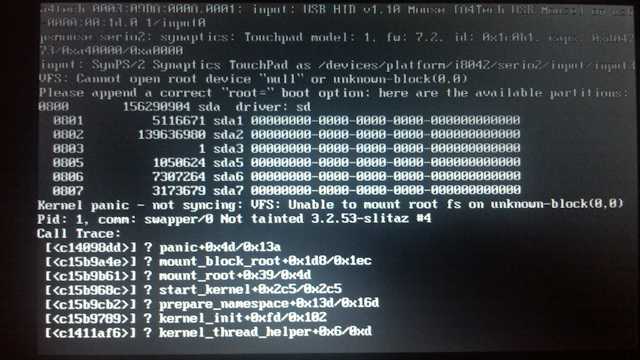
Second, I've put '/init' into it and boot again:
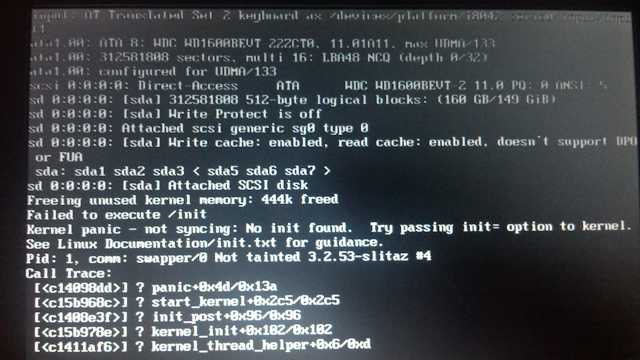
"Failed to execute /init"
Kernel found /init, but can't execute it (because not all conditions resolved to run /init script).
I still can't cope with Kernel panic trying to put different files into initrd image. I stop with next list:
[*]init
[*]bin
[*]bin/sh
[*]bin/busybox
[*]lib
[*]lib/libc.so.6
[*]lib/libc-2.14.1.so
[*]lib/ld-2.14.1.so
[*]etc
[*]etc/ld.so.cache
Current cpio size is 2316992 bytes (2.2MB). It is out of this topic, so I stop here.
I think it's clear the difference between two photos. And topic starter's case is #1.
Offline
@Aleksej, thanks for you investigations, I never noticed uncompressed rootfs fails and didn't test Gnu-cpio or made very big cpio, maybe topic starter will do.
Now, I have installed qemu,gnu-cpio,gnu-gzip, all I know, gzip compressed rootfs.gz fails to boot. But it works after unpacking to cpio by [c]gzip -d[/c] . And now, because of slow qemu, it's possible to see something new, before this day I thought initrd equals initramfs.
[attachment=38824,1978]
(gzip compressed rootfs.gz, ~30-40 lines before kernel panic)
[c]rootfs image is not initramfs (junk in compressed archive): looks like an initrd[/c]
if unpack: (gzip -d rootfs.gz), book ok, without this message.
[attachment=38824,1979]
Offline
Hi az_ua,
Maybe you've already read it. But I want to cite this doc:
[c]What is initramfs?
------------------. . . skip . . .
All this differs from the old initrd in several ways:
. . . skip . . .
- The program run by the old initrd (which was called /initrd, not /init) did
some setup and then returned to the kernel, while the init program from
initramfs is not expected to return to the kernel.. . . skip . . .[/c]
So, it speak to me again that kernel can't find /init inside initramfs archive. Then it tries to find /initrd and fails again. IMHO.
So, problem only in the Gzip (Busybox's Gzip)?
It is interesting to see Kernel's initramfs sources (if I could understand something there).
PS. My test /init file contained only this:
[c]#!/bin/sh
echo "Hello, world!"[/c]
:-)
Offline
> problem only in the Gzip (Busybox's Gzip)?
Mostly Gzip but not only Busybox's. Any gzip.
> /init
Never noticed your errors with /init. Just copy&rename /init to /initrd and give 'broken padding' not 'junk':
[attachment=38826,1980]
Whatever, it may will not work. (without compression, with gnu cpio) That's why all the distros using something like squashfs for live. Just an example: tazlito writeiso, including ~/.cache to rootfs (without compression) after starting palemoon will result in kernel-panic. There are no 65536 files, or with paths longer than 255. There are many other, even more strange paths with spaces, but only excluding ~/.cache helps.
Offline
> gzip
seems it's just disabled in kernel:
CONFIG_HAVE_KERNEL_GZIP=y
CONFIG_KERNEL_GZIP is not set
CONFIG_RD_GZIP=y
CONFIG_INITRAMFS_COMPRESSION_GZIP is not set
CONFIG_DECOMPRESS_GZIP=y
...and there are still some unknown and undocumented cpio restrictions, noticed above.
Offline
Known cpio restrictions:
[*]Limit for the size of individual file for [c]newc[/c] format: 4,294,967,295 bytes (4 GB): source
[*]file name, seems, is almost unlimited (man cpio(5)). 4GB file name? At least I created cpio with 4052 bytes file name length and it operates well
[*]cpio not makes directories unless [c]-d[/c] option is provided, so extracting "/dir1/file" will fail if "dir1" not yet exists. Is it significant for Kernel's cpio realization?
_____
Just copy&rename /init to /initrd and give 'broken padding' not 'junk':
Whatever, it may will not work.
Mainly because initrd is not an archive, it is block device image that contains filesystem inside it, and you can mount it as loop device to read or/and modify its content. Oh, this image is gzipped as well.
IMHO, Kernel's messages not quite correct. "Looks like an initrd" should read "Not looks like an initramfs".
Offline
Hi Aleksej,
TazPkg 824 buged; after update, unable to install packages:[c]
root@slitaz:/home/tux# tazpkg -gi tazpkg -gi abiword
/usr/bin/tazpkg: .: line 26: can't open '/usr/lib/tazpkg/tazpkg-find-depends'
root@slitaz:/home/tux# [/c]
Offline
thanks for your time, guys, im using lzma now.
itd be great to be able to use no compression, though!
its the size issue. if the generated rootfs.gz file is larger than around (i believe) 470mb booting wont be possible (initrd too large).
ive tried the loram package but to no avail..
can anyone help me on this one?
Offline
Pages: 1
[ Generated in 0.021 seconds, 7 queries executed - Memory usage: 1.61 MiB (Peak: 1.77 MiB) ]