 SliTaz Forum
You are not logged in.
Hi there! 
I just released new TazPkg Beta.
I invite everyone who cares about the fate of SliTaz to the testing.
It is a separate package called "tazpkg-test"; let the original "tazpkg" be a sort of stable while we trying new code.
You'll get the package on the "Download" link on this page. Double click downloaded package to install it.
I know this TazPkg release is Beta state, and it still have few FIXMEs and TODOs. I'll try to solve it in a near future. At least this TazPkg can download and install packages 
What to test? Everything. Read the documentation (yes, it's too large now) and try all the commands and options you've found there. Try the "cold" packages installation (when some package installed in a first time) and "warm" packages re-installation (upgrade).
Proof-read the documentation. Rephrase it to easy reading. Translate it to other languages you know.
Now you can use "[c]--root[/c]" option for all TazPkg commands. You can specify real Rolling installation to work with. Or you can specify new non-existing folder, and TazPkg recreates its infrastructure there. For example:
[c]$ su
# tazpkg -gi nano --root=/tmp/test[/c]
After that you'll get:
[*][c]/tmp/test/etc/slitaz/[/c]: configuration files for this "root";
[*][c]/tmp/test/var/lib/tazpkg[/c]: brand new TazPkg Databases for this "root";
[*]installed specified package "nano" and all its dependencies (glibc-base, ncurses-common, ncursesw, and zlib);
[*][c]/tmp/test/var/log/slitaz/tazpkg.log[/c]: log of TazPkg actions;
[*]… and number of the other great stuff
It is deep night here right now, I went to sleep.
See you all!
Offline
rolling-core "2015-10-04" iso
# tazpkg -gi locale-ru
[c]
Installation of package "locale-ru"
================================================================================
Russian locale pack
--------------------------------------------------------------------------------
Copying package... [ Done ]
Extracting package... [ Done ]
Remember modified packages... [ Done ]
Installing package...cp: can't stat 'fs/usr/share/lxpanel/images/xkb-flags/ua.png': No such file or directory
cp: can't stat 'fs/usr/share/lxpanel/images/xkb-flags/ru.png': No such file or directory
[ Failed ]
Removing all tmp files... [ Done ]
# tazpkg -gi locale-ru --forced
...
...
Installing package... [ Done ]
...
...
[/c]
Offline
Thank you, Alexander!
So, here is a wide problem with all sort of symlinks, both folders and files.
Do we have Busybox's [c]cp[/c] properly worked? Can you retry with the GNU Coreutils version of [c]cp[/c]?
Package installation is a simple single command, and I not changed it.
Note, if you wanted to use Coreutils [c]cp[/c] rather to Busybox [c]cp[/c] now you need specify the full path to [c]cp[/c] command; or remove [c]cp[/c] from the alias-make loop in the "getenv" module: /usr/libexec/tazpkg/getenv somewhere at the script's begin ( modules are minified).
Offline
Hi there!
Trying to solve nasty behavior with copying "real" folders into "symlinked" folders I upgraded TazPkg-test. Download: http://cook.slitaz.org/cooker.cgi?download=tazpkg-test-845.tazpkg
While we can't copy directories into symlinks, I wanted to copy directories into directories (symlinks destinations directories). Here small picture describing how I rebuild package's directories before installing them into filesystem:
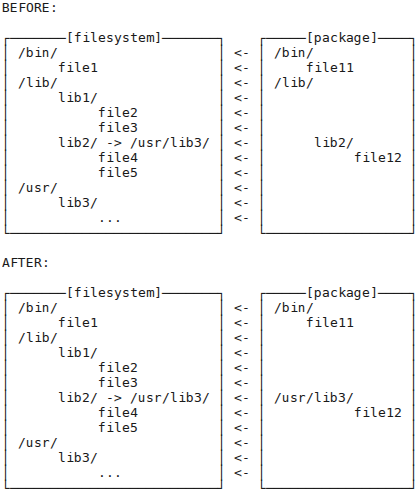
It works. Please testing.
Offline
Hi Aleksej,
0) This is a huge piece of great work!
1) The --root option is a great idea; is it possible to install tazpkg-test itself into a test dir? Maybe do I just need to change the "sourcing" commands like [c]. /lib/libtaz.sh[/c] to [c]. /mytestdir/lib/libtaz.sh[/c]? (I would unpack tazpkg-test by hand into /mytestdir.)
2) Your solution for the linked dir problem is very elegant (in your example file4 and file5 should be under lib3/, no?). But I'm wondering: if we remove the previous package that created the link /lib/lib2 -> /usr/lib3, do we remove the link? Because then the software that looks for file12 in /lib/lib2 would fail.
3) The "compiled" scripts are unindented (probably a side effect of comments removal?), which makes them very hard to read... Can this be changed? Well, I guess users don't read the script, and devs use the source. So next question:
4) Can you tell me how to download the source tree?
Thanks!
Offline
Hi llev,
This is a huge piece of great work!
Thank you! It is all just for fun I just like to develop and to solve our development problems… I'm 39 and I think I need to train my brain on a daily basis
The --root option is a great idea
This is an old idea. And it was not properly integrated into existing TazPkg code. Some commands was supported this option, other — don't. Now all commands are supported [c]--root[/c] option.
is it possible to install tazpkg-test itself into a test dir?
Oh, I not asked yet myself is it possible.
Currently, "tazpkg-test" package overwrites all the files of regular "tazpkg" files.
Tester can return back to using "tazpkg" using next commands:
[c]# tazpkg get-install tazpkg --forced
# tazpkg remove tazpkg-test[/c]
Current Makefile defines few variables with the default values, and you can tweak these variables:
[*]Regular installing TazPkg from sources:
[c]make; sudo make install; make clean[/c]
[*]Tweak variables (only example):
[c]make prefix=/usr/local
sudo make prefix=/usr/local install
make clean[/c]
Maybe do I just need to change the "sourcing" commands like [c]. /lib/libtaz.sh[/c] to [c]. /mytestdir/lib/libtaz.sh[/c]?
Completely no; [c]libtaz.sh[/c] is not a part of TazPkg, it is wide-used system library. Leave it itself.
I would unpack tazpkg-test by hand into /mytestdir.
So, now you have... ? —
[*][c]/mytestdir/usr/bin/tazpkg[/c]
[*][c]/mytestdir/usr/libexec/tazpkg/block[/c], etc.
You need to find hardcoded paths in the TazPkg "compiled" files pointed to "/usr/libexec/tazpkg" and to point them to the new place ("/mytestdir/usr/libexec/tazpkg" in your case). You can use command line to do it:
[c]find /mytestdir -type f -exec sed -i "s|/usr/libexec/tazpkg|/mytestdir&|g" \{\} \;[/c]
in your example file4 and file5 should be under lib3/, no?
Yes. You can find them both in the "/lib/lib2/" and "/usr/lib3/".
But I'm wondering: if we remove the previous package that created the link /lib/lib2 -> /usr/lib3, do we remove the link? Because then the software that looks for file12 in /lib/lib2 would fail.
I'll screw my brain with these symlinks too soon
There are exists "regular" files and "regular" folders. TazPkg stores information about installed files only. And it will remove only installed files while you remove the package. In addition it will remove all empty folders (where files was) up to first non-empty folder. It will not remove "/usr/lib3/" if it still contains files. But…
There are exists "weird" symlinks! Symlink is a file. But it can point both to file or folder. And there is no easy answer to question "is TazPkg stores symlinks to folders in the files.list?": I need to see it. And I can't answer to your question: I need to make few tests. I'll prepare test packages and will install them and will remove. Better if I can find real packages with the described case.
The "compiled" scripts are unindented (probably a side effect of comments removal?), which makes them very hard to read... Can this be changed? Well, I guess users don't read the script, and devs use the source.
There are removed all comments and indentations from scripts. Yes, it is hard to read, but you not need to read this (something similar you'll find in our init script ). Scripts worked well without comments and indentations, as well as with, but it saves us few kilobytes. Idea is: if you need to develop TazPkg please use sources. There you'll find extended comments and all developer needs.
Can you tell me how to download the source tree?
Source code repository for TazPkg is http://hg.slitaz.org/tazpkg/ (please follow link)
Look at the top — here you'll see:
If you need to download sources one or few times only — you can download the tarball in tar.bz2 or tar.gz format (and then reload it when it changed).
If you need to download sources on a regular basis —
[*]Install Mercurial:
[c]# tazpkg -gi mercurial[/c]
[*]Go to your folder for source codes using terminal.
[*]Execute command (as regular user) to initial clone the repository:
[c]hg clone http://hg.slitaz.org/tazpkg[/c]
[*]You'll find new folder "tazpkg" in your folder for source codes. This folder will contain current TazPkg sources.
[*]Next, when you need to update sources from repository, issue a command (as regular user) within this "tazpkg" folder:
[c]hg pull -u[/c]
Thanks!
Thank you for your interest!
Offline
Hi Aleksej,
Thanks for the explanations. Silly me, I went to hg but did not see the tarball links.
Also I had not thought of using the "prefix=" argument of "make", this is much simpler than editing the paths directly in the compiled scripts!
About links. Maybe something like this in remove_with_path():
[c]if [ -L "$1" ]; then
target=$(readlink -n "$1")
if [ -d "$target" ] ; then
{while-loop to remove dirs}
[ -d "$target" ] || rm "$1" # if target was removed, remove link
return
fi
fi[/c]
Small problem: if file12 is alone in /usr/lib3, and files.list shows /usr/lib3/file12 *after* /lib/lib2, $target is not empty when /lib/lib2 is examined so the link is not removed.
So this is not clean, but it is better to leave a broken link that no software uses, than to remove a working link on which some software relies!
Offline
Hi llev,
Sorry, I not executed any tests yet.
Just info for thought:
[*]When TazPkg packed the package, it builds the list of files in this order: "regular" files then symlinks: http://hg.slitaz.org/tazpkg/file/8a73a58ed3cb/modules/pack#l28
[*]And the same behavior when Cook prepared the files.list: http://hg.slitaz.org/cookutils/file/e0a7dfab950c/cook#l812
First case when you build your own packages using TazPkg. Second case for all official packages.
Small problem: if file12 is alone in /usr/lib3, and files.list shows /usr/lib3/file12 *after* /lib/lib2, $target is not empty when /lib/lib2 is examined so the link is not removed.
As [c]/lib/lib2/[/c] is a symlink, then it will be listed after [c]/usr/lib3/file12[/c].
So…? Any problem?
Offline
So... sounds great! Looks like this approach would work. Time will tell...
Offline
I've just found there's a "mkdb" function. "usage" doesn't show it, is it on purpose?
How does it work?
Offline
Updated fr.po for tazpkg-beta: http://www.cjoint.com/c/EJjuDImN0fA
Offline
Oh, really. This "mkdb" function is a very new, and is absent in the "usage" list and in the documentation.
Please read comments in the "mkdb" module for more information. And I'll update "usage" and docs soon.
Also thank you for translation. I'll push it tomorrow to the sources.
Offline
Hi,
Add 'mkdb' description to 'usage' and English docs. Refresh French translation (thanks Lucas Levrel)
http://hg.slitaz.org/tazpkg/rev/e54a3ba8cc25
Offline
Nice! Now the pot&po files need to be updated to include the new string. Should I do: make pot && make msgmerge? Or should this be done on the Hg server?
Offline
Should I do: make pot && make msgmerge? Or should this be done on the Hg server?
You may make it "in advance", in belief developer will make the same changes.
Hg server is only a storage.
First, we make changes to code, and maybe to translations. Then bug fixing and new features implementation. After that developer make pot and msgmerge (note, make pot and msgmerge produces large nearly "senseless" commit, so developers not to like to update po files frequently).
Please, push me when I need to rebuild pot and po's.
Offline
OK, so, when a new gettext call is added to a script, instead of:
{ You make new.pot & newfr.po and push to Hg ;
I download new.pot & newfr.po, I patch newfr.po to translate new string, which gives a new_newfr.po ;
You push the new_newfr.po to Hg ;
}
which makes two commits, we could do this way:
{ I make new.pot & newfr.po on my computer ;
I patch newfr.po which gives new_newfr.po ;
You make new.pot, apply new_newfr.po, then push to Hg ;
}
which makes only one commit.
Am I right?
Offline
Hi Aleksej,
Finally a few hours to do tests .
tazpkg-test 846 doesn't remove dependent packages:
root@sda5:/home/tazpkg# tazpkg -r nettle
The following packages depend on package "nettle":
libgnutls
Remove package "nettle" (3.1.1)? (y/N) y
Removing package "nettle"
================================================================================
Removing all files installed... [ Done ]
Removing package receipt... [ Done ]
================================================================================
Package "nettle" (3.1.1) removed.
Remove packages depending on package "nettle"? (y/N) y
tazpkg remove libgnutls
root@sda5:/home/tazpkg#
root@sda5:/home/tazpkg# tazpkg -gi libgnutls
"libgnutls-3.3.16" package is already installed.
You can use the --forced option to force installation.
root@sda5:/home/tazpkg#
root@sda5:/home/tazpkg# tazpkg -r libgnutls
The following packages depend on package "libgnutls":
glib-networking
Remove package "libgnutls" (3.3.16)? (y/N) y
Removing package "libgnutls"
================================================================================
Removing all files installed... [ Done ]
Removing package receipt... [ Done ]
================================================================================
Package "libgnutls" (3.3.16) removed.
Remove packages depending on package "libgnutls"? (y/N) y
tazpkg remove glib-networking
root@sda5:/home/tazpkg#
Offline
Hi Ceel,
Thank you for report!
Unfortunately, this is not a bug in the tazpkg-test 846.
It is an old bug in the current tazpkg 839.
Make sure: http://hg.slitaz.org/tazpkg/file/b1da66280a9d/tazpkg#l1775
On the line #1781 you can find "echo ...", so it is only prints message instead of doing the job.
It was long ago, when I debugged the script, and then I did not want my packages really removed, I would only see messages. Unfortunately, this code was left in the release.
Likely you updated the tazpkg package, and it overwrites tazpkg-test files.
To continue test "tazpkg-test", please reinstall it:
[c]# tazpkg -gi tazpkg-test --forced[/c]
And now, I think, is worth to make a temporary patch in tazpkg to solve this "echo" bug.
Offline
Hi Aleksej,
You're right. I've made a special installation for tazpkg-test and removed tazpkg and installed tazpkg-test from my main installation with [c]--root[/c] option.
I didn't thought to erase the tazpkg line in installed.md5 file. I suppose that the reason that tazpkg overwriten tazpkg-test.
Waiting to remove tazpkg again I've blocked tazpkg so I shouldn't meat any problem now.
Just have to test again what I tested yesterday :-(
EDIT: seems the line to delete is in installed.info.
Offline
Hi Aleksej, and thanks for you great work with the new tazpkg-test...!
Only two details:
1) tazpkg -i or -gi not work if bash is the default shell, if I change the symlink /bin/sh point to /bin/busybox tazpkg work correctly.
2) tazpkg reconfigure option also has shell-type problems with /bin/sh point to /bin/busybox don't work here is the message:
cp: can't stat 'bash': No existe el fichero o el directorio
/usr/libexec/tazpkg/reconfigure: line 1: post_install: not found
But if the default shell is bash tazpkg reconfigure seems work well...!
@Aleksej
Hi. Something I don't understand. Since I've installed gnumeric I have some strange warning messages when I update packages (not all):
root@sda5:/home/tazpkg# tazpkg up
Recharging repository "Main"
================================================================================
Checking... [ Done ]
Database timestamp: 10/28/15 02:02
================================================================================
Repository "Main" is up to date.
Package Repository Version Status
================================================================================
tazpkg-test Main 849 ��� 851
xorg-base-fonts Main 1.2 New build
xorg-xset Main 1.2.2 New build
================================================================================
You have 3 available upgrades (0 blocked)
270 installed packages scanned in 1s
Do you wish to install them now? (y/N) y
Installation of package "tazpkg-test"
================================================================================
SliTaz packages manager
--------------------------------------------------------------------------------
Copying package... [ Done ]
Extracting package... [ Done ]
Remember modified packages... [ Done ]
Installing package... [ Done ]
Removing all tmp files... [ Done ]
Update system databases...Warning in file "/usr/share/applications/gnumeric.desktop": usage of MIME type "zz-application/zz-winassoc-xls" is discouraged ("zz-application/zz-winassoc-xls" should be replaced with "application/vnd.ms-excel")
[ Done ]
================================================================================
Package "tazpkg-test" (851) is installed.
Installation of package "xorg-base-fonts"
================================================================================
X window base/minimal fonts from the Xorg project.
--------------------------------------------------------------------------------
Copying package... [ Done ]
Extracting package... [ Done ]
Remember modified packages... [ Done ]
Installing package... [ Done ]
Removing old files... [ Done ]
Removing all tmp files... [ Done ]
Execute post-install commands... [ Done ]
================================================================================
Package "xorg-base-fonts" (1.2) is installed.
Installation of package "xorg-xset"
================================================================================
Xorg user preference utility.
--------------------------------------------------------------------------------
Copying package... [ Done ]
Extracting package... [ Done ]
Remember modified packages... [ Done ]
Installing package... [ Done ]
Removing all tmp files... [ Done ]
Update system databases...Warning in file "/usr/share/applications/gnumeric.desktop": usage of MIME type "zz-application/zz-winassoc-xls" is discouraged ("zz-application/zz-winassoc-xls" should be replaced with "application/vnd.ms-excel")
[ Done ]
================================================================================
Package "xorg-xset" (1.2.2) is installed.
root@sda5:/home/tazpkg#
I'll see if tazpkg-test-851 does the same thing at next update.
Offline
Hi Aleksej, me again
I noticed a bug when using [c]--root[/c] option; ie:
[c]tazpkg -r gnumeric --root=/mnt[/c]
-> in /var/log/slitaz/tazpkg.log of the running system: [c]2015-10-28 20:38:29 - Removed - gnumeric (1.10.17)[/c] (but of course gnumeric hasn't been removed of the running system)
-> in /var/lib/tazpkg/installed.info of the running system, the line for gnumeric has been erased; I suppose gnumeric can't be automatically updated now on the running system.
Offline
Hi Ceel,
Warning in file "/usr/share/applications/gnumeric.desktop" . . .
It means that this desktop file not following standards (and should be fixed). In the previous TazPkg this message just moved to /dev/null. But (all possible) warnings and errors still exists, and I think its better to fix desktop files to the standard than hide inconsistencies.
Thank you for reporting about [c]--root[/c] bugs. I'll prepare a cup of coffee right now and deep into the code...
________
PS. Gnumeric is rebuilded now (cook.slitaz.org.)
Offline
Hi Aleksej,
Core iso with tazpkg version 839 in terminal.
[c]tazpkg up[/c] works but outputs this error in the background:
cat: can't open '/var/lib/tazpkg/blocked-packages.list': No such file or directory
Until I run [c]tazpkg block linux[/c] which creates blocked-packages.list
Offline
Hi mojo,
This bug is fixed in the [c]tazpkg-beta[/c]: http://hg.slitaz.org/tazpkg/file/98077c63c209/modules/getenv#l106
The file "/var/lib/tazpkg/blocked-packages.list" re-created when tazpkg started under root permissions, otherwise it asks user to run it under root.
Should I backport creation of "blocked-packages.list" from [c]tazpkg-beta[/c] to [c]tazpkg[/c]?
Offline
[ Generated in 0.017 seconds, 7 queries executed - Memory usage: 1.62 MiB (Peak: 1.77 MiB) ]