 SliTaz Forum archive
You are not logged in.
Everytime I install Blender with wine or without it never opens,plz hlp!
Offline
also,if anyone knows of any oter good 3d modeling softwares(for beginners)then that would also work.
Offline
Install missing depends:
[c]tazpkg -gi libboost-chronos[/c]
Blender starts in terminal with this command:
[c]blender[/c]
If Applications/Graphics/Blender 3D creation suite shortcut fails to install.
[c]tazpkg -gi desktop-file-utils-extra[/c]
[c]desktop-file-install /usr/share/applications/blender.desktop[/c]
No wine on this system.
[attachment=39715,2047]
Offline
tazpkg -gi libboost-chronos:
Unable to find package "libboost-chronos" in the mirrored packages list.
Unable to find package "get-libboost-chronos" in the mirrored packages list.
Unable to find package "libboost-chronos" in the extra packages list.
tazpkg -gi desktop-file-utils-extra:
/usr/libexec/tazpkg/install: line 12: title: not found
Missing package "coreutils-operations"
/usr/libexec/tazpkg/install: line 12: _p: not found
/usr/libexec/tazpkg/install: line 12: footer: not found
/usr/libexec/tazpkg/install: line 12: title: not found
GNU utilities that perform basic operations.
--------------------------------------------------------------------------------
/usr/libexec/tazpkg/install: line 12: action: not found
[ Done ]
/usr/libexec/tazpkg/install: line 12: action: not found
[ Done ]
/usr/libexec/tazpkg/install: line 12: action: not found
[ Done ]
/usr/libexec/tazpkg/install: line 12: action: not found
Processing pre-install commands...
Removing all Busybox replaced utils... [ Done ]
[ Done ]
/usr/libexec/tazpkg/install: line 12: action: not found
[ Done ]
/usr/libexec/tazpkg/install: line 12: action: not found
[ Done ]
/usr/libexec/tazpkg/install: line 12: footer: not found
/usr/libexec/tazpkg/install: line 12: title: not found
Extra desktop file utils (install and validate).
--------------------------------------------------------------------------------
/usr/libexec/tazpkg/install: line 12: action: not found
[ Done ]
/usr/libexec/tazpkg/install: line 12: action: not found
[ Done ]
/usr/libexec/tazpkg/install: line 12: action: not found
[ Done ]
/usr/libexec/tazpkg/install: line 12: action: not found
[ Done ]
/usr/libexec/tazpkg/install: line 12: action: not found
[ Done ]
/usr/libexec/tazpkg/install: line 12: footer: not found
blender:
blender-bin: error while loading shared libraries: libboost_chrono.so.1.50.0: cannot open shared object file: No such file or directory
Offline
Hi Linux Forever,
First, here is typo in the package name. You wrote "libboost-chronos" while package name is "libboost-chrono" (without "s").
Second, you did not say which SliTaz version you use. Is it 4.0 or Rolling? I hope it's Rolling.
Third, judging from the errors:
[c]/usr/libexec/tazpkg/install: line 12: title: not found
/usr/libexec/tazpkg/install: line 12: _p: not found
/usr/libexec/tazpkg/install: line 12: footer: not found
/usr/libexec/tazpkg/install: line 12: title: not found[/c]
you have contemporary package "tazpkg" and legacy package "slitaz-base-files". Please, update it (if you don't know how to do it, just ask 
Don't forget: sometimes it may appear new packages, such as, libboost-chrono. Some packages may get a new version. You should periodically update your package database with the command:
[c]tazpkg recharge[/c]
(as root super user.)
Offline
@Linux Forever
Sorry about the typo.
[c]tazpkg -gi libboost-chrono[/c]
@Aleksej
blender.desktop didn't show on my menu after install/reboot.
blender.desktop checks with no errors using desktop-file-validate.
Offline
-mojo
tazpkg -gi libboost-chrono :
/usr/libexec/tazpkg/install: line 12: title: not found
Part of the Boost C++ Libraries collection.
--------------------------------------------------------------------------------
/usr/libexec/tazpkg/install: line 12: action: not found
[ Done ]
/usr/libexec/tazpkg/install: line 12: action: not found
[ Done ]
/usr/libexec/tazpkg/install: line 12: action: not found
[ Done ]
/usr/libexec/tazpkg/install: line 12: action: not found
[ Done ]
/usr/libexec/tazpkg/install: line 12: action: not found
[ Done ]
/usr/libexec/tazpkg/install: line 12: footer: not found
-Aleksej
I'm using Slitaz 5 RC3 and I don't know how to update "tazpkg"and"slitaz-base-files".
tazpkg recharge :
/usr/libexec/tazpkg/recharge: line 125: title: not found
/usr/libexec/tazpkg/recharge: line 125: action: not found
[ Done ]
Database timestamp: 11/07/15 02:48
/usr/libexec/tazpkg/recharge: line 125: action: not found
[ Done ]
/usr/libexec/tazpkg/recharge: line 125: action: not found
[ Done ]
/usr/libexec/tazpkg/recharge: line 125: action: not found
[ Done ]
/usr/libexec/tazpkg/recharge: line 125: footer: not found
Offline
Looks like you're missing file /lib/libtaz.sh. You can try downloading it here http://hg.slitaz.org/slitaz-base-files/raw-file/af25e2951d08/rootfs/lib/libtaz.sh and putting it in /lib. Then retry tazpkg recharge, tazpkg -gi slitaz-base-files, and mojo's commands.
Offline
after replacing my current /lib/libtaz.sh file (4.4 kb)with the new libtaz.sh file (5.5 kb) :
tazpkg recharge :
Recharging repository "Main"
===================================================================
Checking... [ Done ]
Database timestamp: 11/08/15 18:48
Creating backup of the last packages list... [ Done ]
Getting "bundle.tar.lzma"... [ Done ]
Getting "files-list.lzma"... [ Done ]
===================================================================
Last database is ready to use.
"slitaz-base-files" package is already installed.
You can use the --forced option to force installation.
so I do forced just in case:
Installation of package "slitaz-base-files"
===================================================================
Linux tree and the necessary files for the base system.
-------------------------------------------------------------------
Copying package... [ Done ]
Extracting package... [ Done ]
Remember modified packages... [ Done ]
Execute pre-install commands... [ Failed ]
Saving configuration files... [ Done ]
Installing package... [ Done ]
Removing all tmp files... [ Done ]
Execute post-install commands... [ Done ]
Update system databases... [ Done ]
===================================================================
Package "slitaz-base-files" (286) is installed.
tazpkg -gi libboost-chrono :
"libboost-chrono" package is already installed.
You can use the --forced option to force installation.
I do forced again :
Package "libboost-chrono-1.50.0" already in the cache
Installation of package "libboost-chrono"
====================================================================
Part of the Boost C++ Libraries collection.
--------------------------------------------------------------------
Copying package... [ Done ]
Extracting package... [ Done ]
Remember modified packages... [ Done ]
Installing package... [ Done ]
Removing all tmp files... [ Done ]
====================================================================
Package "libboost-chrono" (1.50.0) is installed.
tazpkg -gi desktop-file-utils-extra (forced):
Package "desktop-file-utils-extra-0.21" already in the cache
Installation of package "desktop-file-utils-extra"
====================================================================
Extra desktop file utils (install and validate).
--------------------------------------------------------------------
Copying package... [ Done ]
Extracting package... [ Done ]
Remember modified packages... [ Done ]
Installing package... [ Done ]
Removing all tmp files... [ Done ]
====================================================================
Package "desktop-file-utils-extra" (0.21) is installed.
desktop-file-install /usr/share/applications/blender.desktop :
nothing...
blender :
Color management: using fallback mode for management
/home/slitaz/wok/blender/source/blender-2.75a/intern/ghost/intern/GHOST_WindowX11.cpp:179: X11 glXQueryVersion() failed, verify working openGL system!
initial window could not find the GLX extension
Writing: /tmp/blender.crash.txt
Segmentation fault
There is no desktop shortcut(it's in the menu) and blender still doesn't open.
Offline
To see if GLX works, install package "mesa-demos" and run command "glxgears".
Offline
glxgears :
Error: couldn't get an RGB, Double-buffered visual
Offline
Hi mojo,
blender.desktop didn't show on my menu after install/reboot.
blender.desktop checks with no errors using desktop-file-validate.
Sorry, this package is giant for my small system, I can't test it's installation.
I just download one file:
ftp://cook.slitaz.org/blender/taz/blender-2.75a/fs/usr/share/applications/blender.desktop
And put it using hands into my /usr/share/applications/, and it shows under Applications Menu / Graphics. Nothing more needed.
Maybe, I'll try to "install" it in the Live CD mode (if my 1GB of RAM will be enough).
Other strange thing in the /usr/bin/blender script:
[c]#!/bin/sh
if [ ! -d $HOME/.blender ]; then
cp -r /usr/share/blender $HOME/.blender
fi
exec blender-bin[/c]
It copied 45'215 KB of files into your home folder before starting. For what? Terrible…
--------
Hi Linux Forever,
Seems you need to install proper Xorg video driver at first.
IIRC you can use next command (as root, and with internet connection up and running):
[c]tazx install-xorg[/c]
(and, seems, also from pure console, not from terminal, but I could be wrong.)
Offline
What is this?I feel like I should choose auto or vesa.Btw I'm running this on sakura
[attachment=39791,2059]
Offline
If you know that you have an Intel video card, then choose "Intel" and so on... Otherwise try "auto". Option "vesa" will install you very light and very dumb video driver incompatible with the game emulators and 3D software.
Offline
So I chose auto (because I don't know how to check my video card) and after installing some xorg-driver intel things I ran blender.Nothing happend so I ran it from terminal and it shows me this :
Color management: using fallback mode for management
AL lib: (EE) ALCplaybackOSS_open: Could not open /dev/dsp: No such file or directory
/home/slitaz/wok/blender/source/blender-2.75a/intern/ghost/intern/GHOST_WindowX11.cpp:179: X11 glXQueryVersion() failed, verify working openGL system!
initial window could not find the GLX extension
Writing: /tmp/blender.crash.txt
Segmentation fault
I have somethings to say :
/home/slitaz/wok
there's no /home/slitaz it's /home/West !!!ther's not even a hidden folder called /home/slitaz !!!
and that /tmp/blender.crash.txt says
# Blender 2.75 (sub 0), Unknown revision
# backtrace
blender-bin(BLI_system_backtrace+0x31) [0x8ea0e01]
blender-bin() [0x84926f0]
[0xffffe400]
/lib/libc.so.6(strstr+0x17) [0xb6a6bc97]
blender-bin(gpu_extensions_init+0x107) [0x8a78417]
blender-bin(GPU_init+0x25) [0x8a7b785]
blender-bin(WM_init+0x11d) [0x84a1dbd]
blender-bin(main+0x105c) [0x847ce4c]
/lib/libc.so.6(__libc_start_main+0xf8) [0xb6a0bee8]
blender-bin() [0x8490f49]
Offline
Nasty bugs, out of my skills.
What if to check [c]glxgears[/c] again?
Offline
glxgears says :
Running synchronized to the vertical refresh. The framerate should be
approximately the same as the monitor refresh rate.
glxgears: ../../../src/mesa/swrast/s_renderbuffer.c:584: map_attachment: Assertion `srb->Map' failed.
Aborted
Offline
Maybe these commands will give more insight:
[c]grep Loading /var/log/Xorg.0.log
grep -i glx /var/log/Xorg.0.log[/c]
First one should find which video driver is used, and second one if GLX capabilities are "on".
Also you can find info about your card with
[c]lspci[/c]
Offline
grep Loading /var/log/Xorg.0.log :
[ 20.218] (II) Loading /usr/lib/X11/modules/extensions/libextmod.so
[ 20.229] (II) Loading extension MIT-SCREEN-SAVER
[ 20.229] (II) Loading extension XFree86-VidModeExtension
[ 20.229] (II) Loading extension XFree86-DGA
[ 20.229] (II) Loading extension DPMS
[ 20.229] (II) Loading extension XVideo
[ 20.229] (II) Loading extension XVideo-MotionCompensation
[ 20.229] (II) Loading extension X-Resource
[ 20.229] (II) Loading /usr/lib/X11/modules/extensions/libdbe.so
[ 20.230] (II) Loading extension DOUBLE-BUFFER
[ 20.230] (II) Loading /usr/lib/X11/modules/extensions/libglx.so
[ 20.272] (II) Loading extension GLX
[ 20.272] (II) Loading /usr/lib/X11/modules/extensions/librecord.so
[ 20.279] (II) Loading extension RECORD
[ 20.279] (II) Loading /usr/lib/X11/modules/extensions/libdri.so
[ 20.289] (II) Loading extension XFree86-DRI
[ 20.290] (II) Loading /usr/lib/X11/modules/extensions/libdri2.so
[ 20.290] (II) Loading extension DRI2
[ 20.311] (II) Loading /usr/lib/X11/modules/drivers/intel_drv.so
[ 20.435] (II) Loading /usr/lib/X11/modules/drivers/vesa_drv.so
[ 20.440] (II) Loading /usr/lib/X11/modules/drivers/fbdev_drv.so
[ 20.464] (II) Loading sub module "fbdevhw"
[ 20.464] (II) Loading /usr/lib/X11/modules/libfbdevhw.so
[ 20.693] (II) Loading sub module "fb"
[ 20.693] (II) Loading /usr/lib/X11/modules/libfb.so
[ 20.719] (II) Loading sub module "dri2"
[ 20.719] (II) Loading /usr/lib/X11/modules/extensions/libdri2.so
[ 21.304] (II) Loading /usr/lib/X11/modules/input/evdev_drv.so
grep -i glx /var/log/Xorg.0.log :
[ 20.230] (II) LoadModule: "glx"
[ 20.230] (II) Loading /usr/lib/X11/modules/extensions/libglx.so
[ 20.270] (II) Module glx: vendor="X.Org Foundation"
[ 20.270] (==) AIGLX enabled
[ 20.272] (II) Loading extension GLX
[ 20.989] (II) AIGLX: enabled GLX_MESA_copy_sub_buffer
[ 20.989] (II) AIGLX: enabled GLX_INTEL_swap_event
[ 20.989] (II) AIGLX: enabled GLX_SGI_swap_control and GLX_MESA_swap_control
[ 20.989] (II) AIGLX: GLX_EXT_texture_from_pixmap backed by buffer objects
[ 20.990] (II) AIGLX: Loaded and initialized i915
[ 20.990] (II) GLX: Initialized DRI2 GL provider for screen 0
lspci :
00:00.0 Host bridge: Intel Corporation 82845G/GL[Brookdale-G]/GE/PE DRAM Controller/Host-Hub Interface (rev 03)
00:02.0 VGA compatible controller: Intel Corporation 82845G/GL[Brookdale-G]/GE Chipset Integrated Graphics Device (rev 03)
00:1d.0 USB controller: Intel Corporation 82801EB/ER (ICH5/ICH5R) USB UHCI Controller #1 (rev 02)
00:1d.1 USB controller: Intel Corporation 82801EB/ER (ICH5/ICH5R) USB UHCI Controller #2 (rev 02)
00:1d.2 USB controller: Intel Corporation 82801EB/ER (ICH5/ICH5R) USB UHCI Controller #3 (rev 02)
00:1d.3 USB controller: Intel Corporation 82801EB/ER (ICH5/ICH5R) USB UHCI Controller #4 (rev 02)
00:1d.7 USB controller: Intel Corporation 82801EB/ER (ICH5/ICH5R) USB2 EHCI Controller (rev 02)
00:1e.0 PCI bridge: Intel Corporation 82801 PCI Bridge (rev c2)
00:1f.0 ISA bridge: Intel Corporation 82801EB/ER (ICH5/ICH5R) LPC Interface Bridge (rev 02)
00:1f.2 IDE interface: Intel Corporation 82801EB (ICH5) SATA Controller (rev 02)
00:1f.3 SMBus: Intel Corporation 82801EB/ER (ICH5/ICH5R) SMBus Controller (rev 02)
00:1f.5 Multimedia audio controller: Intel Corporation 82801EB/ER (ICH5/ICH5R) AC'97 Audio Controller (rev 02)
01:04.0 Ethernet controller: Sundance Technology Inc / IC Plus Corp IC Plus IP100A Integrated 10/100 Ethernet MAC + PHY (rev 31)
Offline
I see no notable difference with mine... Let's look which module is used, and its version:
[c]lspci -k |head -6
tazpkg -s linux -i |grep ^linux[/c]
Offline
lspci -k |head -6 :
00:00.0 Host bridge: Intel Corporation 82845G/GL[Brookdale-G]/GE/PE DRAM Controller/Host-Hub Interface (rev 03)
Subsystem: Intel Corporation 82845G/GL[Brookdale-G]/GE/PE DRAM Controller/Host-Hub Interface
Kernel driver in use: agpgart-intel
00:02.0 VGA compatible controller: Intel Corporation 82845G/GL[Brookdale-G]/GE Chipset Integrated Graphics Device (rev 03)
Subsystem: Intel Corporation 82845G/GL[Brookdale-G]/GE Chipset Integrated Graphics Device
Kernel driver in use: i915
tazpkg -s linux -i |grep ^linux :
linux 3.2.71 base-system
linux-agp 3.2.71 base-system
linux-crypto 3.2.71 base-system
linux-drm 3.2.71 base-system
linux-firmware 3.2.71 non-free
linux-media 3.2.53 base-system
linux-sound 3.2.71 base-system
linux-wireless 3.2.71 base-system
Offline
linux-media 3.2.53 base-system ???
Offline
linux-media 3.2.53
A priori it's not the source of the problem (these are modules for capture device), but it shows the system is not up-to-date.
Linux_Forever, please run as root:
[c]tazpkg recharge && tazpkg up[/c]
or update all your packages with tazpanel: http://127.0.0.1:82/user/pkgs.cgi?up
Offline
Hi there,
I promised to run Blender using SliTaz Live CD 
OK, I do it now.
I used latest SliTaz Rolling Core ISO dated 15-11-08.
All the packages installed was updated.
I run (as root) in the terminal "tazx" and installed video drivers "auto" (and "intel" correctly installed).
In the terminal: [c]tazpkg -gi blender[/c]
And... 1GB RAM is enough for Blender in the Live session. Even 259 MB is free.
I have application icon iin the Application menu > Graphics. But I run [c]blender[/c] in the terminal to see any errors:
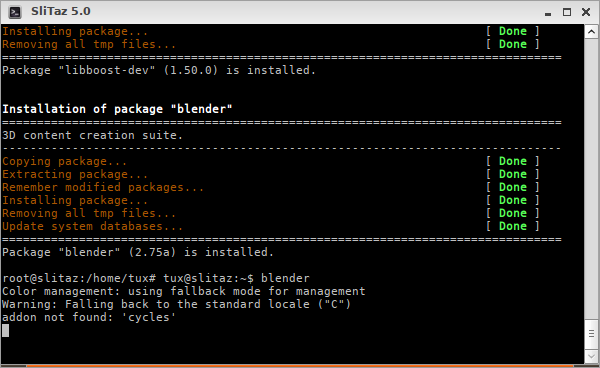
And the screenshot (click to enlarge):
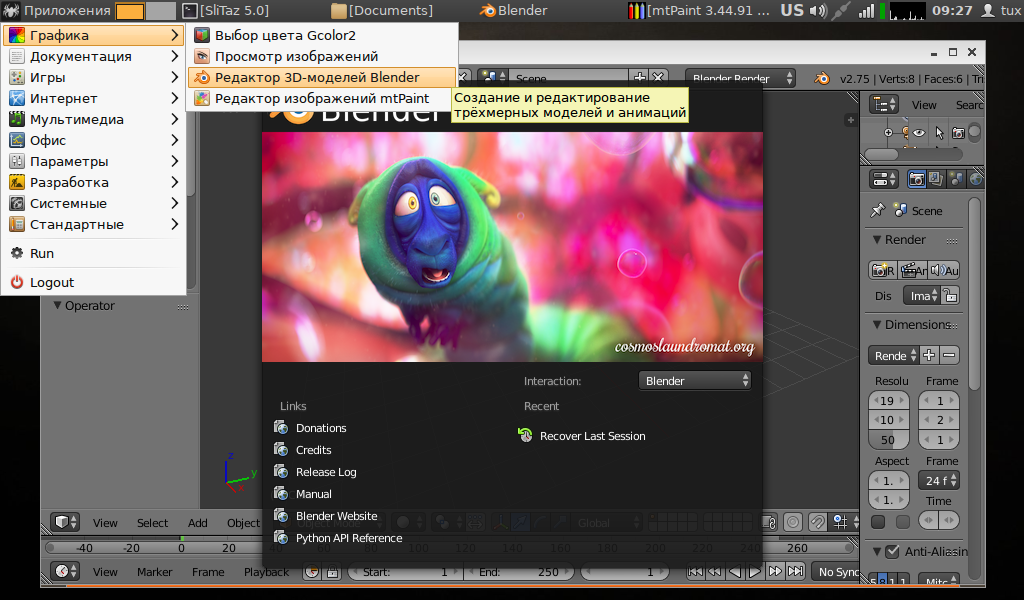
I have no 3D model to open, so execuse me. I only clicked Blender menu and seems it works
Offline
@llev
"Linux_Forever, please run as root:
tazpkg recharge && tazpkg up
or update all your packages with tazpanel: http://127.0.0.1:82/user/pkgs.cgi?up"
I did that yesterday actually.
------------------------------------------x------------------------------------------------------------
Also I just ran blender in the terminal and suddenly it opened out of nowhere!And I don't even know how it didn't work before but it works now.
Offline
[ Generated in 0.018 seconds, 7 queries executed - Memory usage: 1.62 MiB (Peak: 1.77 MiB) ]