 SliTaz Forum archive
You are not logged in.
Pages: 1
Hi,
May someone with appropriate rights add this icon to the slitaz-icon tarball, under SliTaz/categories/22/?
Please rename the current applications-science.png to applications-education.png .
Thanks!
[attachment=40677,2168]
Offline
Hi Lucas,
As you can find, "slitaz-icon" package is no more used in the SliTaz Rolling flavors.
If you need to add icon to "slitaz-icon", please, add your icon to the wok/slitaz-icon/stuff and change the package's receipt.
If you need to add an icon to the currently used icon theme, please take a look at "slitaz-icons-faenza" and "slitaz-icons-faenza-dark" packages (for light and dark panels). They both are based on the Faenza icon themes. If you can't find appropriate icon in the Faenza icon theme, you can add your own icon — please take a look into wok — I already added few icons to that themes.
Offline
OK, I've been misleaded by the fact that my system and the wok still have slitaz-icon.
Thanks.
Offline
Oh, I want to note why I switched from "slitaz-icon".
Package "slitaz-icon" provided both 22x22 and 32x32 px icons (as stated in its description).
Currently, we use 16x16 px small icons (menu, buttons, small icons in the PCManFM), 48x48 px big icons (big icons in PCManFM, icons in Yad boxes), and 22x22 px "status" icons for LXPanel.
Icons from "slitaz-icon" looks blurry both for small and big sizes. In the "slitaz-icons-*" packages family I realized my old dream — pixel perfect clean icons. Also, sum of two packages "slitaz-icons-faenza" and "slitaz-icons-faenza-dark" is slightly smaller than single "slitaz-icon" package (568K/2.0M vs 680K/2.5M).
As for "slitaz-icons-*" you need 16x16 px icon for the main (LXPanel) menu and 48x48 px (desirable) for icons when "Applications" opened inside the PCManFM.
Offline
Hi Aleksej,
Thanks for details. Indeed, the icons are sharper now that I installed the faenza theme and set it with lxappearance! I'm going to make 16x16 and 48x48 versions, with some transparency on the borders.
Currently, the Education category uses applications-science.png . It is good graphically speaking, because the icon is a blackboard (well, green in fact), but the name is quite inconsistent.
It would be nice to keep this icon for this category, and use a new icon for Science. But then, keeping the name applications-science.png for Education is even more inconsistent!
I think the most logical thing would be to name the icons "applications-education.png" for Education and "applications-science.png" for Science. This implies renaming the faenza-provided "applications-science.png" into "applications-education.png". To get something coherent across all icon packages, maybe you can tweak mksit.sh?
Offline
Good evening, Lucas!
Problem touched only Faenza-based themes, and as you can find mksit.sh used to make more icon themes, so I do not want to make changes globally.
Please, take a look to commit. Now you can add your icons. Also, please minify them previously using this command:
[c]optipng -strip all -o7 -zm1-9 /path/to/applications-science.png[/c]
Offline
The menu is OK, but pcmanfm's Applications folder is not (see attached image). I've looked into the files of package pcmanfm but didn't find anything relevant. Maybe a menu caching problem?
[attachment=40721,2173]
Offline
Hi Lucas,
Maybe. Note, menu cache updates only when .desktop files are updates, it is not touches .directory files updates. Try to update/edit one of your /usr/share/application/*.desktop file (or .desktop file from home, can't recall the exact path).
If it not helps, remove menu cache from your home folder and update one .desktop file to recreate menu cache.
Offline
Hi Lucas,
I just made [c]tazpkg up[/c]. All fine. I edited two [c].desktop[/c] files from [c]/usr/share/applications[/c] to move them to the new categories (because I have no one app that belongs to Education of Science categories).
Applications menu is OK. PCManFM is OK too:
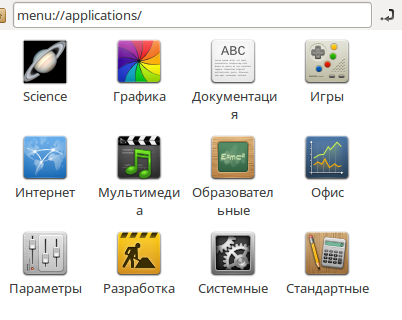
Also, if you have free time, please add translations to the new [c].directory[/c] file. First googling results for me is: https://github.com/ttshinichi/Lxlauncher/blob/master/lxlauncher-0.2.2/data/lxde-science.directory
Offline
Hi Aleksej,
Thanks for testing.
As for translating, this is a good idea! I thought I'd rather not use Google Translate, but I didn't think I could find ready-made translations!
Maybe tomorrow.
Offline
Pages: 1
[ Generated in 0.020 seconds, 7 queries executed - Memory usage: 1.55 MiB (Peak: 1.77 MiB) ]