 SliTaz Forum archive
You are not logged in.
Pages: 1
Most things i have need glibc 2.17 (telegram, yoyogames runner,pocketmine)
it will be updated ?
i tryed converting from deb and it now worked well (broke everything ;-;)
Offline
I am seeing that e.g. glibc-base is used by like 300 packages.
If an update is done, it would mean lots of testing...
The fastest way is probably when you cook your own glibc packages.
Admittedly the 2.14.1 version is quite old: from 2011
Most things i have need glibc 2.17 (telegram, yoyogames runner,pocketmine)
it will be updated ?
i tryed converting from deb and it now worked well (broke everything ;-;)
Offline
Dependency problem with Vivaldi browswer
SliTaz Version 5.0 (Rolling release) 2017-07-23
/usr/bin/vivaldi-stable: /lib/libc.so.6: version `GLIBC_2.15' not found (required by /usr/bin/vivaldi-stable)
I have: /lib/libc.so.6 -> libc-2.14.1.so
Offline
This is not the answer that you expect, but it will help solve some problems.
This use LD_LIBRAY_PATH.
Example for telegram you can take here
Unpack to $HOME/bin/ and run:
$ $HOME/bin/Telegram/start-telegram
Just add glibc+dependence+LD_LIBRARY_PATH.
The rest of the applications can be done on this sample.
Most programs allow you to do this.
Offline
I have just installed the Vivaldi browser and have the same problem. Please excuse my ignorance as I'm new to Slitaz (this is day 2) but why is Vivaldi in the repo if there are known dependency issues?
Offline
> why is Vivaldi in the repo if there are known dependency issues?
Looks like this: there wasn't problems when Vivaldi was added to the repo. Then looks like Vivaldi was updated, and again, and then switched to the new toolchain. Vivaldi — was, but SliTaz — wasn't.
Looks like older version of Vivaldi should work. But they say using old web browser is very bad idea.
Just don't use it in the SliTaz Stable or SliTaz Rolling.
SliTaz Next has newer toolchain and Vivaldi working perfectly there.
Offline
Thanks for your reply. I did live boot Slitaz Next, but I couldn't figure out how to install it...
Offline
@stroudmw
Vivaldi 1.10.845.3 (Official Build) dev (32-bit) is installing and running fine under Slitaz 5.
This is the last version of Vivaldi that is 32 bit and doesn't require glibc 2.15 (Slitaz 5 has glibc 2.14).
Here are the links for the deb and rpm packages from Vivaldi blog site:
http s://downloads.vivaldi.com/snapshot/vivaldi-snapshot_1.10.845.3-1_i386.deb
http s://downloads.vivaldi.com/snapshot/vivaldi-snapshot-1.10.845.3-1.i386.rpm
Use #tazpkg convert to convert to *.tazpkg and install.
Offline
@shellyfrank
Thanks very much for this. I downloaded the .deb file and ran tazpkg convert vivaldi-snapshot_1.10.845.3-1_i386.deb.
I then clicked on vivaldi-snapshot-1.10.845.3-1.tazpkg (in the file manager) and it brought up the tazpkg graphical installer. When the install had completed, I had a menu entry (under "Internet") called "Vivaldi (Snapshot)" and nothing appears to happen when I click on it.
Where have I gone wrong?
Thanks again 
Offline
Hi stroudmw,
If you run the program in the terminal, it will say the following:
[c]vivaldi-snapshot
[19216:19216:0124/180625.536236:FATAL:setuid_sandbox_host.cc(157)] The SUID
sandbox helper binary was found, but is not configured correctly. Rather than
run without sandboxing I'm aborting now. You need to make sure that
/opt/vivaldi-snapshot/vivaldi-sandbox is owned by root and has mode 4755.[/c]
All you need to fix it is became root and correct ownership/mode by executing next two commands in the root's terminal:
[c]chown root:root /opt/vivaldi-snapshot/vivaldi-sandbox
chmod 4755 /opt/vivaldi-snapshot/vivaldi-sandbox[/c]
Offline
@stroudmw I see now that I have used the rpm package to convert to tazpkg, and not the deb. I don't know if there is any difference, but maybe try converting the rpm package from the website, install it and see if the application launches. Aleksej, luckily I didn't have the above problem with permissions after I installed Vivaldi. Good tip though.
Also, follow Aleksej's advice and try to launch the browser from a terminal
[c]$ vivaldi-snapshot[/c]
Offline
I've tried to install the rpm and I've tried the chown/chmod and neither work. If I type in "vivaldi-snapshot" I get "/bin/sh: vivaldi-snapshot: not found"
There is an icon in the menu, but nothing happens when I click on it.
The only reason that I want to use Vivaldi is that it's about 100MiB lighter than Firefox (I've only got 700MiB RAM) and Midori doesn't render some web pages very well (like Facebook, for instance).
Here are my sequence of events:
[c]sudo tazpkg -r vivaldi-snapshot (to remove the .deb package)
sudo tazpkg convert ~/Downloads/vivaldi-snapshot-1.10.845.3-1.i386.rpm
sudo tazpkg -i vivaldi-snapshot-1.10.845.3-1.tazpkg
sudo chown root:root /opt/vivaldi-snapshot/vivaldi-sandbox
sudo chmod 4755 /opt/vivaldi-snapshot/vivaldi-sandbox
vivaldi-snapshot[/c]
Here is a summary of my sytem (I'm sorry, but I don't know how to insert monospace text or code):
[c]System: Host: camel Kernel: 3.2.98-slitaz i686 (32 bit) Desktop: N/A
Distro: 5.0
Machine: System: Acer (portable) product: Aspire 3000
Mobo: Acer model: Lugano M Bios: Acer v: 3A21 date: 06/10/05
Battery BAT1: charge: 2.5 Wh 100.0% condition: 2.5/22.0 Wh (11%)
CPU: Single core Mobile AMD Sempron 2800+ (-UP-) cache: 256 KB
speed: 1600 MHz (max)
Graphics: Card: Silicon Integrated Systems [SiS] 661/741/760 PCI/AGP or 662/761Gx PCIE VGA Display Adapter
Display Server: X.org 1.12.4 drivers: sis (unloaded: fbdev,vesa)
Resolution: N/A
Audio: Card Silicon Integrated Systems [SiS] SiS7012 AC'97 Sound Controller
driver: snd_intel8x0
Sound: Advanced Linux Sound Architecture v: 1.0.24
Network: Card: Silicon Integrated Systems [SiS] SiS900 PCI Fast Ethernet
driver: sis900
IF: eth0 state: unknown speed: 100 Mbps duplex: full
mac: 00:c0:9f:a7:e1:3c
Drives: HDD Total Size: NA (-)
ID-1: /dev/sda model: SAMSUNG_MP0402H size: 40.1GB
ID-2: USB /dev/sdb model: S2_Portable size: 500.1GB
Partition: ID-1: / size: 37G used: 1.8G (6%) fs: ext4 dev: /dev/root
Sensors: None detected - is lm-sensors installed and configured?
Info: Processes: 78 Uptime: 55 min Memory: 165.1/690.1MB Init: SysVinit
Client: Shell (sh) inxi: 2.3.0[/c]
Thanks again for all your help!
Mike.
Offline
Hi stroudmw,
(I added the backticks for your monospace code).
If I type in "vivaldi-snapshot" I get "/bin/sh: vivaldi-snapshot: not found"
Check the file "/usr/bin/vivaldi-snapshot" existence. It should come with your converted package.
This file is the only link to the executable file "/opt/vivaldi-snapshot/vivaldi-snapshot".
Offline
It's there... odd.
But not to worry... I've found the Opera Web Browser in the repo and it works great, so I'll use it But this poor old machine just can't handle Facebook, so I'll just use the Android app on my phone instead.
I've also found a very old version of Thunderbird mail, so I can use that too. Pity that the calendar won't work on that version.
One thing... what is a "backtick"?
Thanks again for all your help! I really like Slitaz and this community!
Cheers,
Mike
Offline
You should found this when you write your post:
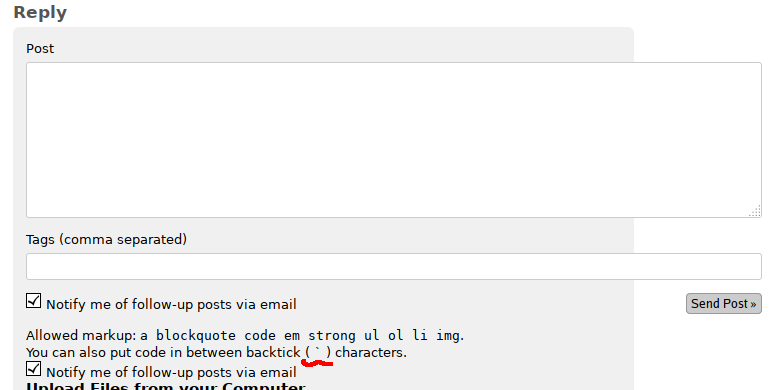
Offline
[c]aha! I see![/c]
Offline
stroudmw
As you say, you've got an old computer. Maybe your CPU doesn't support SSE2 instraction set. Type in your terminal the following command to find if your processor has the sse2 flag:
[c]$ less /proc/cpuinfo[/c]
Look under flags for sse2. If you only see sse and not sse2 then most likely this is the reason why Vivaldi doesn't run on your system. This is a chrome issue I remember from when I was using an old 32 bit machine.
Offline
Hi again,
sse2 is there. Surprisingly, so is pae.
I know it's an old machine, but it works remarkabley well with Slitaz! At the moment I have the TazWeb browser (with which I'm typing this), Midori, Thunderbird mail, and the sakura terminal open, and am using 244/690MiB RAM, so I have lots to spare
My needs are rather simple: email, web browsing, and the odd Office document. And I also use it as a music player (I use DeadBeef).
I had set it up for our local SPCA about 6 months ago (they were robbed and all of their computer equipment was stolen). Then I acqured an i5 that is about 3 years old and was running Windows 7, but didn't have a Windows key (not sure why). So I put Linux on the i5 and took it to the SPCA in exchange for this one.
You will be pleased to hear that the Midrand (Johannesburg, South Africa) SPCA is running Linux exclusively now!
Don't worry about Vivaldi... I've found that Midori and the TazWeb browser do pretty much what I need, and I have Opera as a backup.
Thanks again for your help!
Cheers,
Mike
Offline
Hi Mike,
I am sorry to hear about the theft of your office equipment in Jo'burg. I am, on the other hand happy to know that the shop is now fitted with linux  Pity about Vivaldi not wanting to run. This thread is really concerning glibc and it has spun off topic now. I wish you all the best, and good health to the animals.
Cheees,
Mike (also)
Offline
Old versions of Vivaldi browser, suitable to glibc-base and nss
versions on SliTaz can be installed using get-vivaldi too,
for example:
[c]# tazpkg -gi get-vivaldi
# get-vivaldi --version=1.9.818.50-1[/c]
Offline
Pages: 1
[ Generated in 0.017 seconds, 7 queries executed - Memory usage: 1.58 MiB (Peak: 1.77 MiB) ]