 SliTaz Forum
You are not logged in.
Pages: 1
Hi Volks ...
i completed all my used menu application entries in /usr/share/applications with german language support:
Name[de_DE]=
This works well as root, but as user only the standart Name will be used in the lxpanel menu ...
Can anybody tell me why?
Offline
have you set the de_DE locale for the user?
Offline
Hi HMA,
Short answer: Just try
[c]Name[de]=…
Comment[de]=…[/c]
Longer answer:
Part of standard: Localized values for keys. Reading it I can say that you right, but here, maybe, not correct implementation in the Openbox, or LXPanel, or anything else?
And I interesting in output of command:
[c]cat /etc/locale.conf[/c]
from your not-root user using terminal.
Offline
Hi jik, hi Aleksej,
thank you for your hints.
@jjk .... sure, i have. And the Menu Category Entries are german.
@Aleksey Name[de] also Comment[de] give no other result.
the locale is set to de_DE.
[c]michael@AOD255:~$ cat /etc/locale.conf
LANG=de_DE
LC_ALL=de_DE
michael@AOD255:~$[/c]
[c]michael@AOD255:~$ locale
LANG=de_DE
LC_CTYPE="de_DE"
LC_NUMERIC="de_DE"
LC_TIME="de_DE"
LC_COLLATE="de_DE"
LC_MONETARY="de_DE"
LC_MESSAGES="de_DE"
LC_PAPER="de_DE"
LC_NAME="de_DE"
LC_ADDRESS="de_DE"
LC_TELEPHONE="de_DE"
LC_MEASUREMENT="de_DE"
LC_IDENTIFICATION="de_DE"
LC_ALL=de_DE[/c]
The user lxpanel settings are exactly the same like root, and as root the entries language are the correct one....
It looks like a rights probleme .... but how can this be?
Offline
Strange, hmm…
I set locale de_DE, and it works for me:
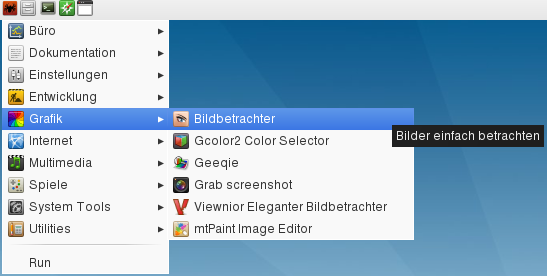
And here is desktop file attached that you see in screenshot.
Offline
Aleksej, Grab screenshot or System Tools is not german
but HMA, where is the problem, because I can edit them all and then there are correct
maybe syntax error - space between Name and [ or before or after the =
correct:
Name[de]=Midori
not correct
Name[de_DE]
tell me wich one is not working and I will make a screenshot
Offline
... yup, strange ...
"I set locale de_DE, and it works for me:"
But although you shows me the solution: Althought the locale shows de_DE i set it to de_DE again in the Terminal:
[c]michael@AOD255:~$ locale=de_DE
michael@AOD255:~$[/c]
I don't know why .... but it works! At last the menu-entries are german! 
Thank you very much Aleksey, for the hint and your efforts!
Offline
Hi kultex .... you are right! I dont know why .... but it seems the locale settings wasn't work .... only after set them to de_DE again in Terminal , the locale works correctly.
Offline
HMA, do you have a long-time effect?
Or you want to set your locale again and again?
Show me your output, please:
[c]cat /proc/cmdline[/c]
Offline
Hi Aleksej, yes i have a long-time effect.
Here is the cmdline output:
michael@AOD255:~$ cat /proc/cmdline
root=/dev/sda7 lang=de_DE kmap=de-latin1 laptop quiet
michael@AOD255:~$
But, there i havn't changed anything.
Offline
Ok .... i played around with the menu-entries. I think, now i know the Problem.
If you work with a frugal installation or an rewritten image to hd (unlzma), this Problem appears.
If you change, delete, add lines in the menu-entries-files the changes will not adopted. Also the locale=de_DE will give no effect. If you delete a menu-entrie or add a new ( i did this with Aleksej's attached file) the menu-entries will be reread an shows the changed or added lines in the menu-entires-files....
Offline
of course - if you do any changes in root on a frugal installation, you have to run tazusb or tazlito to save the changes....
Offline
Hi .... oh thats a mistake... i didn't restart the unit! Only logged out as root and logged in as user! And in the second step.... i rewrote the image to HD and boot from this, now regular installation.
Offline
Pages: 1
[ Generated in 0.017 seconds, 7 queries executed - Memory usage: 1.55 MiB (Peak: 1.77 MiB) ]