 SliTaz Forum archive
You are not logged in.
Hi, all.
I used tazpkg to convert some .deb & .rpm packages to .tazpkg format. They install and function properly, but the only way to start the now installed apps them is by terminal or Run command from Apps menu. There is no shortcut, no icon in the said menu on the bottom panel, or anywhere else for that matter.
Is there an easy way to solve this?
Offline
i don't know how to debug (if needed) tazpkg convert, you could read this
http://forum.slitaz.org/topic/lyx
and try to extract and put in right place .desktop and .icon files from originals deb and rpm packages
Offline
Programs already have .desktop files in that folder, but still there are no shortcuts in Applications menu. Namely, programs in question are Opera v12.12 and BleachBit v0.9.4 (so far).
So, that's not the solution.
Offline
may you post desktop files?
Offline
Slitaz uses GTK but packages converted from other distros can have Gnome,KDE,QT references in the .desktop files which hide them.
# leafpad /usr/share/applications/bleachbit.desktop
Remove OnlyShowIn=
Remove Gnome,KDE,Qt from Categories=
bleachbit.desktop from our repo shows in Applications/System Tools:
[Desktop Entry]
Version=1.0
Type=Application
Name=BleachBit
Comment=Free space and maintain privacy
GenericName=Unnecessary file cleaner
TryExec=bleachbit
Exec=bleachbit
Icon=bleachbit
Categories=GTK;System;
Encoding=UTF-8
StartupNotify=true
Offline
-This is BleachBit's .desktop file
[Desktop Entry]
Version=1.0
Type=Application
Name=BleachBit
Comment=Free space and maintain privacy
GenericName=Unnecessary file cleaner
TryExec=bleachbit
Exec=bleachbit
Icon=bleachbit
Categories=GTK;System;Settings;
Encoding=UTF-8
StartupNotify=true
-And this is Opera's
[Desktop Entry]
Type=Application
Version=1.0
Name=Opera
GenericName=Web browser
Comment=Fast and secure web browser and Internet suite
Icon=opera-browser
TryExec=/usr/bin/opera
Exec=/usr/bin/opera %U
Terminal=false
MimeType=text/html;text/xml;application/xhtml+xml;text/vnd.wap.wml;text/wml;application/x-mimearchive;application/mime;application/xml;application/rss+xml;application/rdf+xml;image/svg+xml;application/x-opera-extension;x-scheme-handler/http;x-scheme-handler/https;x-scheme-handler/ftp;x-scheme-handler/mailto;video/ogg;audio/ogg;video/webm;image/webp;
Categories=Network;WebBrowser;
StartupNotify=true
X-AppInstall-Package=opera
........
(I've removed unnecessary localization lines)
None have Qt, Gnome, etc. in Categories line.
EDIT: I have SmartCam installed from source, its .desktop file has GNOME in 'Categories=' line, but shows in Applications menu nonetheless.
Offline
while i don't understand the reason why you don't install repo's version, i think that this is odd enough, bleachbit.desktop is equal to the repo one:
[c]root@slitvaio:/home/fabio# cat /usr/share/applications/bleachbit.desktop
[Desktop Entry]
Version=1.0
Type=Application
Name=BleachBit
Comment=Free space and maintain privacy
Comment[ar]=تفريغ المساحة والحفاظ على الخصوصية
Comment[ast]=Llibera espaciu y caltién la to privacidá
Comment[be]=Вольная прастора і кіраваньне сакрэтнасьцю
Comment[bg]=Освободете място и запазете поверителност
Comment[ca]=Allibera l'espai i manté la privacitat
Comment[cs]=Uvolní místo na disku a ochrání vaše soukromí
Comment[da]=Frigør plads og beskyt privatlivet
Comment[de]=Behalte den freien Platz und die Privatsphäre
Comment[eo]=Liberigi lokon kaj prizorgi privatecon
Comment[eo_new]=Liberigi lokon kaj prizorgi privatecon
Comment[es]=Libera espacio y mantiene la privacidad
Comment[et]=Vabasta ruumi ja säilita privaatsus
Comment[fi]=Vapauta tilaa ja hallitse yksityisyyttä
Comment[fr]=Libérer de l'espace et effacer ses traces
Comment[gl]=Liberar espazo e manter a intimidade
Comment[he]=פינוי מקום ושמירה על הפרטיות
Comment[hi]=मुक्त स्थान और गोपनीयता बनाए रखने
Comment
=Oslobodi prostor i očuvaj povjerljivost
Comment[hu]=Hely felszabadítása és magánszférájának fenntartása
Comment[id]=Bersihkan ruang dan menjaga privasi
Comment[it]=Libera spazio e mantiene la privacy
Comment[ja]=スペースの確保とプライバシーの保全
Comment[ko]=자동 청소 및 개인정보 유지
Comment[ku]=Ciyê vala û parastina nepeniyê
Comment[lt]=Atlaisvinkite vietą bei apsaugokite privatumą pašalindami nereikalingus failus ir duomenis
Comment[ms]=Kosongkan ruang dan kekalkan kerahsiaan
Comment[nb]=Ledig plass og bevare personvern
Comment[nl]=Maak ruimte vrij en behoudt privacy
Comment[pl]=Zwolnij miejsce i zarządzaj prywatnością
Comment[pt]=Libertar espaço e manter a privacidade
Comment[pt_BR]=Espaço livre e manter privacidade
Comment[ro]=Spațiu liber și păstrarea intimității
Comment[ru]=Свободное пространство и управление секретностью
Comment[sk]=Voľné miesto a zachovanie súkromia
Comment[sl]=Sprostite prostor in ohranite zasebnost
Comment[sv]=Frigör plats och behåll integritet
Comment[th]=พื้นที่ว่างและการรักษาความเป็นส่วนตัว
Comment[tr]=Boş alan ve gizlilik koruması
Comment[uk]=Вільний простір та керування приватністю
Comment[vi]=Làm trống ổ đĩa và bảo vệ sự riêng tư
GenericName=Unnecessary file cleaner
GenericName[ar]=منظّف الملفات غير المرغوبة
GenericName[ast]=Llimpiador de ficheros non necesarios
GenericName[be]=Неабавязковы уборшчык файлаў
GenericName[bg]=Изчистване на непотребни файлове
GenericName[ca]=No cal eliminar fitxers
GenericName[cs]=Čistič disku od nepotřebných souborů
GenericName[da]=Unødvendig fil-oprydder
GenericName[de]=Reiniger für unnötige Dateien
GenericName[eo]=Purigilo de nenecesaj dosieroj
GenericName[eo_new]=Purigilo de nenecesaj dosieroj
GenericName[es]=Limpiador de archivos innecesarios
GenericName[et]=Mittevajalike failide puhastaja
GenericName[fi]=Turha tiedostonsiivooja
GenericName[fr]=Nettoyeur de fichiers inutiles
GenericName[gl]=Limpador de ficheiros innecesarios
GenericName[he]=מנקה הקבצים הבלתי נחוצים
GenericName[hi]=अनावश्यक क्लीनर फ़ाइल
GenericName
=Čistač nepotrebnih datoteka
GenericName[hu]=Szükségtelen fájl törlő
GenericName[id]=Pembersih berkas yang tidak penting
GenericName[it]=Ripulisce file non necessari
GenericName[ja]=不要なファイルクリーナ
GenericName[ko]=불필요한 파일 청소
GenericName[ku]=Paqijkirina pelên nehewce
GenericName[lt]=Nereikalingų failų šalinimas
GenericName[ms]=Pembersih fail yang tak perlu
GenericName[nb]=Unødvendig filrenser
GenericName[nl]=Verwijder overbodige bestanden
GenericName[pl]=Program czyszczący z niechcianych plików
GenericName[pt]=Limpeza de ficheiros desnecessários
GenericName[pt_BR]=Limpar arquivos desnecessários
GenericName[ro]=Ștergerea fișierelor nenecesare
GenericName[ru]=Необязательный уборщик файлов
GenericName[sk]=Čistenie nepotrebných súborov
GenericName[sl]=Čistilec za nepotrebne datoteke
GenericName[sv]=Icke nödvändig filrensning
GenericName[th]=ตัวลบแฟ้มที่ไม่จำเป็น
GenericName[tr]=Gereksiz dosya temizleyici
GenericName[uk]=Необов'язкова чистка файлів
GenericName[vi]=Trình dọn dẹp tập tin không cần thiết
GenericName[zh_CN]=不必要文件清理器
GenericName[zh_TW]=無用檔案清理器
TryExec=bleachbit
Exec=bleachbit
Icon=bleachbit
Categories=GTK;System;
Encoding=UTF-8
StartupNotify=true[/c]
and it shows in apps menu.
you could try to login in slim as root to see if it's a permissions problem.
if you don't like headache you could remove packages you have installed, then:
#tazpkg recharge
#tazpkg get-install bleachbit
#tazpkg get-install get-opera
#get opera
and you should be done.
Offline
typo: last command it's get-opera
Offline
I'm mainly logged in as root (I'm very careful). Tux user has too many restrictions and I don't enjoy using terminal and SU too often.
Anyway, installing from repo isn't an issue, but if I want a newer version of a software, I should be able to get a shortcut in the Apps menu for a convenient launching when installing from a converted package.
The bigger question now is why aren't those .desktop files working at all?
Offline
awww, you like headache :-)
i'm sorry, i think i can't help you
at this link : http://pkgs.slitaz.org/search.sh?filelist=bleachbit&version=s you can check the files list of the official package then compare with the output of tazpkg -lf nameofyourconverted.tazpkg
let me know if you solve this (mysterious) problem.
Offline
Try to remove "TryExec=..." lines. It hides menu entries if can't find specified binaries. Maybe, something is broken in your system, and menu can't find binary.
Also, there's no big sense in TryExec, while .desktop file comes together with binary file in one package.
Offline
The .desktop files work flawlessly when double-clicked. Opera opens, BleachBit opens, etc, no problem there.
What I want, what I need is to get a shortcut in Applications (or, in Windows world, Start) menu when I install an app from a converted ("tazpkg convert" command) DEB or RPM package.
This is obviously a problem with the TazPKG app itself, since it's not a one-package problem. Those .desktop files are generated by TazPKG, but don't "function" properly for some reason. I've edited the opera-browser.desktop file to match the scheme of Midori's and got no result.
Maybe my system IS broken in some way, but how? TazPKG works the same way wether it's a repository package or a converted, local one. At least it should.
Offline
may you upload your packages somewhere and put links here?
you made me curious
Offline
I may. I chose ZS because it's free, doesn't require an acc and it wait-free. Just click Download now.
BleachBit 0.9.4 - http://www64.zippyshare.com/v/84088442/file.html
Opera 12.12 - http://www64.zippyshare.com/v/67532202/file.html
Now, for the sake of test, I've converted SmartCam 1.4.0 Debian package, installed it and... it works properly... gives an item to the Apps menu and all. But these two still don't (I've repeated the conversion process). Now I'm totally puzzled.
Offline
@sale
I pasted your opera-browser.desktop onto my system and it appears at Applications/Internet/Opera
Your bleachbit.desktop did not appear on my system menu until I change:
Categories=GTK;System;Settings;
to
Categories=GTK;System;
Then it shows in Applications/System Tools/BleachBit
Offline
@sale
same results here, maybe you could investigate /etc/xdg/menus/applications.menu , http://www.freedesktop.org/wiki/Specifications/menu-spec?action=show&redirect=Standards/menu-spec and http://standards.freedesktop.org/desktop-entry-spec/latest/ , xdg-utils seems promising too.
please, share if you find out wy to have more categories lead menu entry to disappear.
Offline
Same 
Install package desktop-file-utils-extra, validate .desktop files in this way:
$ desktop-file-validate ./bleachbit.desktop
./bleachbit.desktop: hint: value "GTK;System;Settings;" for key "Categories" in group "Desktop Entry" contains more than one main category; application might appear more than once in the application menu
./bleachbit.desktop: warning: key "Encoding" in group "Desktop Entry" is deprecated
$ desktop-file-validate ./bleachbit-root.desktop
./bleachbit-root.desktop: hint: value "GTK;System;Settings;" for key "Categories" in group "Desktop Entry" contains more than one main category; application might appear more than once in the application menu
./bleachbit-root.desktop: warning: key "Encoding" in group "Desktop Entry" is deprecated
Cite from SliTaz /etc/xdg/menus/applications.menu:
[c]<!-- System Tools-->
<Menu>
<Name>System</Name>
<Directory>SystemTools.directory</Directory>
<Include>
<And>
<Category>System</Category>
<Not><Category>Settings</Category></Not>
</And>
</Include>
</Menu>
<!-- Settings -->
<Menu>
<Name>Settings</Name>
<Directory>Settings.directory</Directory>
<Include>
<And>
<Category>Settings</Category>
<Not><Category>System</Category></Not>
</And>
</Include>
</Menu>[/c]
In other words, entry appears in System if it is in System Category and not Settings. And vice versa. System and Settings are antagonists here.
Whole list:
Utilities=(Utility) and not(System,Graphics)
Development=(Development)
Education=(Education)
Games=(Game)
Graphics=(Graphics)
Internet=(Network)
Multimedia=(AudioVideo) and not(Utility)
Office=(Office)
System=(System) and not(Settings)
Settings=(Settings) and not(System)
Documentation=(Documentation)
Stop.
Some investigations.
Utility;System → System
Utility;Graphics → Graphics
Utility;System;Graphics → System and Graphics
AudioVideo;Utility → Utilities
System;Settings → nowhere
I think, we need to change System rule to make it less strict [PS. commited]. Like this:
[c]<!-- System Tools-->
<Menu>
<Name>System</Name>
<Directory>SystemTools.directory</Directory>
<Include>
<And>
<Category>System</Category>
</And>
</Include>
</Menu>[/c]
Also, I want to tell, that Categories like GTK, GNOME, Qt have no the least sense to our Application menu, we can delete them.
And, interesting, if SliTaz menu works with sub-menus? Like Games→Board. Hmm, worth a try
In addition, I want to tell a word about TazPkg convert. It's just a repacking from one form of archive to another (plus rewrite some package related infos). It's not TazPkg fault if converted package have no menu entry (if original package have no it).
Offline
Yahoo, it works! 
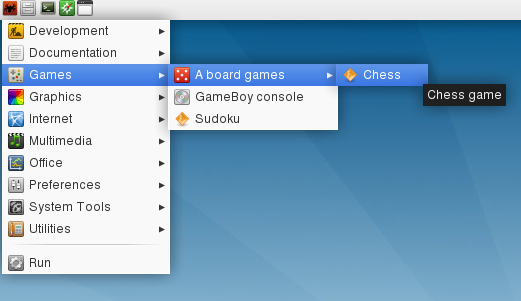
Offline
thanks Aleksej
Offline
@mojo, thanks, that worked for me, too, but TazPKG now gives notification that I have 1 upgrade package and it's, wait for it... BleachBit 0.9.3. Oh, man!
I'd like to point out, if it's not clear already, these are both originally Debian installation packages from official websites which are converted with TazPKG, otherwise untouched. So, any inconsistency or antagonism or conflicting entries, lines, etc is automatically created during the conversion.
This and with respect to Aleksej's post, am I right to assume that this will be a common problem with converted packages?
Offline
Package conversion isn't perfect, which is why the [c]tazpkg extract[/c] and [c]tazpkg pack[/c] commands exist. Together they can allow you to modify packages to correct any bugs that may come up.
Offline
bleachbit 0.9.4 can't be an offical debian package:
http://packages.debian.org/search?keywords=bleachbit&searchon=names&suite=all§ion=all
if you refer to
http://bleachbit.sourceforge.net/download/linux
as the source of your download, please check desktop file inside the deb and you will find that it's different from the ones inside official debian packages.
i think tazpkg did not alter it.
tazpkg proposing to downgrade bleachbit it's, in my opinion, a fault, but this is another matter.
you could recook bleachbit upgrading to 0.9.4 or you could try [c]tazpkg block bleachbit[/c]
Offline
@Trixar_za: That's OK, but what is the bug with Opera, then? Its .desktop file, to be specific? BTW, I've desktop-file-validate'd it and got no result, no output message at all, nothing. So, I assume it's a good thing, but it's still not working as it should.
Funny thing is "get-opera" from Packages list downloads an Opera v12.02 Debian package, converts it to tazpkg format and installs it. It worked in the begining, when the OS installation was relatively fresh, but now it is broken the same way as "my" converted one: has no shortcut. The installer removed existing Opera installation.
This is the Categories line:
Categories=Application;Qt;Network;WebBrowser;X-Ximian-Main;X-Ximian-Toplevel
Anyway, I'm getting really tired of this.
As a temp "solution", I've reinstalled 12.12 and made a shortcut on the desktop, so that'll do for now. The problem isn't solved, just avoided.
Offline
@ernia: I never said it were an official package, just that it's a .deb one. Does it change anything? I don't think so.
Offline
If you don't look inside them you will never know.
Offline
[ Generated in 0.016 seconds, 7 queries executed - Memory usage: 1.61 MiB (Peak: 1.77 MiB) ]