 SliTaz Forum archive
You are not logged in.
Pages: 1
Finally!
I finished my many days session to work on improving SLiM.
SLiM is now updated to version 1.3.5, which “out of the box” support UTF-8. Now SLiM messages can be translated into your native language.
I wrote a theme manager for SLiM — a small shell script. Now, after the installation of a package with the theme, this theme will be chosen without further action by the user. Whenever you install a theme, the manager remembers the previous theme. If you remove the current theme, the manager returns to the previous theme used.
In addition, the manager translates theme's messages into your language! Now it support 30 languages: English (en), Български (bg), Bosanski (bs), Català (ca), Česky (cs), Dansk (da), Deutsch (de), Ελληνικά (el), Español (es), Esperanto (eo), Suomi (fi), Français (fr), Hrvatski (hr), Magyar (hu), Indonesia (id), Italiano (it), Lietuvos (lt), Nederlands (nl), Norsk (bokmål) (no), Polski (pl), Português (pt), Português (Brasil) (pt_BR), Română (ro), Русский (ru), Slovenčina (sk), Slovenščina (sl), Српски / Srpski (sr), Svenska (sv), Türkçe (tr), Українська (uk).
Original English messages and all translated messages are stored inside the theme. Therefore, theme author can completely choose message, for example, if he wants to see the word “Username”, “User” or “Login”.
There are two types of messages. “Welcome” messages I translated using Google-translator, and I'm not sure about the quality of translation. Please correct me! You can find my strings here. Translations for messages “Username” and “Password” I took from Wikipedia's multilingual logon pages. There's gotta be right, given the large community of Wikipedia.
I have created three themes for SLiM. That's how they look in different languages:

They are generally similar to each other, because I'm too lazy to invent a different layouts  Background is standard SliTaz's wallpaper (/usr/share/images/slitaz-background.jpg). The point is, that you see as it were has already booted the desktop (or at least its background); you need only to input a name and password, and — here it is, the desktop.
As usual, you can find all the new packages in the Cooking repo.
And, if you still use SliTaz Stable (4.0) as me, you can find these packages on my Mediafire page: SliTaz-4.0.
Here are:
[*]slim-theme-cat-20130524.tazpkg
[*]slim-theme-7legs-20130527.tazpkg
[*]slim-theme-mascot-20130527.tazpkg
I would like to draw your attention to the fact that after installing the slim-1.3.5 you will need to restart your computer to complete the installation. SliTaz desktop session running on top of SLiM, so it halting/restarting will lead to a momentary shoot out to the console. We will not do that. After a reboot, you can use the new SLiM, and new themes, and all that is described in this post.
Happy SLiM!
And happy SliTaz!
Offline
Hello Aleksej.
First of 3 strings is not correct in French :
it should be :
"Bienvenue dans Sitaz" ( ~= welcome "into" slitaz)
"Bienvenue chez Slitaz" ( ~= welcome "at" slitaz "house") = a bit strange ...
"Bienvenue à Slitaz" ( ~= slitaz is sort of event or place) = a bit strange too ...
meh...
"Slitaz. Bienvenue ! " ?
Others people, what do you think about that ?
Two others strings are perfects.
Thanks for your work here, and on the other points of Slitaz !
Offline
Hi subreptice,
OK, let's wait other mentions.
Note, that "slitaz" here — is name of host, name of your machine, stored in the /etc/hostname.
On the one hand, it can be any word. On the other hand, the default is "slitaz" (lower case) — the phrase will begin with a lowercase letter in case of « slitaz. Bienvenue ! »
I can do so, if needed.
PS. Oh, I see I miss a space between « slitaz » and « ! » in French.
Offline
Name of host !! = so I was completely wrong, sorry for that.
So it should be just
"Bienvenue host !"
at least for me.
Offline
@Aleksej
Works great.. excellent contribution to aesthetics SliTaz boot!
translation into Spanish is correct.
thanks
Offline
Slitaz vous souhaite la bienvenue
moulefrite,
your string is so long for chosen font and panel width.
Offline
Well done Aleksej!

Offline
Thank you, mojo!
Your screenshot is a good advertisement for this theme. What a screenshot tool used? (I found gtk-screenshot is not bad to silent store shots on F11 press).
What about wallpaper? Nice!
Offline
Meet new awesome SLiM themes from Holk Foor!
Control (183,3 KiB)
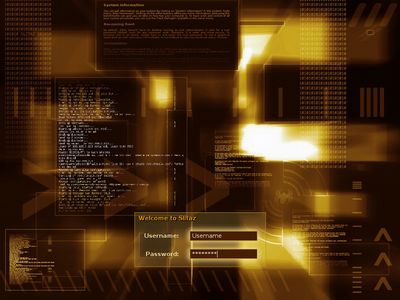
[c]tazpkg get-install slim-theme-control[/c]
Pilar (47,0 KiB)
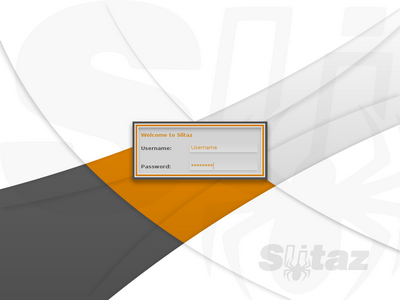
[c]tazpkg get-install slim-theme-pilar[/c]
Radar Spider (85,5 KiB)
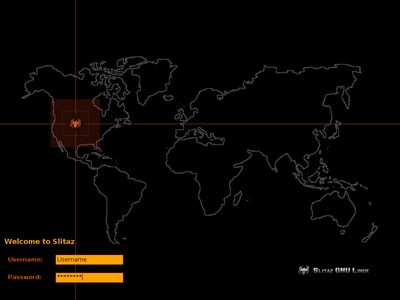
[c]tazpkg get-install slim-theme-radarspider[/c]
Robotic (30,9 KiB)
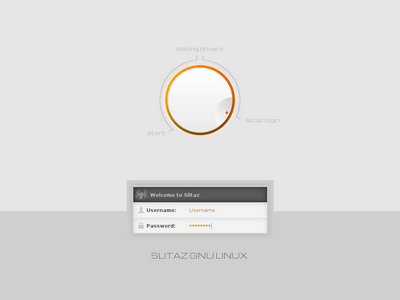
[c]tazpkg get-install slim-theme-robotic[/c]
Offline
well done guys. :-)
Really like it.
Offline
Correction for italian: it is "benvenuto", not "benvenuti": the last one's wrong 'cause it's plural
Offline
Thanks, slimhunter!
I will fix it soon.
Offline
Yeah ! [attachment=26479,1182]
Hello Aleksej !
Tonight I finally took time to install SLiM v.1.3.5. Really cool, good idea! I love your cat; it looks like the one of my daugther. This will be one more reason for her to regret to still use MS Windows ;-)
The french message "Bienvenue à l'SliTaz ! is not correct. I modified lines #46 in /usr/share/slim/themes/cat_and_spider/strings and #49 in /usr/share/slim/themes/cat_and_spider/slim.theme like this [c]w:fr Bienvenue sur %host ![/c]
Agree with mojo: rolling should deserve this wallpaper and your slim-theme-mascot, I really don't like the actual wallpaper.
By the way, why don't you place your packages on http://mirror.slitaz.org/packages/4.0/ ? Now I have to take care when I check for upgrades, TazPanel systematically proposes SLiM package v.1.3.2. Well not really important. Thanks for this work.
Offline
Now I have to take care when I check for upgrades, TazPanel systematically proposes SLiM package v.1.3.2.
Blocking a modified tazpkg prevents it from being overwritten during an upgrade.
Terminal: [c]# tazpkg block slim[/c]
TazPanel: Packages/My Packages/click on slim/click Block button
View tazpkgs on the blocked list:
Terminal: [c]# tazpkg list blocked[/c]
TazPanel/My Packages blocked tazpkg names are in red text
Offline
Thanks mojo,
I'd just found the solution yesterday in one of your previous posts (http://forum.slitaz.org/topic/compiled-from-source-packages-not-seen-by-tazpkg#post-23265)
I never think to have a look at the options of tazpkg and yet it's really a complete tool.
Offline
Hello guys!
I now this is an old post.
But I saw that you make a translation script for SliM, so Id like to know if is possible to make some script to change the user profile picture at login manager. something like SDDM, using:
- slim remeber the last user
- change the panel picture accourding the user name (at the field)
Any Idea? Pls help me to think how to fix this challange. 
Offline
Hi Saymon,
SLiM stands for Simple login manager. It is too dumb to do work you expected.
Try to use other login managers.
We have "lightdm" and "lxdm" both for SliTaz Rolling and SliTaz Next (lightdm, lxdm) and "sddm" exclusively for the SliTaz Next.
PS. I recall somewhere (in the Ubuntu?) there was $HOME/.face.png file containing user avatar…
Offline
I tried the slim-themes "control", "pilar" and "radarspider". In the panel.png I
got stripes and the right border did not appear. I looked at the properties
of a working theme like "default" and found:
PNG image, 587x235, 8-bit/color RGBA, non-interlaced
In the panel.png of "pilar" I found:
PNG image, 400x189, 8-bit colormap, non-interlaced
So I opened the panel.png of "pilar" with the graphics-program GIMP
and set the RGB-option.
Offline
Pages: 1
[ Generated in 0.016 seconds, 7 queries executed - Memory usage: 1.58 MiB (Peak: 1.77 MiB) ]