 SliTaz Forum archive
You are not logged in.
Pages: 1
This night before sleeping I was read articles 'bout this use case, and now I tried this. And connection works! I want to share this knowledge, I think it can help someone to connect to 2G and 2.5G networks (don't know about 3G, have no 3G devices now, and will have no).
SYSTEM: SliTaz Cooking/Rolling with Kernel 3.2.50 made by Kultex & Arun.
ADDITIONAL DOWNLOADS: no
ACTIONS:
[*]Open SpaceFM-root (File manager with root access) and don't close it until finished.
[*]Make new file /etc/ppp/peers/gprs and fill it with this content:
[c]/dev/ttyACM0
460800
connect 'chat -f /etc/ppp/chat/gprs'
defaultroute
usepeerdns[/c]
Note that /dev/ttyACM0 is my modem (mobile phone, smartphone). Connect it and check /dev folder. 460800 is modem's speed.
[*]Make new folder /etc/ppp/chat and new file /etc/ppp/chat/gprs and fill it with this content:
[c]#ECHO ON
ABORT 'BUSY'
ABORT 'ERROR'
ABORT 'NO ANSWER'
ABORT 'NO CARRIER'
'' AT
OK ATZ
OK 'ATQ0 V1 E1 S0=0 &C1 &D2 +FCLASS=0'
OK AT+CGDCONT=1,"IP","www.umc.ua"
OK ATDT*99**1*1#[/c]
Note that www.umc.ua is my APN (Access Point Name) and *99**1*1# is dialing number, it have variants: *99# or *99***1# or something else. As far as I remember, my old 3G CDMA modem has #777 number.
[*]Open terminal (I prefere Sakura), become root by typing [c]su[/c] and [c]root[/c] password.
[*]Connect to internet: [c]pppd call gprs[/c]
[*]Nothing happened visual, but maybe we connected now? Click "Network Status Monitor" in the LXPanel and select/type [c]ppp0[/c] in the combo-box. Yes, we connected.
[*]Open Midori web-browser, and go to SliTaz Forum to share this happyness! 
[*]I have internet connection, but I can't use this connection. Check /etc/resolv.conf, it have something strange! Check /etc/ppp/resolv.conf, it have actual content -- two lines with provider's DNS servers. Copy /etc/ppp/resolv.conf to /etc/resolv.conf
[*]Reload page in Midori, it works!
Note, if your connection need user/password then you need some tweaking here. But it is out of this short topic.
Happy connection
Happy SliTaz!
Offline
Hello!
I still use my smartphone for Internet access. I have a good plan with 1,500 MiB of traffic per month.
Yesterday I wrote UDEV rules for my modem, and wrote small script with button "Dial".
And then my script grow and grow, now it bigger than 5 KiB. It not use wvdial as wrapper for dialing; it depends on: udev, ppp and yad. I think, not bad if I will add it to slitaz-tools? Do you need this script preinstalled on SliTaz? I need.
Now, my steps when I want to connect to Internet:
1. Insert USB-wire to USB-port.
2. Wait about 2 sec, and see this:
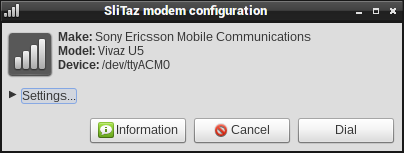
3. Click "Dial" and wait 5-10 sec. That's all.
4. To disconnect: right click "ladder" icon and select "Disconnect".

Sorry, it is ideal case
And here is real life: at first, code is at very experimental state. At second, script not always can fetch modem settings from phone's modem. And first time I insert USB Modem, I need to check settings:
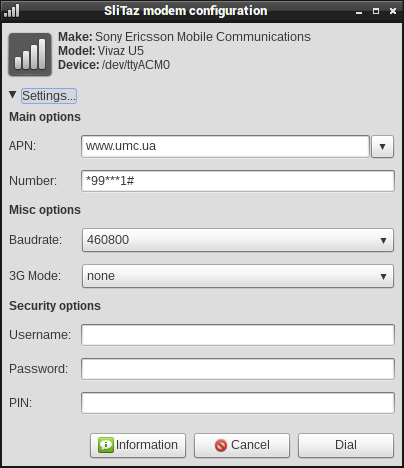
Then, when you click "Dial", settings are stored, and TazModem will recall your modem next time, among other. All setting stored separated for your different devices.
And I added simple "info" page:
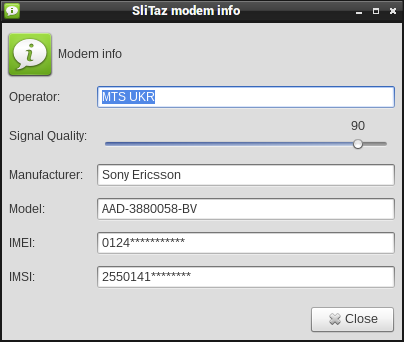
I'll happy if it script will be useful for anyone. And, please, test it with 3G Modems, because I have not.
But I want to warn you of existing pitfalls.
1. Dialog displays only when modem with "zero" at the end of name is connected: /dev/ttyUSB0 or /dev/ttyACM0. And TazModem will use this device for dialing. When you use two or more modems, you'll not see dialog because devices ttyACM4...9 will adds.
2. If you have slow modem, you'll see garbage in "Info" page; you need to adjust values in the /lib/udev/tazmodem.sh:
[c]# timings for catty in milliseconds (default: r=100 s=1000 are very slow)
TIME_R=1 # to wait after each char
TIME_S=300 # to wait after each '\r'[/c]
3. UDEV runs with root permissions, and TazModem runs as root, but all modem configurations stored in the tux home folder, because I can't run Yad dialog when HOME=/root
You can see all TazModem settings here: /home/tux/.config/tazmodem/
4. Really, TazModem is: UDEV rule + single shell script; but I also added to package: catty (simple 10KiB communicating utility), latest version of /lib/libtaz.sh, and Russian translation for my pleasure.
Offline
Hi Aleksej,
thx for the skript - I will test it next weekend - no time before - and I will include it in the testing iso. The same as the new slitaz-tools - especially I like the new logout button...
Thomas
Offline
Thank you, Thomas!
Sorry, I not tried yet your new ISO, I still using that one from mailing list. And there is a problem with your content of /etc/resolv.conf file. System can't use connection. When I remove this file, then TazModem works well, and pppd creates new file with right content. Can you remove /etc/resolv.conf from your flavor? Or, maybe better, TazModem removed it before dialing?
Touching new look of SliTaz Tools. I use full set of Faience and Faenza icon sets, with size 16 for small icons and 48 for big. And really I not care about icon existence in the slitaz-icons package.
Seems like I want to determine icons in use for each Core package, and rebuild slitaz icons to keep it small and beautiful.
Offline
Thanks for the hint with /etc/resolv.conf - one more file to be cleaned by tazlito, but I think, that it should be done also by TazModem, because if somebody is using another Internet connection before, you will have the same problem...
Offline
Downloading the attachment doesn't work.
Offline
Ikem,
Oh really, I (the author and key master) can't download it too.
Seems that something broken in the forum engine.
Offline
Just re-upload it.
Offline
That would be nice.
Offline
Aleksey - Eric changed something with attachments - http://forum.slitaz.org/topic/forum-issue
so all the old attachments dont work any more - we have to upload those who are important again
Offline
Sorry guys, I really can't find it anywhere.
Offline
[c]tazpkg repack tazmodem[/c]
Offline
Hi mojo,
No, sorry, really I have no this package installed. It's only an experiment. And I found some files in my previous SliTaz 4 system at /home/boot/rootfs
Hope, these two files helps someone who needs them:
http://www.mediafire.com/?hd9e6xigucspjyd
Now that smartphone I experimented with is semi-broken. And, weird, but I can't use new Android smartphone as GPRS modem. But it's okay while I use Wi-Fi at home.
Offline
Only some don't work and he really didn't change anything yet. They were probably lost in the move from the old server to the new one, so just re-upload the ones that don't work anymore.
Offline
The link is broken but the file may still be there, I'll ask Eric to check the server backend.
Offline
Mojo,
AFAIK, that package contains only two files. So it's not a problem to reconstruct a package receipt and the whole package.
But sad, it takes a time I have no, until ~ 2nd half of January.
And now, sorry, I'll go to sleep. Bye, friends!
Offline
Yep,
Sorry i can't find this file.
I have made no change,just fix that was not working anymore.
We changed the server because we had and hard drive issue.
I wil see with Pascal if he has an old backup.
.
+Eric
Offline
Hello everyone, my problem is that when I connect my modem 3G (Huawei E3131a model used by the operator Optimus in Portugal) is not recognized,so i can't reference to the device like (/dev/ttyUSB0 or /dev/ttyACM0) any hint to "force" the recognition of the modem?? I'm like new in linux world. Tnk you.
Offline
Pages: 1
[ Generated in 0.017 seconds, 7 queries executed - Memory usage: 1.58 MiB (Peak: 1.77 MiB) ]